
OfficerDown42 - Minecraft Skins & Skin History
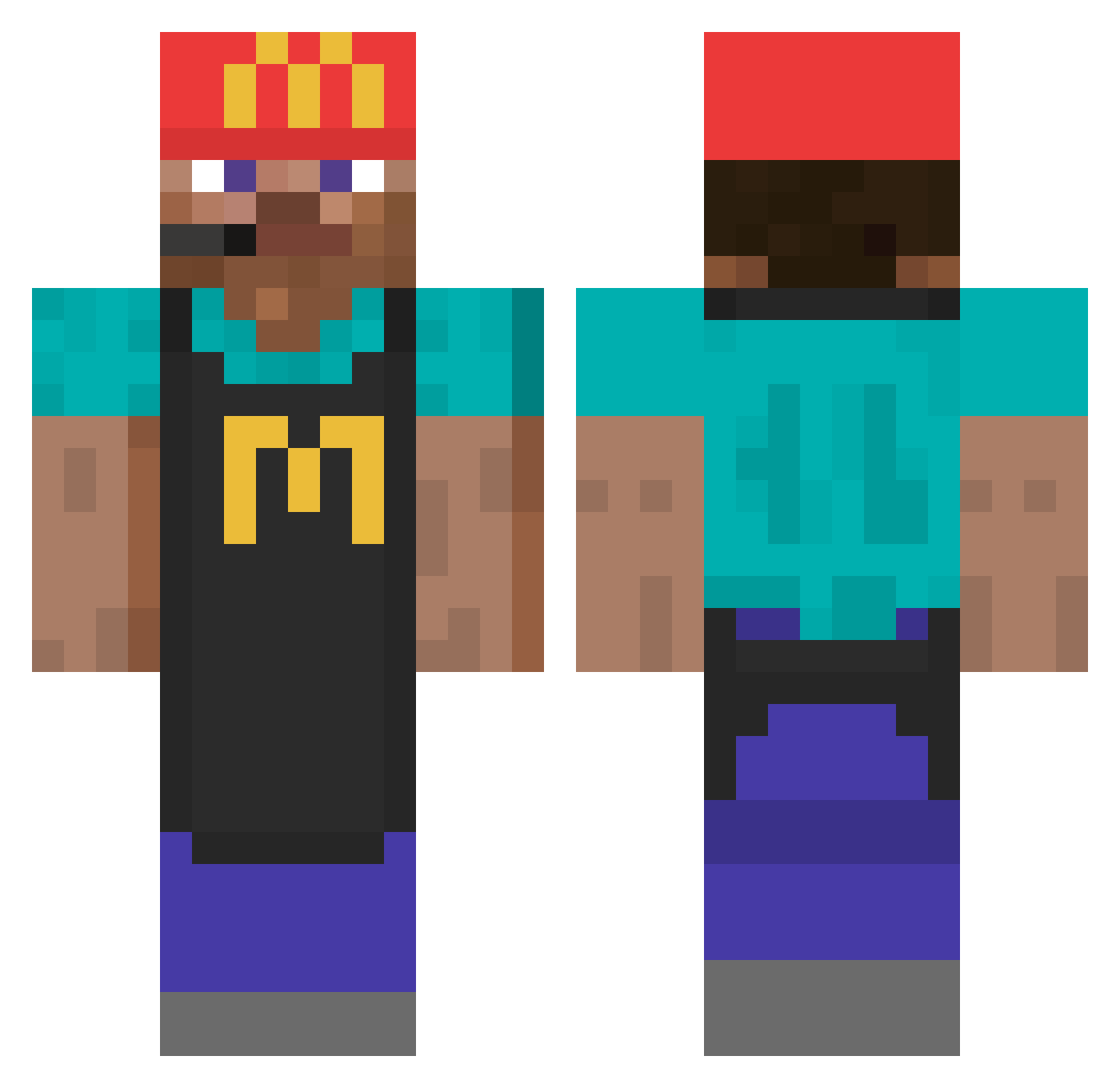
Current Minecraft skin of the player OfficerDown42, loaded from the official Mojang API. Rotate the 3D model with your mouse or finger, then download the skin as a PNG file and use it in Minecraft: Bedrock Edition or Java Edition for free. When OfficerDown42 changes their skin, this page updates automatically and the old skin stays in the history below.
Other players with this skin (740)
OfficerDown42 was the 184th player we have seen with this skin, first spotted on 20.08.2026. The same skin was seen on these players. Open a nickname to see their current skin and skin history.
 cookie989898 SmileyToJa Ronron2_0 ArvidFantom Twiz_fr neggermand47 joemamabrine69 Kampfpudding1985 ddinggul zzzaron Drikstar Matheusq ignPixels TangyKitty Corvopsicodelico Kvetchy lxnpnt Kralgor jungyewon Azur193 Eis2022Eis oticarrer Zakie02 titou_1104 GR_Ninos _Kubusman_ mitchie1856 Pop_Nova siemin123456789 XxTotoGamerxX jujusursonskate Mathias4786 jotape20 kainke peacemakeroo Joid_ NoName1231 trevdog567 angxl_nxs Kolja_H 720x4 volfino_33 TORZ33 chicoking LichtVR Stinkyboi0526
 D4VDchan Dimitri2011XY DioEbreo Burnt_Milk 9telon6 Simroi nabo18 Paulmt31 Clutx Raphhh93 Vapourisrllllly LeBAo_ouo izabelle919 Eqou
More Cashier Minecraft skins
How to install the OfficerDown42 skin
- Press the Download button above to save the skin as a PNG file.
- Minecraft: Bedrock Edition (PE): open the Dressing Room from the main menu (or tap your character → Edit Character), go to Classic Skins → Owned, press the + (new skin) button, choose the downloaded PNG and pick the Classic (Steve) model. Works on PC and mobile; consoles cannot import custom skins.
- Minecraft: Java Edition: open the Minecraft Launcher, go to the Skins tab, click New Skin, load the PNG, pick the Classic (Steve) model and press Save & Use. You can also upload it at minecraft.net → Profile → Change Skin.
The skin does not show up after import - what should I do?
Restart Minecraft and open the Dressing Room again - imported skins sometimes appear only after a restart. Also make sure you selected the imported skin and picked the Classic (Steve) model.
Which model should I choose, Classic or Slim?
This skin is designed for the Classic (Steve) model. If you pick the wrong model, the arms of the skin will look stretched or squeezed.
Is the skin of OfficerDown42 free to download?
Yes. Press Download, save the PNG file and use it in Minecraft: Bedrock Edition or Java Edition - no payment or registration needed. The skin also works on multiplayer servers and Realms.
More skins
Looking for more? Go back to all Minecraft skins and check the top skins of the week, month and all time, or find any player's skin by nickname.