
Octoman2011 - Minecraft Skins & Skin History
Current Minecraft skin of the player Octoman2011, loaded from the official Mojang API. Rotate the 3D model with your mouse or finger, then download the skin as a PNG file and use it in Minecraft: Bedrock Edition or Java Edition for free. When Octoman2011 changes their skin, this page updates automatically and the old skin stays in the history below.
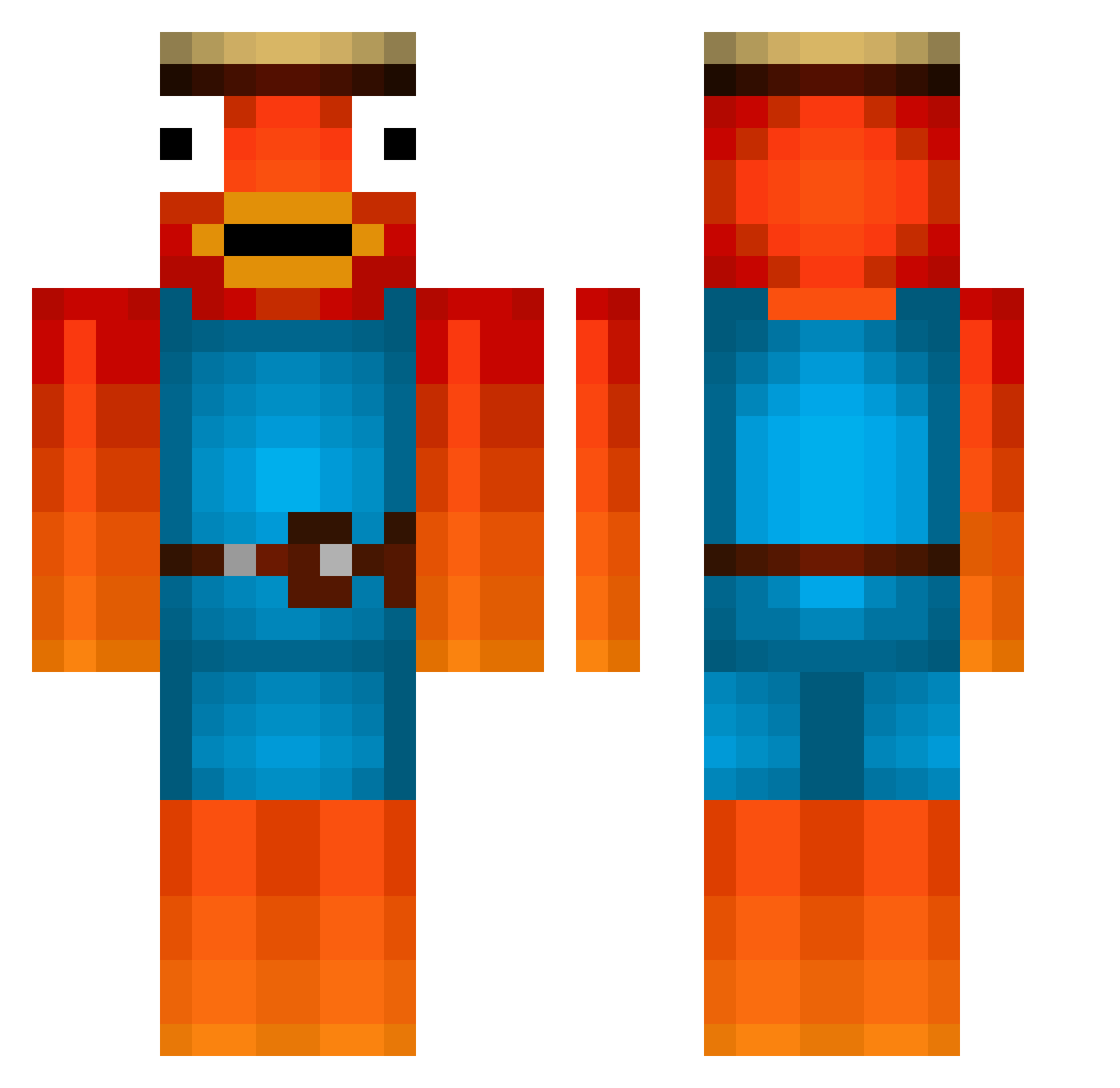
Other players with this skin (476)
Octoman2011 was the 167th player we have seen with this skin, first spotted on 30.08.2026. The same skin was seen on these players. Open a nickname to see their current skin and skin history.
 ninj4go blablabal FNC_Jirka IchBinsTimo Destination_TTV plush0 Ben_31185 GarageLee ShredSauceee HBCats LuuuKTR andrus990 TKR_PAPA Lucarro1 t1rch MrFister08 Duke112 forsenhappy MagnusGrs Pescadini Twavis06
 THE_NORWIN hwanhehehe SusLilYee19 Libiline LachsTV _Hadrick J316Shadow rupi4599 MorphTheGoated derkutty WFElliot B00ster69 2nd_TRY DonBalius Xander031 AlienGuy_546 Dynastycraft JustDani1 SamoGamer777 Dym074 FishySticky4231 Bekats CalebP98 MilkShakesSpear sethbrothers treeees Dxn1s Ekavura Ewan______ minasux djcoolguy_10 ivangetsrejected HeavenStand DasBusKommt LactoseGenMilk _21_Leon JanqshDqminatqr Swagart7
 Guntinator
More Fishstick Minecraft skins
How to install the Octoman2011 skin
- Press the Download button above to save the skin as a PNG file.
- Minecraft: Bedrock Edition (PE): open the Dressing Room from the main menu (or tap your character → Edit Character), go to Classic Skins → Owned, press the + (new skin) button, choose the downloaded PNG and pick the Classic (Steve) model. Works on PC and mobile; consoles cannot import custom skins.
- Minecraft: Java Edition: open the Minecraft Launcher, go to the Skins tab, click New Skin, load the PNG, pick the Classic (Steve) model and press Save & Use. You can also upload it at minecraft.net → Profile → Change Skin.
The skin does not show up after import - what should I do?
Restart Minecraft and open the Dressing Room again - imported skins sometimes appear only after a restart. Also make sure you selected the imported skin and picked the Classic (Steve) model.
Which model should I choose, Classic or Slim?
This skin is designed for the Classic (Steve) model. If you pick the wrong model, the arms of the skin will look stretched or squeezed.
Is the skin of Octoman2011 free to download?
Yes. Press Download, save the PNG file and use it in Minecraft: Bedrock Edition or Java Edition - no payment or registration needed. The skin also works on multiplayer servers and Realms.
More skins
Looking for more? Go back to all Minecraft skins and check the top skins of the week, month and all time, or find any player's skin by nickname.