
Nyxkar - Minecraft Skins & Skin History
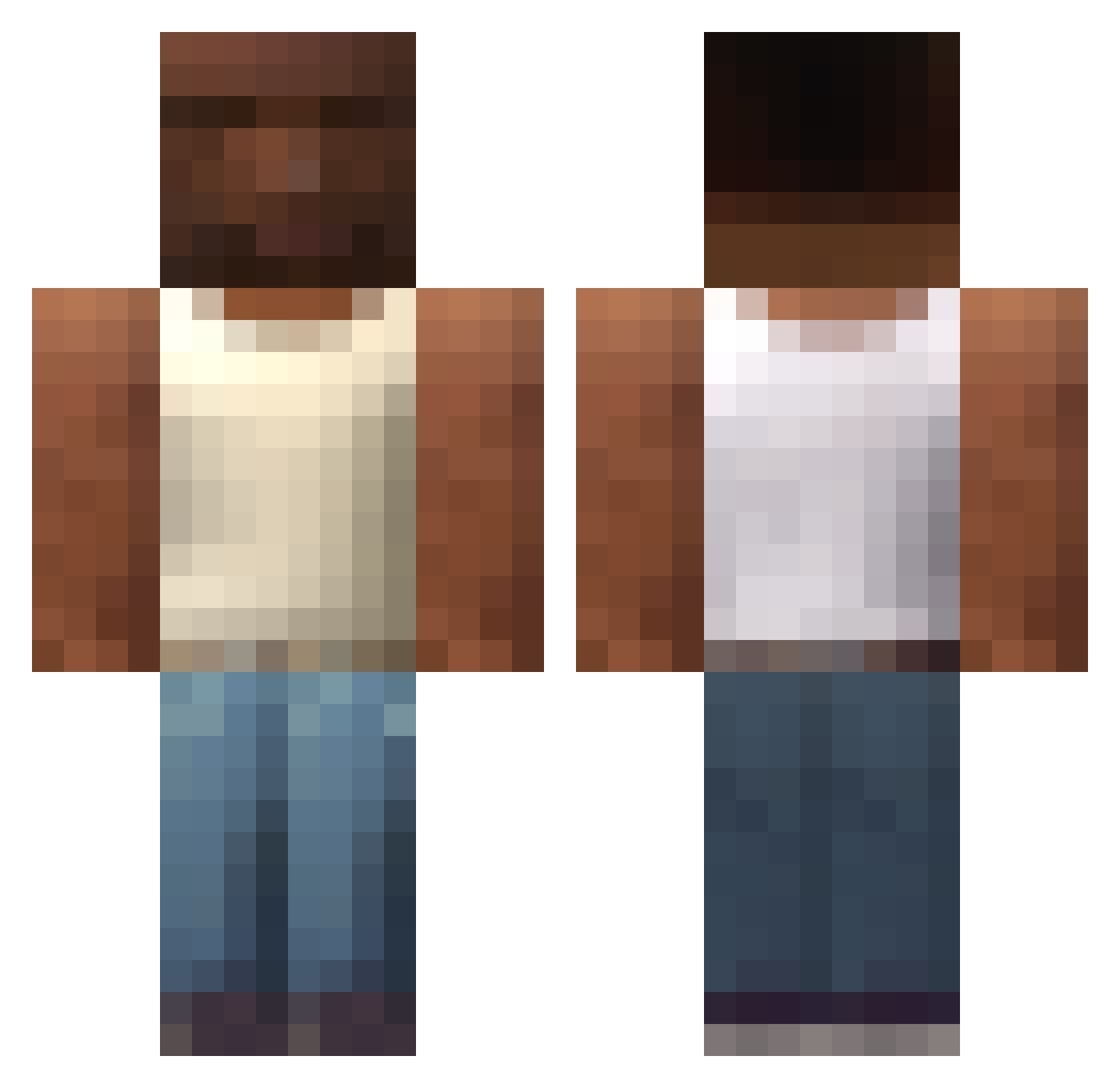
Current Minecraft skin of the player Nyxkar, loaded from the official Mojang API. Rotate the 3D model with your mouse or finger, then download the skin as a PNG file and use it in Minecraft: Bedrock Edition or Java Edition for free. When Nyxkar changes their skin, this page updates automatically and the old skin stays in the history below.
Other players with this skin (607)
Nyxkar was the 426th player we have seen with this skin, first spotted on 04.10.2026. The same skin was seen on these players. Open a nickname to see their current skin and skin history.
 diegolautarob Trombocit Tubizi SouIIXI yinuzo Igorovski_ iA88 Eduardo90XD XenoLeaf uikog Odranoel2501 Log1c_fr Daw1xd mejing DonCheto2004 KrageGames spokokub Mailoveb masosiru romarin_lixeiro henrique_agiota0 OP1121 PPand czarnuhdobawelny pingu_maneiro KilianBLRD Handdler cee2thejayy yodzh wenelu AdamZxz aostiplutonio Meteor779 AAMONSITO megafasator 4ONLY Valkire77 AbHalh 1XLEBRONJAMESX1 2gen2 oTchaca Bludytojas Juancito010 GaviriaR damnerded vesperalport69 Tewpo Urdaddoesntloveu LOYLANG Rijardo0 frannkiii mafy6 _s1mple_L Dark_Scare 5beach Gollum122 y86l pivotmasta jokerhi1 blueqeqe
More San Andreas Minecraft skins
How to install the Nyxkar skin
- Press the Download button above to save the skin as a PNG file.
- Minecraft: Bedrock Edition (PE): open the Dressing Room from the main menu (or tap your character → Edit Character), go to Classic Skins → Owned, press the + (new skin) button, choose the downloaded PNG and pick the Classic (Steve) model. Works on PC and mobile; consoles cannot import custom skins.
- Minecraft: Java Edition: open the Minecraft Launcher, go to the Skins tab, click New Skin, load the PNG, pick the Classic (Steve) model and press Save & Use. You can also upload it at minecraft.net → Profile → Change Skin.
The skin does not show up after import - what should I do?
Restart Minecraft and open the Dressing Room again - imported skins sometimes appear only after a restart. Also make sure you selected the imported skin and picked the Classic (Steve) model.
Which model should I choose, Classic or Slim?
This skin is designed for the Classic (Steve) model. If you pick the wrong model, the arms of the skin will look stretched or squeezed.
Is the skin of Nyxkar free to download?
Yes. Press Download, save the PNG file and use it in Minecraft: Bedrock Edition or Java Edition - no payment or registration needed. The skin also works on multiplayer servers and Realms.
More skins
Looking for more? Go back to all Minecraft skins and check the top skins of the week, month and all time, or find any player's skin by nickname.