
Nyancathing - Minecraft Skins & Skin History
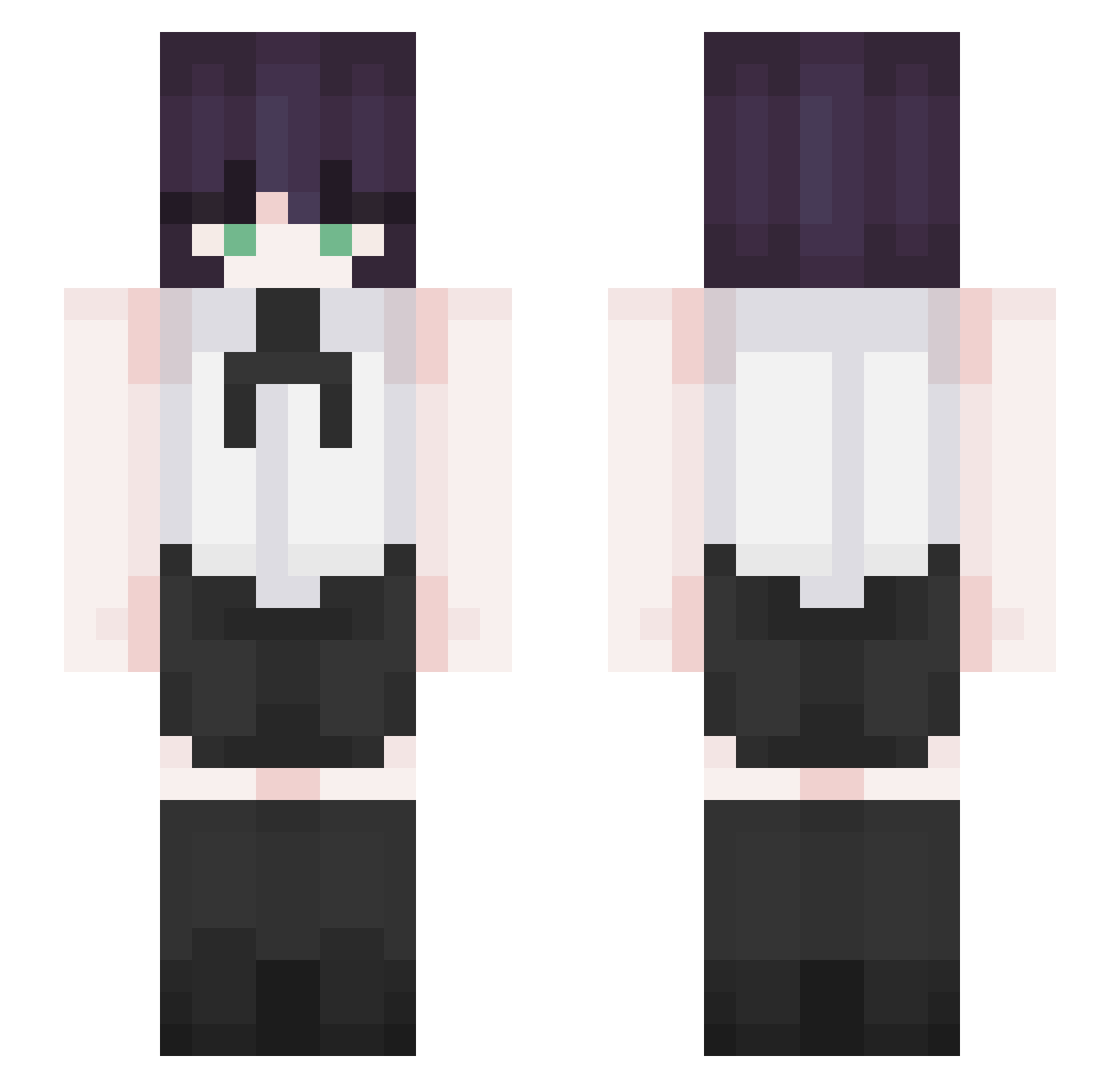
Current Minecraft skin of the player Nyancathing, loaded from the official Mojang API. Rotate the 3D model with your mouse or finger, then download the skin as a PNG file and use it in Minecraft: Bedrock Edition or Java Edition for free. When Nyancathing changes their skin, this page updates automatically and the old skin stays in the history below.
Other players with this skin (280)
Nyancathing was the 80th player we have seen with this skin, first spotted on 20.08.2026. The same skin was seen on these players. Open a nickname to see their current skin and skin history.
 nanun1004 Wang_Ko K0ozak Maelasa_ alepiki ___Mayuu___ Swizion stopsaturn _9yuwxn MuIde 1000a vrokdovrok minyoung6197 sean080808 minggge0319 baegopa218 Poongmoodong Liuzzz Frywinde Wayfed dudry mxbu7 Akzina Kogalicious MommyNakano viennuh karpincho418 suuung_ox AiDen_0812 yourstranger SplitClient7291 moiv3 jww100717 VkzinIwnl Azther0z ssih Kayato06 SnoWyday943 VYN_Yvel KorSoccer Acrux__ ChiaYu0522 denjilvr Hyp3rLe 39Piyori RUK_Reze Lyvre minchae020318 gilliangonzo _statice duckybucky_ reze_0 Alexdel_15 alidrip Neo_Uranium CendreHuitre465 wlgusdl1000 _bxi Cami0404 XeroZH
More Makima Minecraft skins
How to install the Nyancathing skin
- Press the Download button above to save the skin as a PNG file.
- Minecraft: Bedrock Edition (PE): open the Dressing Room from the main menu (or tap your character → Edit Character), go to Classic Skins → Owned, press the + (new skin) button, choose the downloaded PNG and pick the Slim (Alex) model. Works on PC and mobile; consoles cannot import custom skins.
- Minecraft: Java Edition: open the Minecraft Launcher, go to the Skins tab, click New Skin, load the PNG, pick the Slim (Alex) model and press Save & Use. You can also upload it at minecraft.net → Profile → Change Skin.
The skin does not show up after import - what should I do?
Restart Minecraft and open the Dressing Room again - imported skins sometimes appear only after a restart. Also make sure you selected the imported skin and picked the Slim (Alex) model.
Which model should I choose, Classic or Slim?
This skin is designed for the Slim (Alex) model. If you pick the wrong model, the arms of the skin will look stretched or squeezed.
Is the skin of Nyancathing free to download?
Yes. Press Download, save the PNG file and use it in Minecraft: Bedrock Edition or Java Edition - no payment or registration needed. The skin also works on multiplayer servers and Realms.
More skins
Looking for more? Go back to all Minecraft skins and check the top skins of the week, month and all time, or find any player's skin by nickname.