
Novarus86 - Minecraft Skins & Skin History
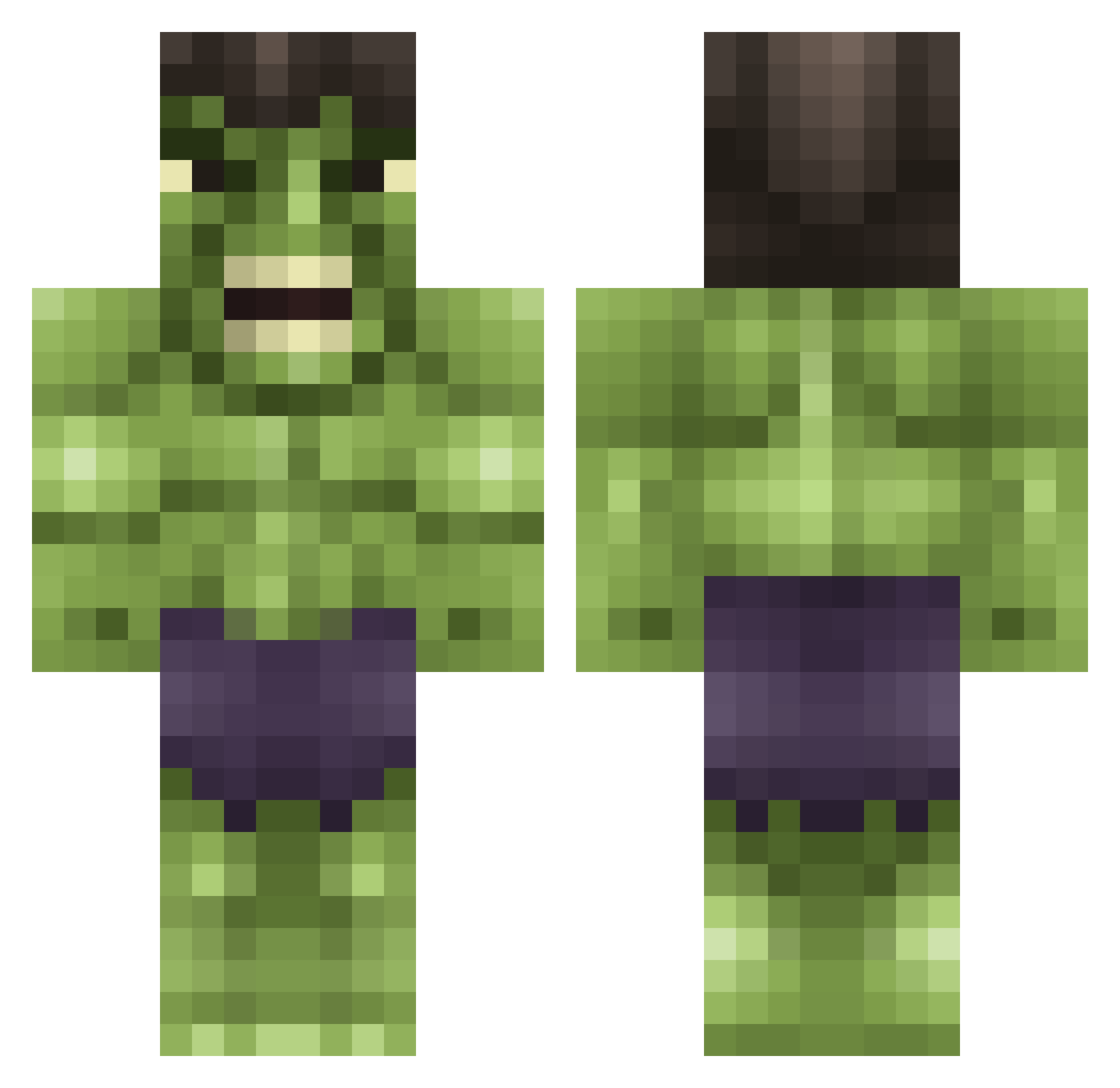
Current Minecraft skin of the player Novarus86, loaded from the official Mojang API. Rotate the 3D model with your mouse or finger, then download the skin as a PNG file and use it in Minecraft: Bedrock Edition or Java Edition for free. When Novarus86 changes their skin, this page updates automatically and the old skin stays in the history below.
Other players with this skin (615)
Novarus86 was the 153rd player we have seen with this skin, first spotted on 20.08.2026. The same skin was seen on these players. Open a nickname to see their current skin and skin history.
 Dean39939 Rickkert94 KalebMoDz K1llertime dwgk2012 twinkeboy123 KayWars matthijsnvn Madmanmaddex01 HimitsuTai Cheeseball99 Emergencyman hulksmash77 OXEN1337 Cofge NikolajFoldager RRoom_ MrStom ossi1396 JustCian Letmeinside elvedin1771 Steve1186 TMBDOOM Henrik_52 nicecookie RhodeYourSister EvanTheHot MaryPancakes meakin2 blacknite937 xmarkines Gruber1234 Lerfty Koala_Freak Luukvben RangerUch BeyondLimit24 alexxoxx Phalynxx garzaroberto99 TEAHWAN2 zMerk17 zombiekillakyle brighton01 lemon_pledge1 AMGHOCKEY MR_LoCco Loco69 Zey wesselthegamer B3ani3B0y blazer891 ZeritoYT MystikKiller mrkentucky19 youchooseit Surfermop9 Fakec JLNlordofdarknes
More Hulk Minecraft skins
How to install the Novarus86 skin
- Press the Download button above to save the skin as a PNG file.
- Minecraft: Bedrock Edition (PE): open the Dressing Room from the main menu (or tap your character → Edit Character), go to Classic Skins → Owned, press the + (new skin) button, choose the downloaded PNG and pick the Classic (Steve) model. Works on PC and mobile; consoles cannot import custom skins.
- Minecraft: Java Edition: open the Minecraft Launcher, go to the Skins tab, click New Skin, load the PNG, pick the Classic (Steve) model and press Save & Use. You can also upload it at minecraft.net → Profile → Change Skin.
The skin does not show up after import - what should I do?
Restart Minecraft and open the Dressing Room again - imported skins sometimes appear only after a restart. Also make sure you selected the imported skin and picked the Classic (Steve) model.
Which model should I choose, Classic or Slim?
This skin is designed for the Classic (Steve) model. If you pick the wrong model, the arms of the skin will look stretched or squeezed.
Is the skin of Novarus86 free to download?
Yes. Press Download, save the PNG file and use it in Minecraft: Bedrock Edition or Java Edition - no payment or registration needed. The skin also works on multiplayer servers and Realms.
More skins
Looking for more? Go back to all Minecraft skins and check the top skins of the week, month and all time, or find any player's skin by nickname.