
Nob1eWing - Minecraft Skins & Skin History
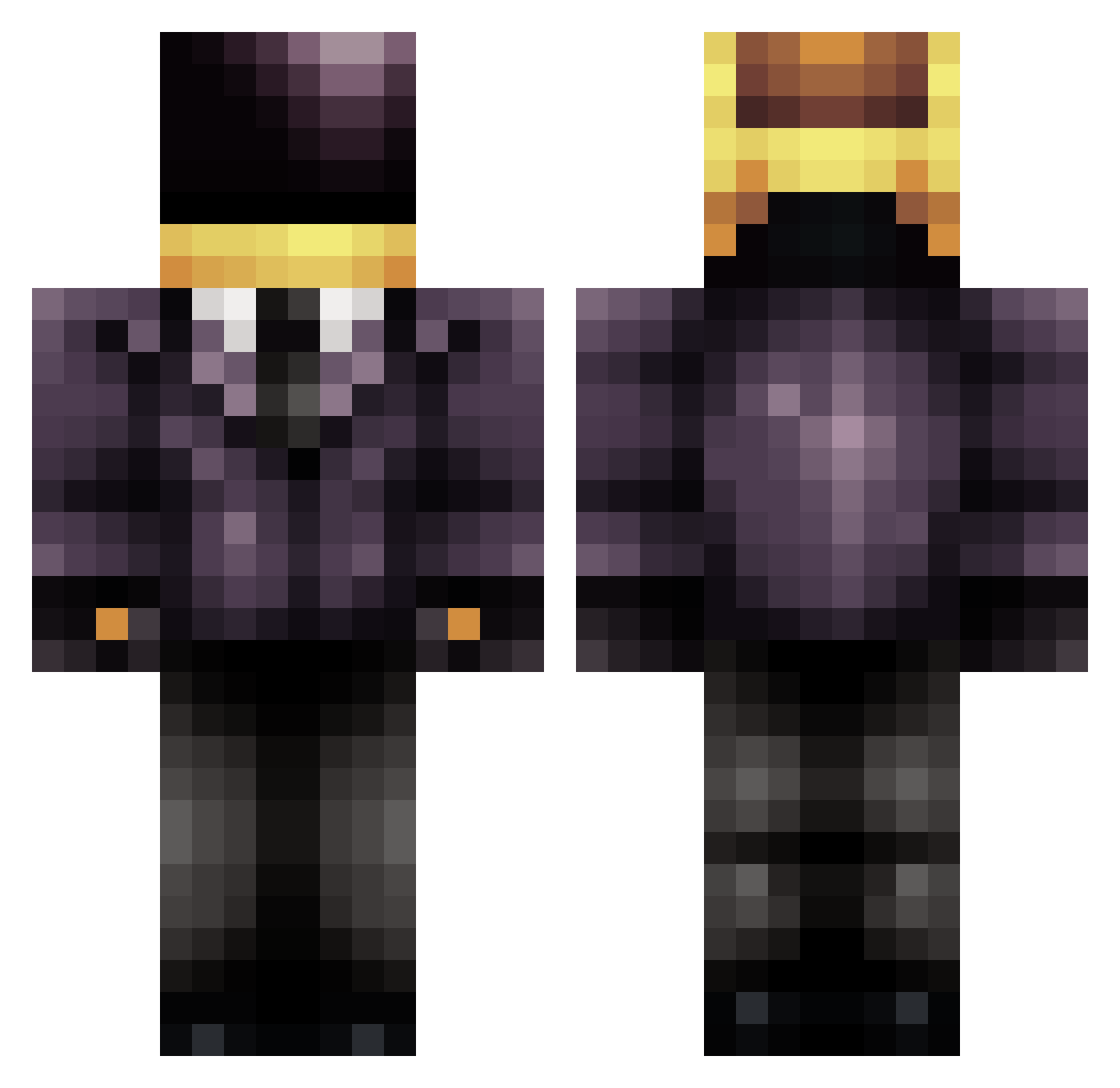
Current Minecraft skin of the player Nob1eWing, loaded from the official Mojang API. Rotate the 3D model with your mouse or finger, then download the skin as a PNG file and use it in Minecraft: Bedrock Edition or Java Edition for free. When Nob1eWing changes their skin, this page updates automatically and the old skin stays in the history below.
Other players with this skin (830)
Nob1eWing was the 787th player we have seen with this skin, first spotted on 13.11.2026. The same skin was seen on these players. Open a nickname to see their current skin and skin history.
 TailaFTW untitledrobot RobotWizard04 Ergerderger PastaNapoli zachteam Ianroxxx LikeaToNy616 lemw361 erinsara heyitsdrew nsukhee Armanicraft daneruid Wubbelmann BJS2002 grover9212 bertita ohshitwhaddup Dark_Assassin141 Swawm Halkenguard Joopis CapnOrange CJC0730 goku1984 PrimeStylez sadpancakes T_Haen SadLight owmx99 HaloPro02 NamesSteve123 DieuMozart ChicknBizkit samspicoli Roach612 MattTheSupreme 08jaen Julznova rambolex McpcmMarkos Yung_Badger marc_aguilar13 NvMustang cero0 Dusteee Rezewy Saxaphone151 Drakcel76 Avriijo mcwolfe14 KillMxMarck ItsTheSponge Woodypower migi1735 Enigma_Machine LastPixl CookieBacon Brug69
More Daft Punk Minecraft skins
How to install the Nob1eWing skin
- Press the Download button above to save the skin as a PNG file.
- Minecraft: Bedrock Edition (PE): open the Dressing Room from the main menu (or tap your character → Edit Character), go to Classic Skins → Owned, press the + (new skin) button, choose the downloaded PNG and pick the Classic (Steve) model. Works on PC and mobile; consoles cannot import custom skins.
- Minecraft: Java Edition: open the Minecraft Launcher, go to the Skins tab, click New Skin, load the PNG, pick the Classic (Steve) model and press Save & Use. You can also upload it at minecraft.net → Profile → Change Skin.
The skin does not show up after import - what should I do?
Restart Minecraft and open the Dressing Room again - imported skins sometimes appear only after a restart. Also make sure you selected the imported skin and picked the Classic (Steve) model.
Which model should I choose, Classic or Slim?
This skin is designed for the Classic (Steve) model. If you pick the wrong model, the arms of the skin will look stretched or squeezed.
Is the skin of Nob1eWing free to download?
Yes. Press Download, save the PNG file and use it in Minecraft: Bedrock Edition or Java Edition - no payment or registration needed. The skin also works on multiplayer servers and Realms.
More skins
Looking for more? Go back to all Minecraft skins and check the top skins of the week, month and all time, or find any player's skin by nickname.