
Nikola0006 - Minecraft Skins & Skin History
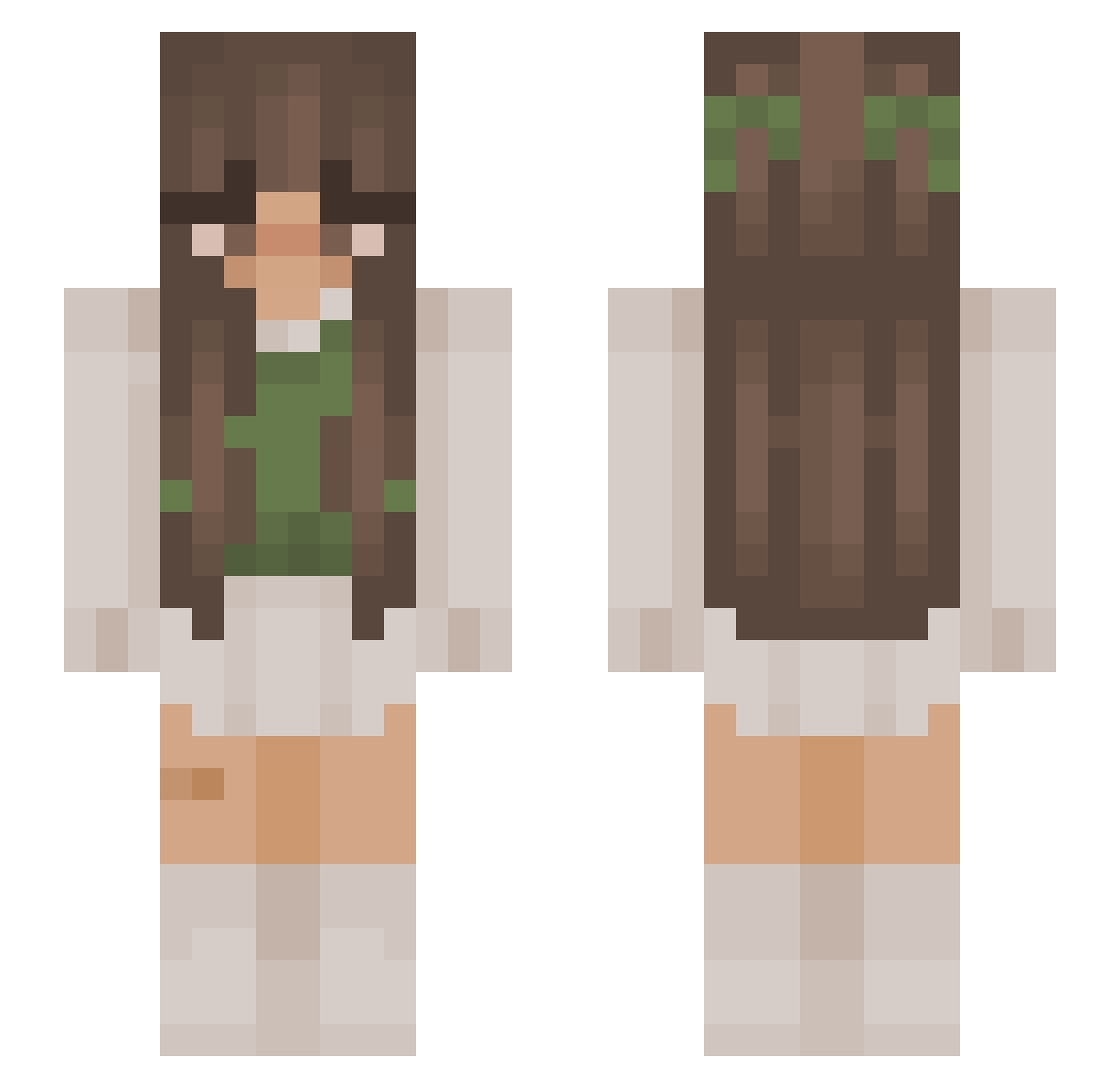
Current Minecraft skin of the player Nikola0006, loaded from the official Mojang API. Rotate the 3D model with your mouse or finger, then download the skin as a PNG file and use it in Minecraft: Bedrock Edition or Java Edition for free. When Nikola0006 changes their skin, this page updates automatically and the old skin stays in the history below.
Other players with this skin (879)
Nikola0006 was the 650th player we have seen with this skin, first spotted on 01.10.2026. The same skin was seen on these players. Open a nickname to see their current skin and skin history.
 kayeet RealStrafanzeige sorrydarling addzersaur acmepork Giselle1flores iQue2014 calinity piwnica400m2 PrettyPrincess05 rrqse _blanqaa OkWhatTheFlip bfraga naoomie PaleChloe covenology wallah325 futkan mewinkies Alisaaamc Marrs_04 mochagrays Fireshot22 Kennah_ Handriuz senthari Bellamona20 flamdawg anarekii 3mma9086 kiimcam mollymcllstr picklejuicefairy justjules2000 Victoriarterry jumpingegg456 Aqua_Universe Danalover132 BerryFairy180 love_bug7 NINJATISHA88 Emilyy_2137 kylab_ Yxzlynn Ginitaa_ Snowdrop3 Phantom_Creator Molly2034 scorpiom0 spookyBean jessyolive123 emnemi ChiaraXX10 Lazurowy qxc_marie embroideryfloss Marshmelon2606 luvlyizzy Notaghost_14
More Cottagecore Minecraft skins
See all 5826 Cottagecore skins
How to install the Nikola0006 skin
- Press the Download button above to save the skin as a PNG file.
- Minecraft: Bedrock Edition (PE): open the Dressing Room from the main menu (or tap your character → Edit Character), go to Classic Skins → Owned, press the + (new skin) button, choose the downloaded PNG and pick the Slim (Alex) model. Works on PC and mobile; consoles cannot import custom skins.
- Minecraft: Java Edition: open the Minecraft Launcher, go to the Skins tab, click New Skin, load the PNG, pick the Slim (Alex) model and press Save & Use. You can also upload it at minecraft.net → Profile → Change Skin.
The skin does not show up after import - what should I do?
Restart Minecraft and open the Dressing Room again - imported skins sometimes appear only after a restart. Also make sure you selected the imported skin and picked the Slim (Alex) model.
Which model should I choose, Classic or Slim?
This skin is designed for the Slim (Alex) model. If you pick the wrong model, the arms of the skin will look stretched or squeezed.
Is the skin of Nikola0006 free to download?
Yes. Press Download, save the PNG file and use it in Minecraft: Bedrock Edition or Java Edition - no payment or registration needed. The skin also works on multiplayer servers and Realms.
More skins
Looking for more? Go back to all Minecraft skins and check the top skins of the week, month and all time, or find any player's skin by nickname.