
Never3ndingPain - Minecraft Skins & Skin History
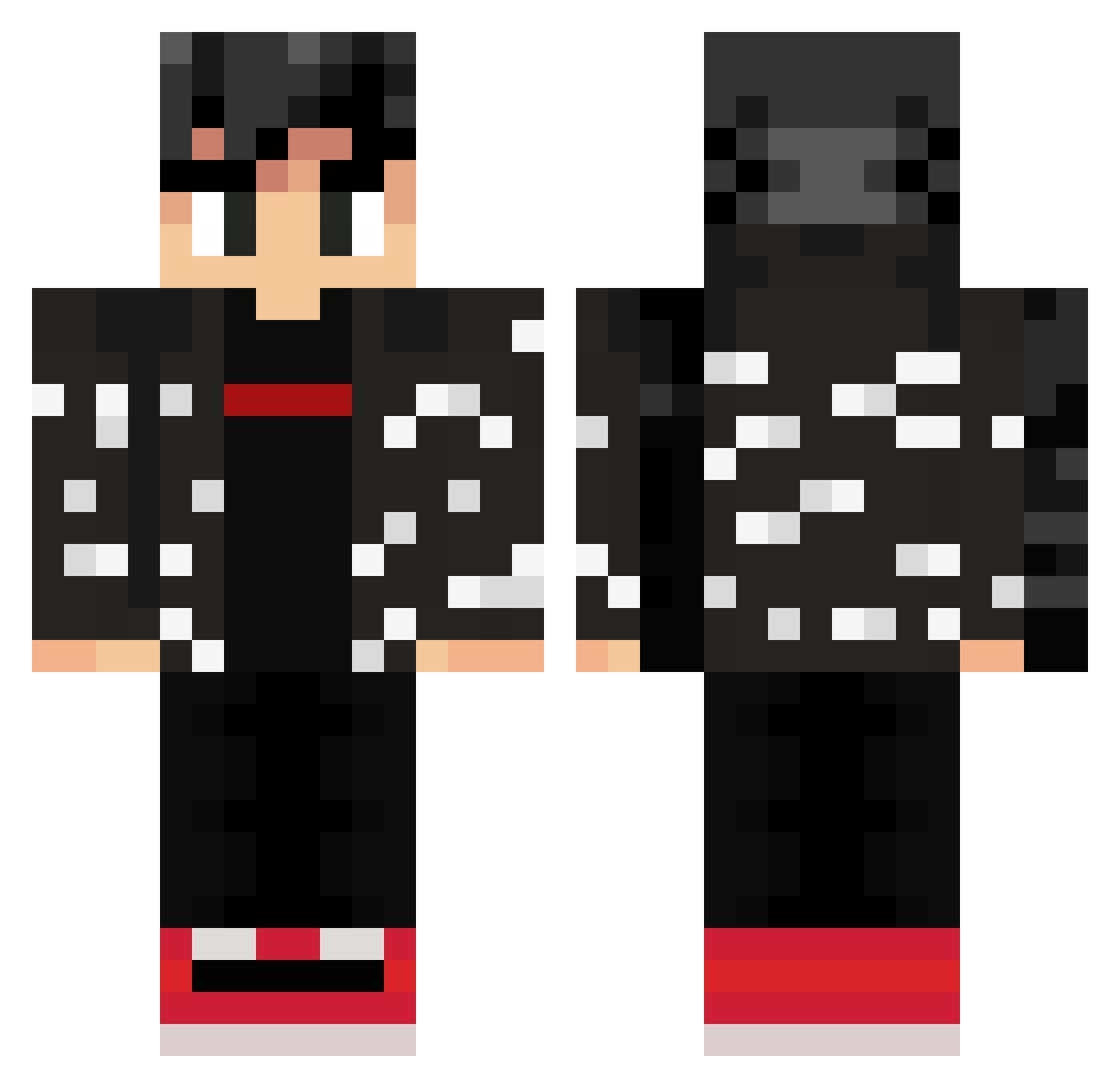
Current Minecraft skin of the player Never3ndingPain, loaded from the official Mojang API. Rotate the 3D model with your mouse or finger, then download the skin as a PNG file and use it in Minecraft: Bedrock Edition or Java Edition for free. When Never3ndingPain changes their skin, this page updates automatically and the old skin stays in the history below.
Other players with this skin (309)
Never3ndingPain was the 235th player we have seen with this skin, first spotted on 16.10.2026. The same skin was seen on these players. Open a nickname to see their current skin and skin history.
 SkillDrainer Vktr72 IZa894 k1_grandz CXLIB5175 Liamzon TheXaiga Alp1461 Fiwi__ zace_vans Parduc16 BdMn11 Jack_jie ESZKALANT OmnicDominic IsRode_XD Sham_sizzle AlexENP xdballitos xlFr0z3n Custom5 austinslifeyt SonGoku17Z xdethan7 pizza123456788 Chuffies BienenLev BigLargeDuckMan Aljo_ Alvaro56 XXblue8 RichCreamin Xer0Star RefreshingBepsi Marsh_miza dn1015 AloxusV2 DatOneGamer Kyhiow X_Bobby_Wasabi_X Crunchbite3 izzie100 Petterofcat Rookylight28 hart2407 GOKUSSGSS1986 K1NGSaL finchhouse GhostSock0827 thomasswinkels MaUx00 chicocebolla1 Silencer107 ProjectMega 016nowwn Tempo69 Booredom Augusta1987 Iley6161 True3vo
More Streetwear Minecraft skins
How to install the Never3ndingPain skin
- Press the Download button above to save the skin as a PNG file.
- Minecraft: Bedrock Edition (PE): open the Dressing Room from the main menu (or tap your character → Edit Character), go to Classic Skins → Owned, press the + (new skin) button, choose the downloaded PNG and pick the Classic (Steve) model. Works on PC and mobile; consoles cannot import custom skins.
- Minecraft: Java Edition: open the Minecraft Launcher, go to the Skins tab, click New Skin, load the PNG, pick the Classic (Steve) model and press Save & Use. You can also upload it at minecraft.net → Profile → Change Skin.
The skin does not show up after import - what should I do?
Restart Minecraft and open the Dressing Room again - imported skins sometimes appear only after a restart. Also make sure you selected the imported skin and picked the Classic (Steve) model.
Which model should I choose, Classic or Slim?
This skin is designed for the Classic (Steve) model. If you pick the wrong model, the arms of the skin will look stretched or squeezed.
Is the skin of Never3ndingPain free to download?
Yes. Press Download, save the PNG file and use it in Minecraft: Bedrock Edition or Java Edition - no payment or registration needed. The skin also works on multiplayer servers and Realms.
More skins
Looking for more? Go back to all Minecraft skins and check the top skins of the week, month and all time, or find any player's skin by nickname.