
NaaaNiChan - Minecraft Skins & Skin History
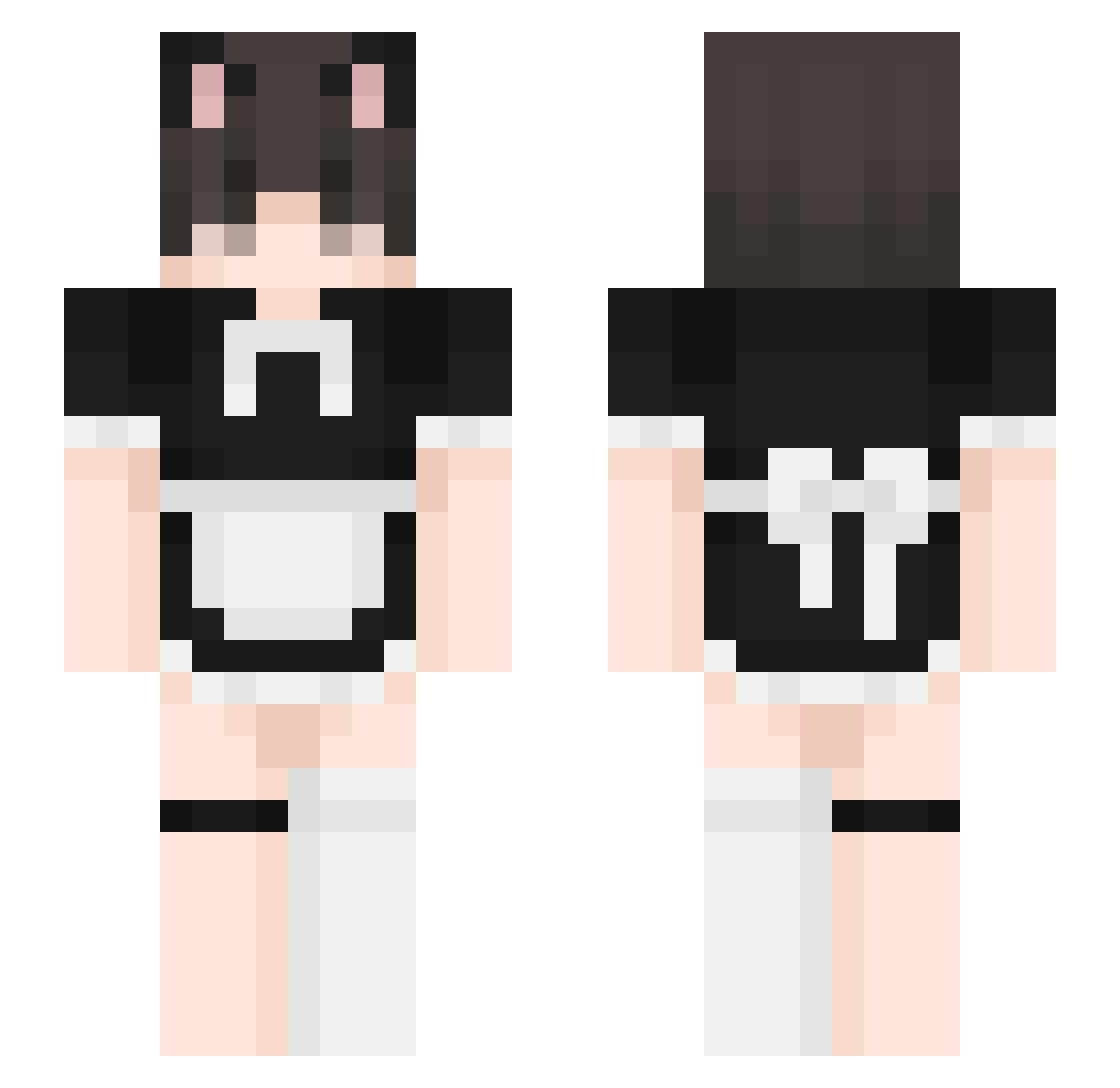
Current Minecraft skin of the player NaaaNiChan, loaded from the official Mojang API. Rotate the 3D model with your mouse or finger, then download the skin as a PNG file and use it in Minecraft: Bedrock Edition or Java Edition for free. When NaaaNiChan changes their skin, this page updates automatically and the old skin stays in the history below.
Other players with this skin (394)
NaaaNiChan was the 116th player we have seen with this skin, first spotted on 25.08.2026. The same skin was seen on these players. Open a nickname to see their current skin and skin history.
 kuro_iwnl Zane_Romeave1 xsawier1 GomasRtt wnhyung78107 BigNastiFrank ITNLukas Yeonmyeong kamikenz SirJakey Wing31 fenix852 Dimitris_2008 Kiraiw dotty3533 derrickzzz Centrio_ WillyWonka559 52vr Ruslan4ik Somerandomsimon Fuuncky chefJohnsu Bwill1058 yumeby SQruD_Game228 ErikoMofu Ore_Mstr Marekb434 stevengtt JeffR0D Stinkygae catBoyGamerGirl King0cto Jingjung555 Lord_Harambe69 imjiein suwucidal
 idk_why_ Moonixl9
 BeanyFemboy haralduwu kidm2025 EMPYRES Zoaue MichalMz1 Duck_No7 LukDoys HampterToucher FlixyPoohhh CRAZZYGAMER4647 KITsunpp forgotten0415 zfkhan6789 tgfx_3 Dominco hgd_7764 Shozye juicyphrogy sabanita
More Maid Minecraft skins
How to install the NaaaNiChan skin
- Press the Download button above to save the skin as a PNG file.
- Minecraft: Bedrock Edition (PE): open the Dressing Room from the main menu (or tap your character → Edit Character), go to Classic Skins → Owned, press the + (new skin) button, choose the downloaded PNG and pick the Slim (Alex) model. Works on PC and mobile; consoles cannot import custom skins.
- Minecraft: Java Edition: open the Minecraft Launcher, go to the Skins tab, click New Skin, load the PNG, pick the Slim (Alex) model and press Save & Use. You can also upload it at minecraft.net → Profile → Change Skin.
The skin does not show up after import - what should I do?
Restart Minecraft and open the Dressing Room again - imported skins sometimes appear only after a restart. Also make sure you selected the imported skin and picked the Slim (Alex) model.
Which model should I choose, Classic or Slim?
This skin is designed for the Slim (Alex) model. If you pick the wrong model, the arms of the skin will look stretched or squeezed.
Is the skin of NaaaNiChan free to download?
Yes. Press Download, save the PNG file and use it in Minecraft: Bedrock Edition or Java Edition - no payment or registration needed. The skin also works on multiplayer servers and Realms.
More skins
Looking for more? Go back to all Minecraft skins and check the top skins of the week, month and all time, or find any player's skin by nickname.