
NOTTHEGOAT6000 - Minecraft Skins & Skin History
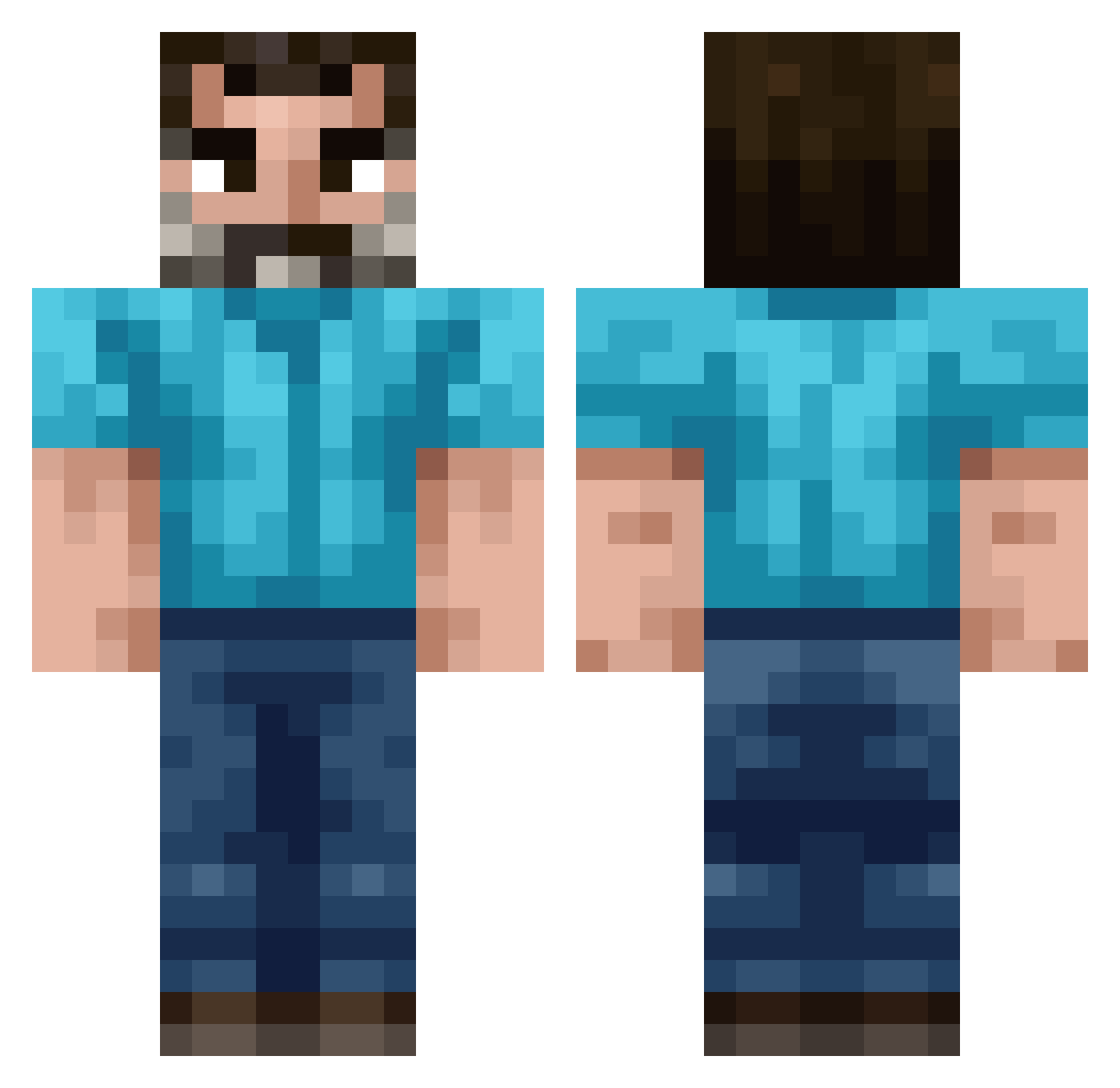
Current Minecraft skin of the player NOTTHEGOAT6000, loaded from the official Mojang API. Rotate the 3D model with your mouse or finger, then download the skin as a PNG file and use it in Minecraft: Bedrock Edition or Java Edition for free. When NOTTHEGOAT6000 changes their skin, this page updates automatically and the old skin stays in the history below.
Other players with this skin (222)
NOTTHEGOAT6000 was the 95th player we have seen with this skin, first spotted on 11.09.2026. The same skin was seen on these players. Open a nickname to see their current skin and skin history.
 PAYBOIFARTI aswfp MartinRoyale kamrosed Raybeeze bambirra1st TroyLoxton Ingstrup negofoice Shartgod420 9YRD SOliver279 Fatty2142 Crisp36 Twimmler DiceyCaclulation Empoleonify Nemo889 megagagis TonyK72 ZeVaxer_ Olliecore Zita659 welshcraft uWCrutch luxizer NooodleRat Jikypops Sillenassasin Wondr0us Filipooo76 builder2026gurra Dr_Disc0 IgglePiggle96 J0e_Mama_Obama ArkNo588 MrGab0 ALTF4FOUR TheMilkMan667 molatiS EnderParel SputRafa krzysztofp AjdaKul skullk1ng53 Xaaryne MicroManiac56 Hyruli ComputerVirrrus i65h YouNoob1 Paranoia555 Metheglin Samcool236 NOTIME_SP AgustinPro10 hans812 VenustoiseHD biingus_ Vlntn
How to install the NOTTHEGOAT6000 skin
- Press the Download button above to save the skin as a PNG file.
- Minecraft: Bedrock Edition (PE): open the Dressing Room from the main menu (or tap your character → Edit Character), go to Classic Skins → Owned, press the + (new skin) button, choose the downloaded PNG and pick the Classic (Steve) model. Works on PC and mobile; consoles cannot import custom skins.
- Minecraft: Java Edition: open the Minecraft Launcher, go to the Skins tab, click New Skin, load the PNG, pick the Classic (Steve) model and press Save & Use. You can also upload it at minecraft.net → Profile → Change Skin.
The skin does not show up after import - what should I do?
Restart Minecraft and open the Dressing Room again - imported skins sometimes appear only after a restart. Also make sure you selected the imported skin and picked the Classic (Steve) model.
Which model should I choose, Classic or Slim?
This skin is designed for the Classic (Steve) model. If you pick the wrong model, the arms of the skin will look stretched or squeezed.
Is the skin of NOTTHEGOAT6000 free to download?
Yes. Press Download, save the PNG file and use it in Minecraft: Bedrock Edition or Java Edition - no payment or registration needed. The skin also works on multiplayer servers and Realms.
More skins
Looking for more? Go back to all Minecraft skins and check the top skins of the week, month and all time, or find any player's skin by nickname.