
NIPX - Minecraft Skins & Skin History
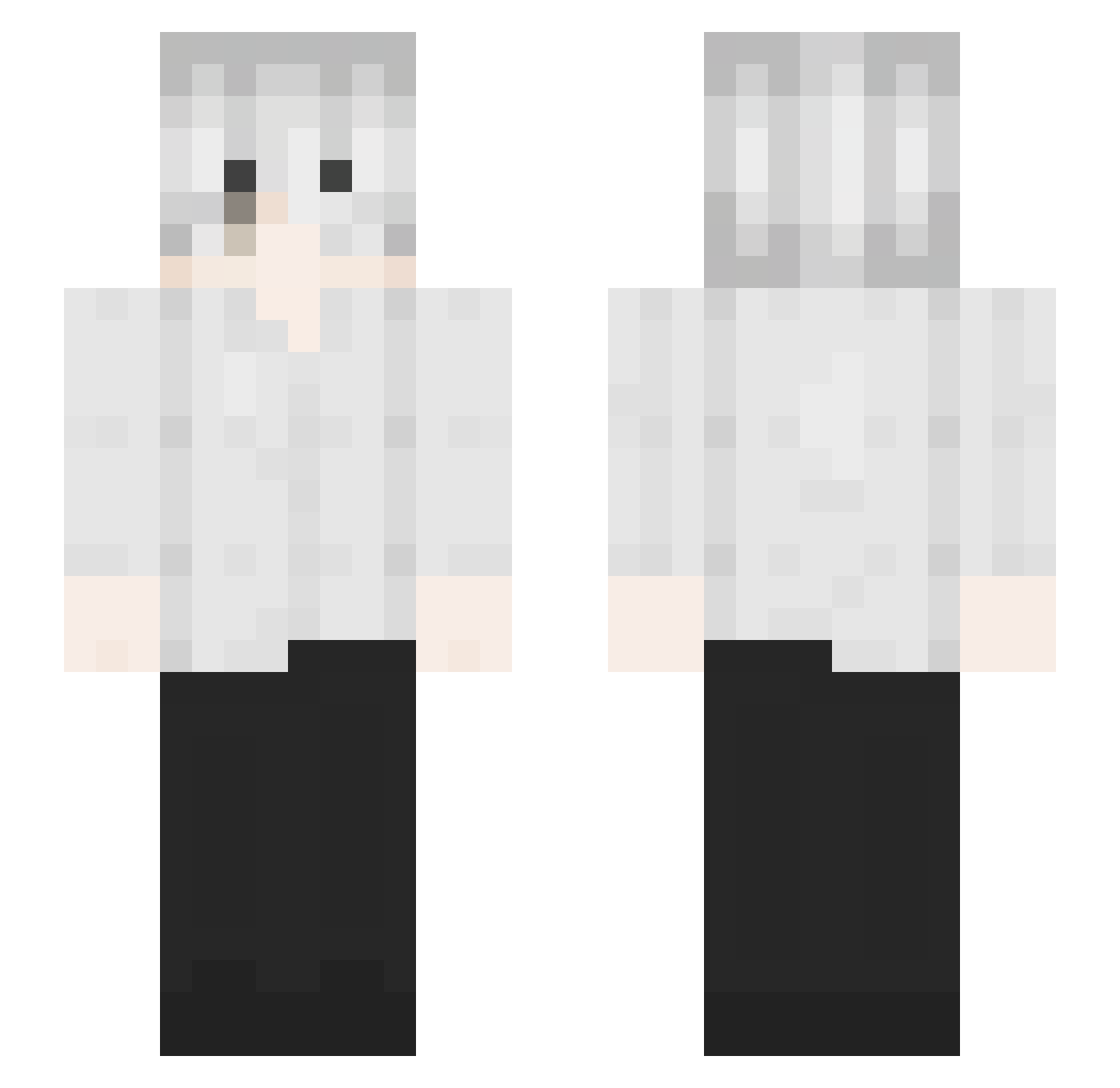
Current Minecraft skin of the player NIPX, loaded from the official Mojang API. Rotate the 3D model with your mouse or finger, then download the skin as a PNG file and use it in Minecraft: Bedrock Edition or Java Edition for free. When NIPX changes their skin, this page updates automatically and the old skin stays in the history below.
Other players with this skin (126)
NIPX was the 27th player we have seen with this skin, first spotted on 12.08.2026. The same skin was seen on these players. Open a nickname to see their current skin and skin history.
 slowsilver08 Le_N_Master xVistDiNguu terrorofsorrow cacket
 dipf zyroxd_12 ogremorse
 KenshiXZ JianHang_ qNavid ATung1512 Jayyire G7nerous justinyktv
 faak_ FIVESNS JQN4S VykoIsBad Kensh1nt dshajdfhkl
 SeenByLes
 Kingdep Elegia_ agus_pks Kalamiaaaa
 volnixx Zyphyrix
 YoungDex challeballeXX sionking0131 cjy120211 titat IDws0
 JiHanWoo
 coldlfied kenkaneki99 ObssesedwThighs yyuw playboidorukk Fxtish _ab2 raimiisnotaloser bu7rrr KrisEatsCake nievidzialny opder
 BuChiYAA
 vscasdgcxb TrueJS j_106 Idvert Dr0pp3d_by_nyx Skycron_rwotL_05 juniorlkjh 207M happy122 Apollo_2105 sudoo1 P3estka_
More Kaneki Ken Minecraft skins
How to install the NIPX skin
- Press the Download button above to save the skin as a PNG file.
- Minecraft: Bedrock Edition (PE): open the Dressing Room from the main menu (or tap your character → Edit Character), go to Classic Skins → Owned, press the + (new skin) button, choose the downloaded PNG and pick the Slim (Alex) model. Works on PC and mobile; consoles cannot import custom skins.
- Minecraft: Java Edition: open the Minecraft Launcher, go to the Skins tab, click New Skin, load the PNG, pick the Slim (Alex) model and press Save & Use. You can also upload it at minecraft.net → Profile → Change Skin.
The skin does not show up after import - what should I do?
Restart Minecraft and open the Dressing Room again - imported skins sometimes appear only after a restart. Also make sure you selected the imported skin and picked the Slim (Alex) model.
Which model should I choose, Classic or Slim?
This skin is designed for the Slim (Alex) model. If you pick the wrong model, the arms of the skin will look stretched or squeezed.
Is the skin of NIPX free to download?
Yes. Press Download, save the PNG file and use it in Minecraft: Bedrock Edition or Java Edition - no payment or registration needed. The skin also works on multiplayer servers and Realms.
More skins
Looking for more? Go back to all Minecraft skins and check the top skins of the week, month and all time, or find any player's skin by nickname.