
Mustaboy - Minecraft Skins & Skin History
Current Minecraft skin of the player Mustaboy, loaded from the official Mojang API. Rotate the 3D model with your mouse or finger, then download the skin as a PNG file and use it in Minecraft: Bedrock Edition or Java Edition for free. When Mustaboy changes their skin, this page updates automatically and the old skin stays in the history below.
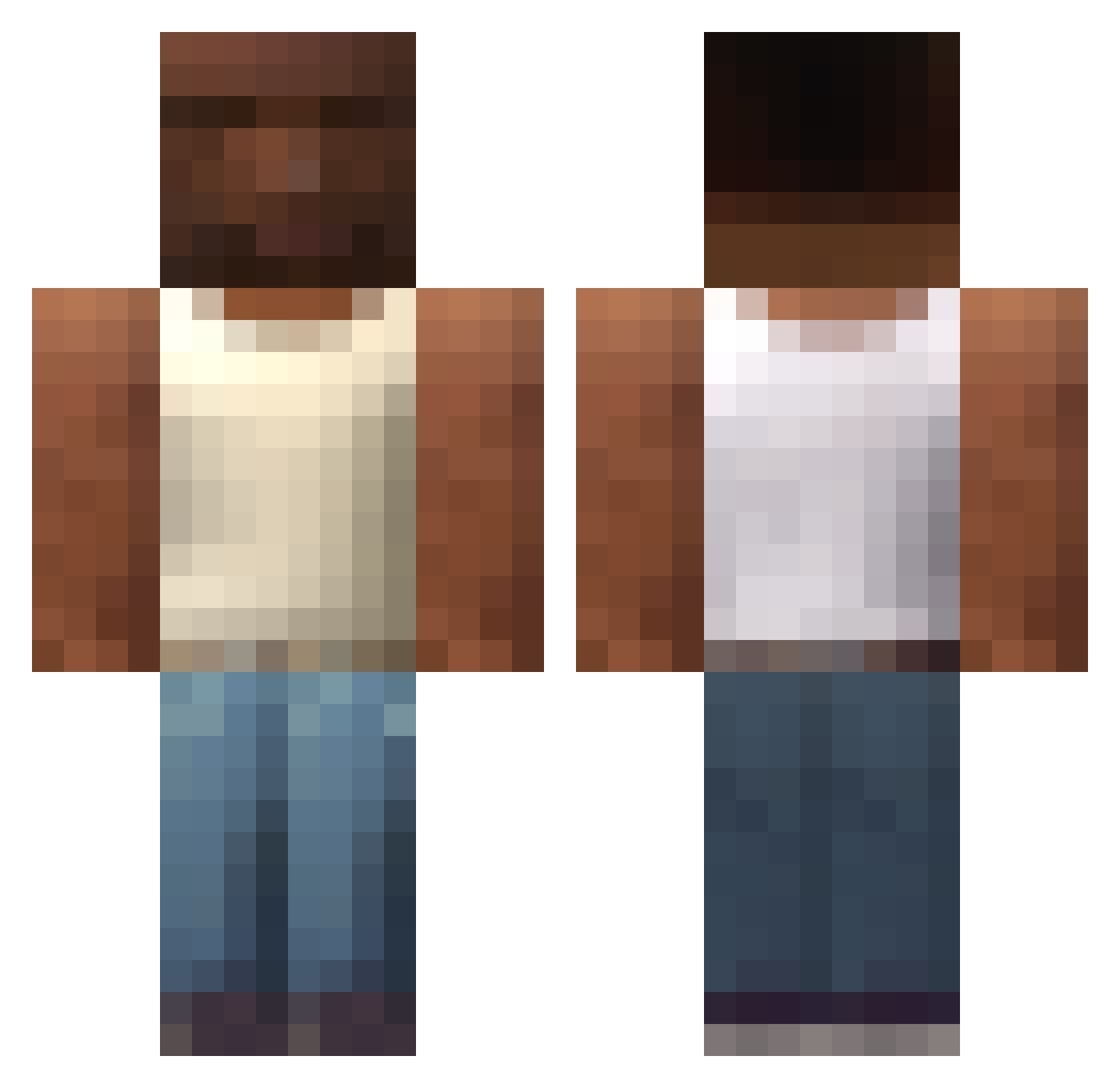
Other players with this skin (607)
Mustaboy was the 90th player we have seen with this skin, first spotted on 08.08.2026. The same skin was seen on these players. Open a nickname to see their current skin and skin history.
 Kemot420 lowkey_kamii Poringman catrinooo sabuu321 Quesidog0_
 Kwadratt_ Zotyvl Sill06 Gadomiak1234 Fr4nc3sko batuiyibilek iec700 iamogus 2Setp_ anytimeSSS V2rbum1Mare Big_V_
 FuntimeXD maru22487 KembaWalker_ elfuego02 Foxzzz7 FailapixYt Reveelde avadikoo Porkakruytost Sophie2 Khomso19 xalan999xz KTN_Star TaAhha L33_28 S_B_K BasedDwarf Ryanodestr SigningPlot6166 Grav_42 Apicks123 Plankenmann DrF0gle Just_Mark013 Alelin12 kikoszi Itz_Luksa toddynhos pandulce4k zxcqw Al_xn dargoo_ UmSimplesGeek DortHit_ii41rlch SuperLoyza L4maaa Teufelskoch11 decoyme conner76 dumboman24 El_sAca_caca imladybug
More San Andreas Minecraft skins
How to install the Mustaboy skin
- Press the Download button above to save the skin as a PNG file.
- Minecraft: Bedrock Edition (PE): open the Dressing Room from the main menu (or tap your character → Edit Character), go to Classic Skins → Owned, press the + (new skin) button, choose the downloaded PNG and pick the Classic (Steve) model. Works on PC and mobile; consoles cannot import custom skins.
- Minecraft: Java Edition: open the Minecraft Launcher, go to the Skins tab, click New Skin, load the PNG, pick the Classic (Steve) model and press Save & Use. You can also upload it at minecraft.net → Profile → Change Skin.
The skin does not show up after import - what should I do?
Restart Minecraft and open the Dressing Room again - imported skins sometimes appear only after a restart. Also make sure you selected the imported skin and picked the Classic (Steve) model.
Which model should I choose, Classic or Slim?
This skin is designed for the Classic (Steve) model. If you pick the wrong model, the arms of the skin will look stretched or squeezed.
Is the skin of Mustaboy free to download?
Yes. Press Download, save the PNG file and use it in Minecraft: Bedrock Edition or Java Edition - no payment or registration needed. The skin also works on multiplayer servers and Realms.
More skins
Looking for more? Go back to all Minecraft skins and check the top skins of the week, month and all time, or find any player's skin by nickname.