
MulkTheHulk - Minecraft Skins & Skin History
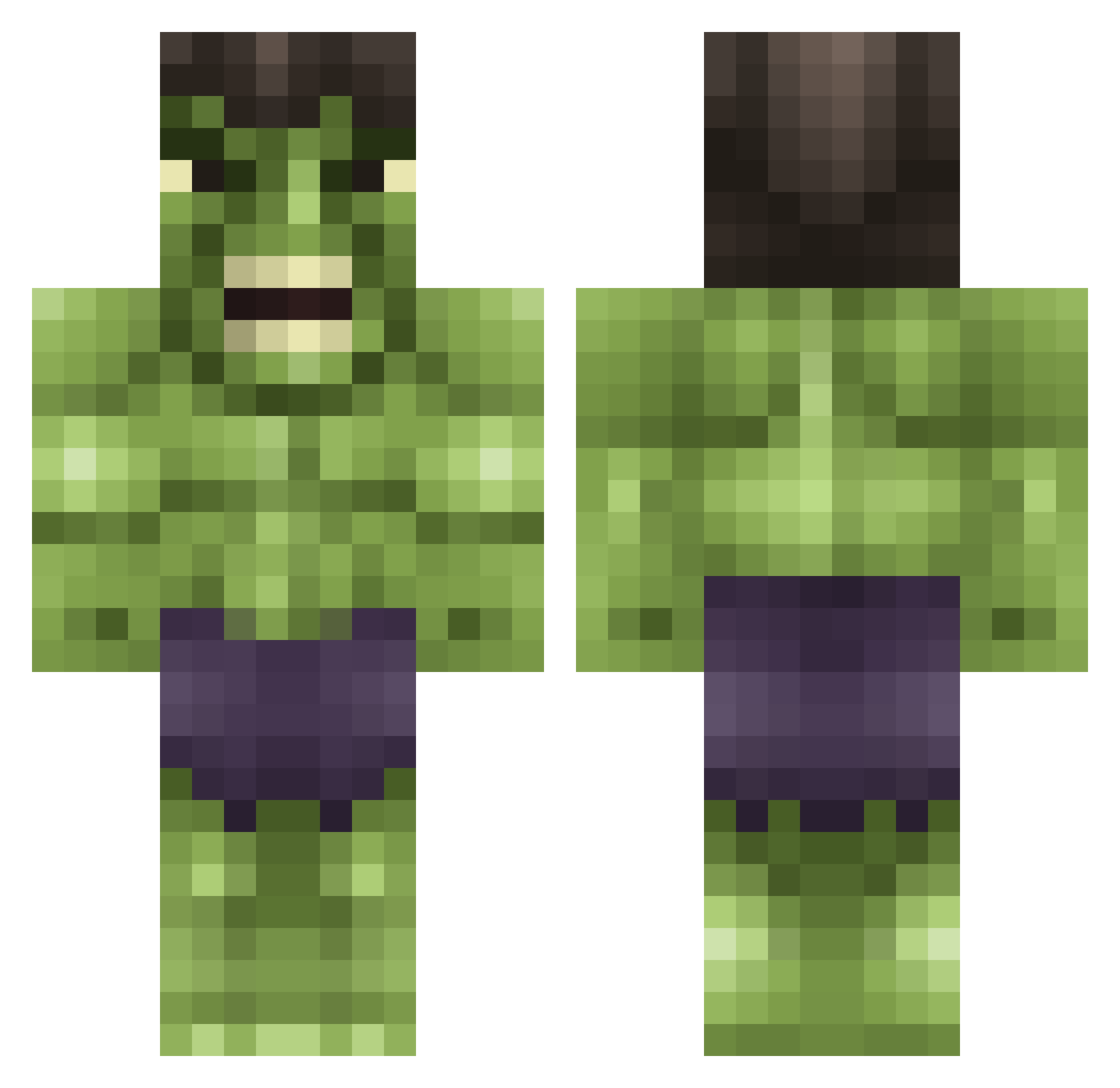
Current Minecraft skin of the player MulkTheHulk, loaded from the official Mojang API. Rotate the 3D model with your mouse or finger, then download the skin as a PNG file and use it in Minecraft: Bedrock Edition or Java Edition for free. When MulkTheHulk changes their skin, this page updates automatically and the old skin stays in the history below.
Other players with this skin (615)
MulkTheHulk was the 60th player we have seen with this skin, first spotted on 04.08.2026. The same skin was seen on these players. Open a nickname to see their current skin and skin history.
 Jakers467 Siggy2005 Gplant18 grandis99 iFrozer BerniToast KingArschfick bobnolte12 Vannila block_Quinten Yarlou sweet_babyjesus sonnyboyjunior Marios37 Buhbuhbilljones Wochinimen OlliVario ZBSDKryten khxlxfx Hausman75 MolHar07 HulkSmash3250 JoeMasterBuilder reverb76 Lunatic__Luna BeardyBlocks Tindalos Ukibar Draple Warblade78 CrookedJewNose same0205 Miginty dswelgin DaddyKnight gun1212 LankyD turtleboy4523 jamieawesome prizorg Khazzard ReedJennings
 kousi Typhan84 nickster3882 Marsmiley1999 xlcs1 GldnSpartan JamJam_2468 FranCasaccio Lithiumoverdrive
 Ashleyb413 Kieran2208xD predator1306 BOnly1 Deathiscoming xWJMx tassia85 simouch Kevin_Brady
More Hulk Minecraft skins
How to install the MulkTheHulk skin
- Press the Download button above to save the skin as a PNG file.
- Minecraft: Bedrock Edition (PE): open the Dressing Room from the main menu (or tap your character → Edit Character), go to Classic Skins → Owned, press the + (new skin) button, choose the downloaded PNG and pick the Classic (Steve) model. Works on PC and mobile; consoles cannot import custom skins.
- Minecraft: Java Edition: open the Minecraft Launcher, go to the Skins tab, click New Skin, load the PNG, pick the Classic (Steve) model and press Save & Use. You can also upload it at minecraft.net → Profile → Change Skin.
The skin does not show up after import - what should I do?
Restart Minecraft and open the Dressing Room again - imported skins sometimes appear only after a restart. Also make sure you selected the imported skin and picked the Classic (Steve) model.
Which model should I choose, Classic or Slim?
This skin is designed for the Classic (Steve) model. If you pick the wrong model, the arms of the skin will look stretched or squeezed.
Is the skin of MulkTheHulk free to download?
Yes. Press Download, save the PNG file and use it in Minecraft: Bedrock Edition or Java Edition - no payment or registration needed. The skin also works on multiplayer servers and Realms.
More skins
Looking for more? Go back to all Minecraft skins and check the top skins of the week, month and all time, or find any player's skin by nickname.