
Muffin112 - Minecraft Skins & Skin History
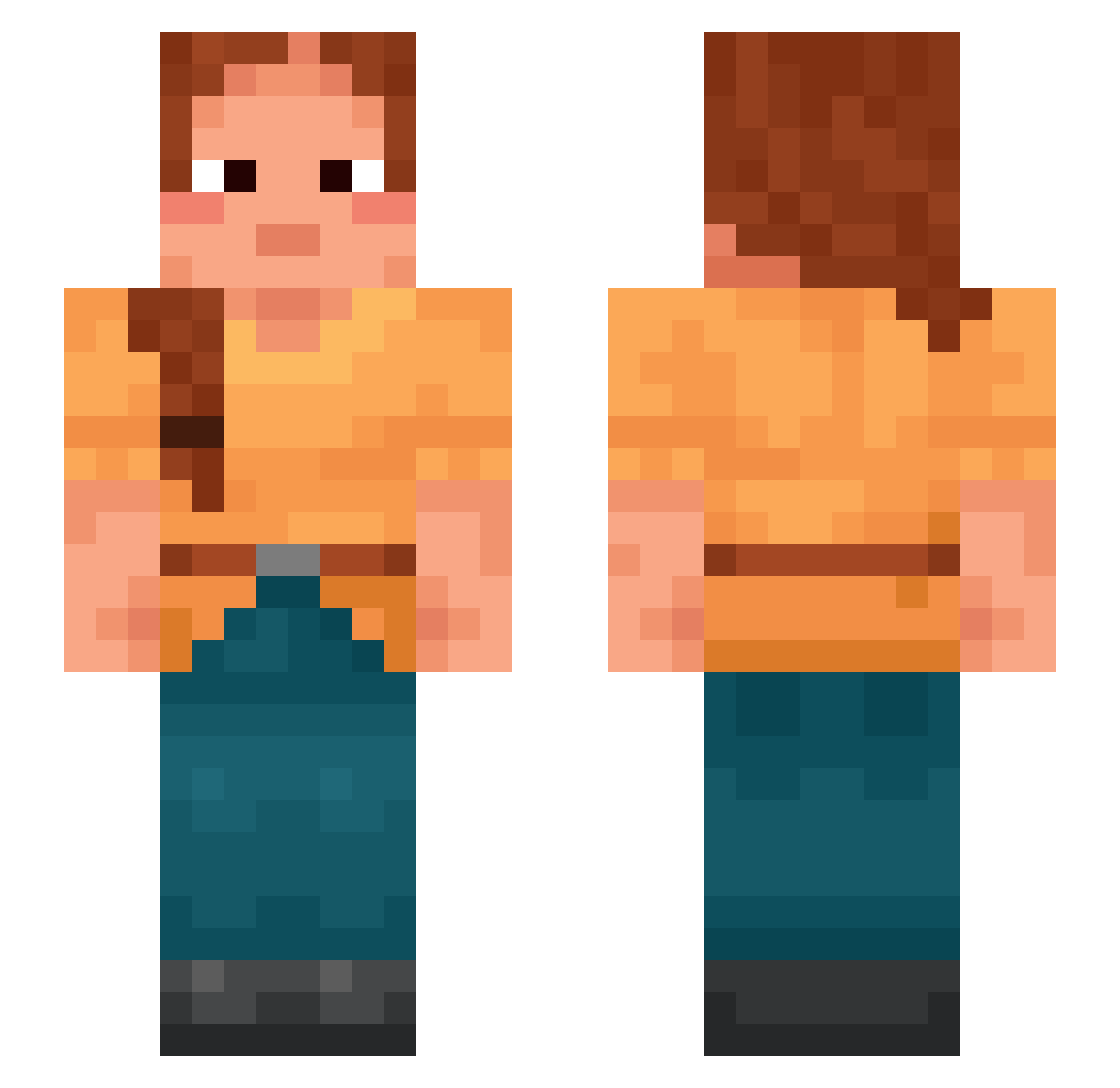
Current Minecraft skin of the player Muffin112, loaded from the official Mojang API. Rotate the 3D model with your mouse or finger, then download the skin as a PNG file and use it in Minecraft: Bedrock Edition or Java Edition for free. When Muffin112 changes their skin, this page updates automatically and the old skin stays in the history below.
Other players with this skin (870)
Muffin112 was the 816th player we have seen with this skin, first spotted on 19.10.2026. The same skin was seen on these players. Open a nickname to see their current skin and skin history.
 Haruu12 Manterrochen Pan_Pandala Giansar rectangular Spiranthes Bilolo Yeara rebel4ever1 Tubar doobl JebadiahxRialc R00lstuhlfahrer Hatted Errorrek Sebastian112233 PortableToast Palliated Stearates trimorph mymypro Tottzi blueskl 2_Propenoic_acid greenlander Virucidal jpdt Esteemed ReMounted tummy cloud_power Snaffle Cyrillic tunas Flow6_ unqa anoa zoonist Spline omgnepret sebvs_ Imuking Woodruffs tsk Rakh Friendships intuitional kowhai abashments Storywriter Sphenoid bibliograph BSF Raspings ItsRayooSW Lithographic Benebula bridegroom jimsedge ashevibes
More Braid Minecraft skins
How to install the Muffin112 skin
- Press the Download button above to save the skin as a PNG file.
- Minecraft: Bedrock Edition (PE): open the Dressing Room from the main menu (or tap your character → Edit Character), go to Classic Skins → Owned, press the + (new skin) button, choose the downloaded PNG and pick the Slim (Alex) model. Works on PC and mobile; consoles cannot import custom skins.
- Minecraft: Java Edition: open the Minecraft Launcher, go to the Skins tab, click New Skin, load the PNG, pick the Slim (Alex) model and press Save & Use. You can also upload it at minecraft.net → Profile → Change Skin.
The skin does not show up after import - what should I do?
Restart Minecraft and open the Dressing Room again - imported skins sometimes appear only after a restart. Also make sure you selected the imported skin and picked the Slim (Alex) model.
Which model should I choose, Classic or Slim?
This skin is designed for the Slim (Alex) model. If you pick the wrong model, the arms of the skin will look stretched or squeezed.
Is the skin of Muffin112 free to download?
Yes. Press Download, save the PNG file and use it in Minecraft: Bedrock Edition or Java Edition - no payment or registration needed. The skin also works on multiplayer servers and Realms.
More skins
Looking for more? Go back to all Minecraft skins and check the top skins of the week, month and all time, or find any player's skin by nickname.