
MucciBros2 - Minecraft Skins & Skin History
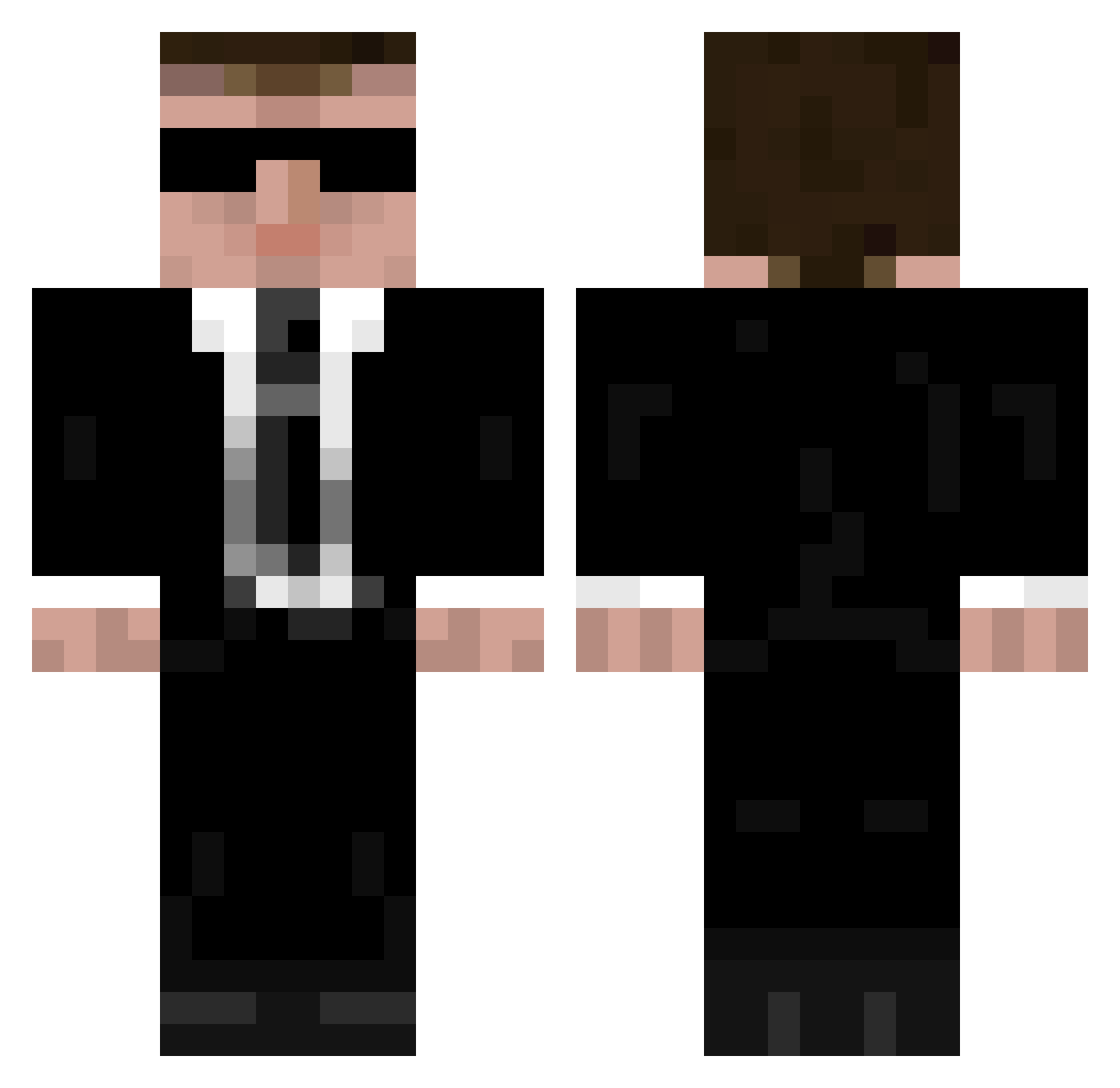
Current Minecraft skin of the player MucciBros2, loaded from the official Mojang API. Rotate the 3D model with your mouse or finger, then download the skin as a PNG file and use it in Minecraft: Bedrock Edition or Java Edition for free. When MucciBros2 changes their skin, this page updates automatically and the old skin stays in the history below.
Other players with this skin (335)
MucciBros2 was the 191st player we have seen with this skin, first spotted on 21.09.2026. The same skin was seen on these players. Open a nickname to see their current skin and skin history.
 Marco_DeTropoya kecou DrFlow LelaTiger 99GS Victorr22 Sentimal Gauky turing27 ADMaas DeadCodeXO Filipeq_01 Nick_Fury0627 CrackedDuke00 SirBallam swordpb AdmiralGeneral04 fa1c0n1203 Herr_Rotbart CRIT13 STEVEBUSTERMAN Prieb SISPYHUS bmw5er pepezianl40 GovernorEvan Steve080911 raisama eraelpeha Dogenut YINGMHD Demow1n rieves seanEP Anakrino _Schwirzi_ SnapDragonz DZDomi16 blitblock EthanP227 Adaneti Mickael1986 blubberboye HazretiScream kwHome sxnm FBNRCG CallMeGery Notbond flawless128 cybergrisu distant_zai Aimgod697 srGray1975 CCB0522 beebs333 Azure_Shok AGENTDB AgentMaybourne ned4
More Agent Minecraft skins
How to install the MucciBros2 skin
- Press the Download button above to save the skin as a PNG file.
- Minecraft: Bedrock Edition (PE): open the Dressing Room from the main menu (or tap your character → Edit Character), go to Classic Skins → Owned, press the + (new skin) button, choose the downloaded PNG and pick the Classic (Steve) model. Works on PC and mobile; consoles cannot import custom skins.
- Minecraft: Java Edition: open the Minecraft Launcher, go to the Skins tab, click New Skin, load the PNG, pick the Classic (Steve) model and press Save & Use. You can also upload it at minecraft.net → Profile → Change Skin.
The skin does not show up after import - what should I do?
Restart Minecraft and open the Dressing Room again - imported skins sometimes appear only after a restart. Also make sure you selected the imported skin and picked the Classic (Steve) model.
Which model should I choose, Classic or Slim?
This skin is designed for the Classic (Steve) model. If you pick the wrong model, the arms of the skin will look stretched or squeezed.
Is the skin of MucciBros2 free to download?
Yes. Press Download, save the PNG file and use it in Minecraft: Bedrock Edition or Java Edition - no payment or registration needed. The skin also works on multiplayer servers and Realms.
More skins
Looking for more? Go back to all Minecraft skins and check the top skins of the week, month and all time, or find any player's skin by nickname.