
MrLm111 - Minecraft Skins & Skin History
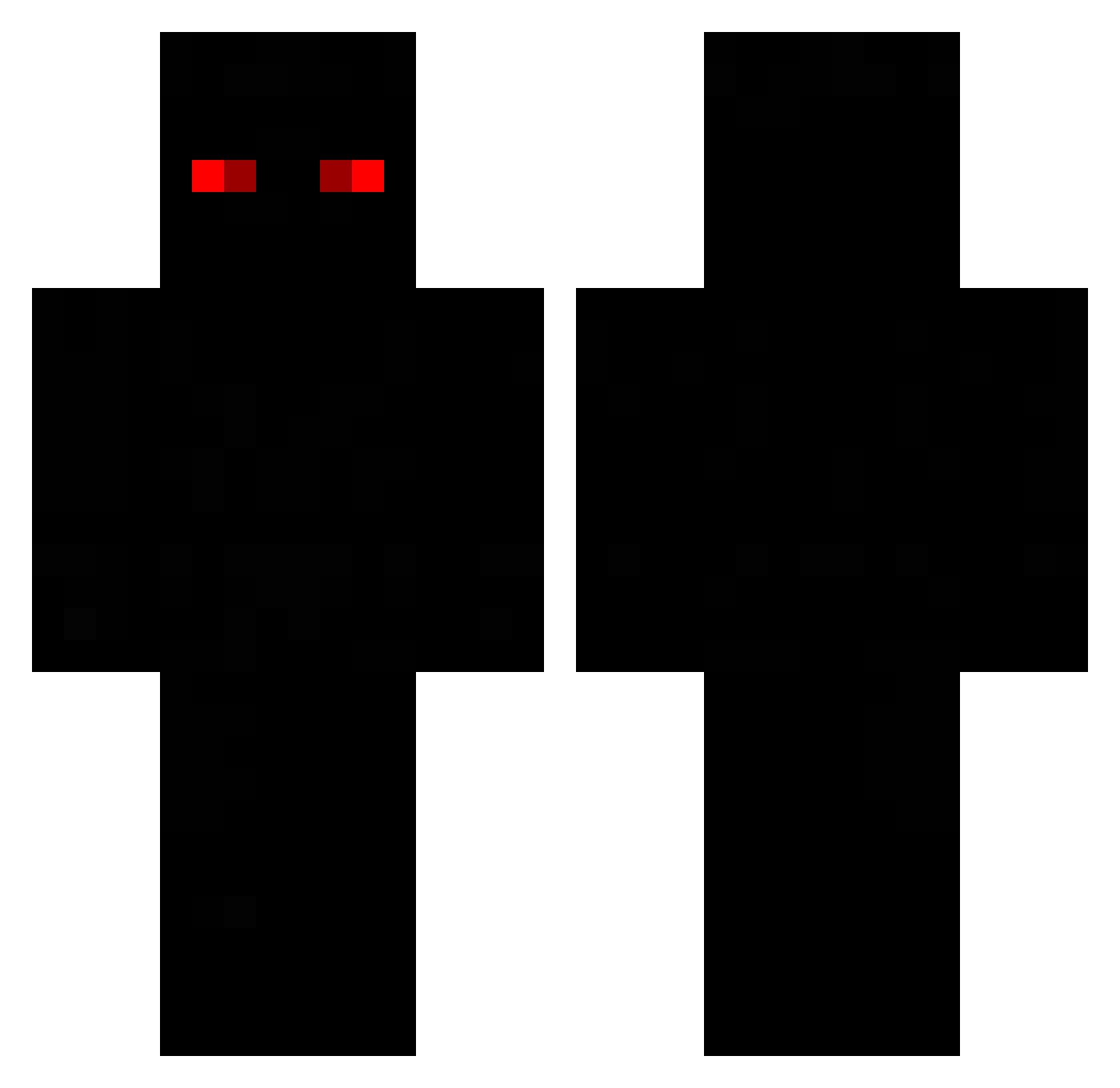
Current Minecraft skin of the player MrLm111, loaded from the official Mojang API. Rotate the 3D model with your mouse or finger, then download the skin as a PNG file and use it in Minecraft: Bedrock Edition or Java Edition for free. When MrLm111 changes their skin, this page updates automatically and the old skin stays in the history below.
Other players with this skin (48)
MrLm111 was the 16th player we have seen with this skin, first spotted on 31.08.2026. The same skin was seen on these players. Open a nickname to see their current skin and skin history.
 CODEEDIZIO Slytherin666 PianoforteBlu Darkfee Farmador_de_Aura LA5EderEchte LcM_1 Mitchelllrv Ten DefenseKing mMochim FrontmannX mael2012 BedIsBae MSPGhostrider
 Tartan7190 MagunsTV pickanay kitkhhh Mona_Ke zzVortexx Slyde457 D1rt84g
 AvidLizard58114 ITSNOVA_ rekooo7 Sydla
 01xv _Darkvoidx N1GHTANGLED Krzaczekexe 1_3_1_2 Noahderpro wikitorkox221 MAK0S_EM Alex_JK2 BERETTAGOD dzejk_kobra M8_Kold What_up34DX StopBlinking Demssinho ney4mar Mcclimansfunny05 StenlYyY26 LEEYOON24 Rnk361 Reistus
How to install the MrLm111 skin
- Press the Download button above to save the skin as a PNG file.
- Minecraft: Bedrock Edition (PE): open the Dressing Room from the main menu (or tap your character → Edit Character), go to Classic Skins → Owned, press the + (new skin) button, choose the downloaded PNG and pick the Classic (Steve) model. Works on PC and mobile; consoles cannot import custom skins.
- Minecraft: Java Edition: open the Minecraft Launcher, go to the Skins tab, click New Skin, load the PNG, pick the Classic (Steve) model and press Save & Use. You can also upload it at minecraft.net → Profile → Change Skin.
The skin does not show up after import - what should I do?
Restart Minecraft and open the Dressing Room again - imported skins sometimes appear only after a restart. Also make sure you selected the imported skin and picked the Classic (Steve) model.
Which model should I choose, Classic or Slim?
This skin is designed for the Classic (Steve) model. If you pick the wrong model, the arms of the skin will look stretched or squeezed.
Is the skin of MrLm111 free to download?
Yes. Press Download, save the PNG file and use it in Minecraft: Bedrock Edition or Java Edition - no payment or registration needed. The skin also works on multiplayer servers and Realms.
More skins
Looking for more? Go back to all Minecraft skins and check the top skins of the week, month and all time, or find any player's skin by nickname.