
MrLink151 - Minecraft Skins & Skin History
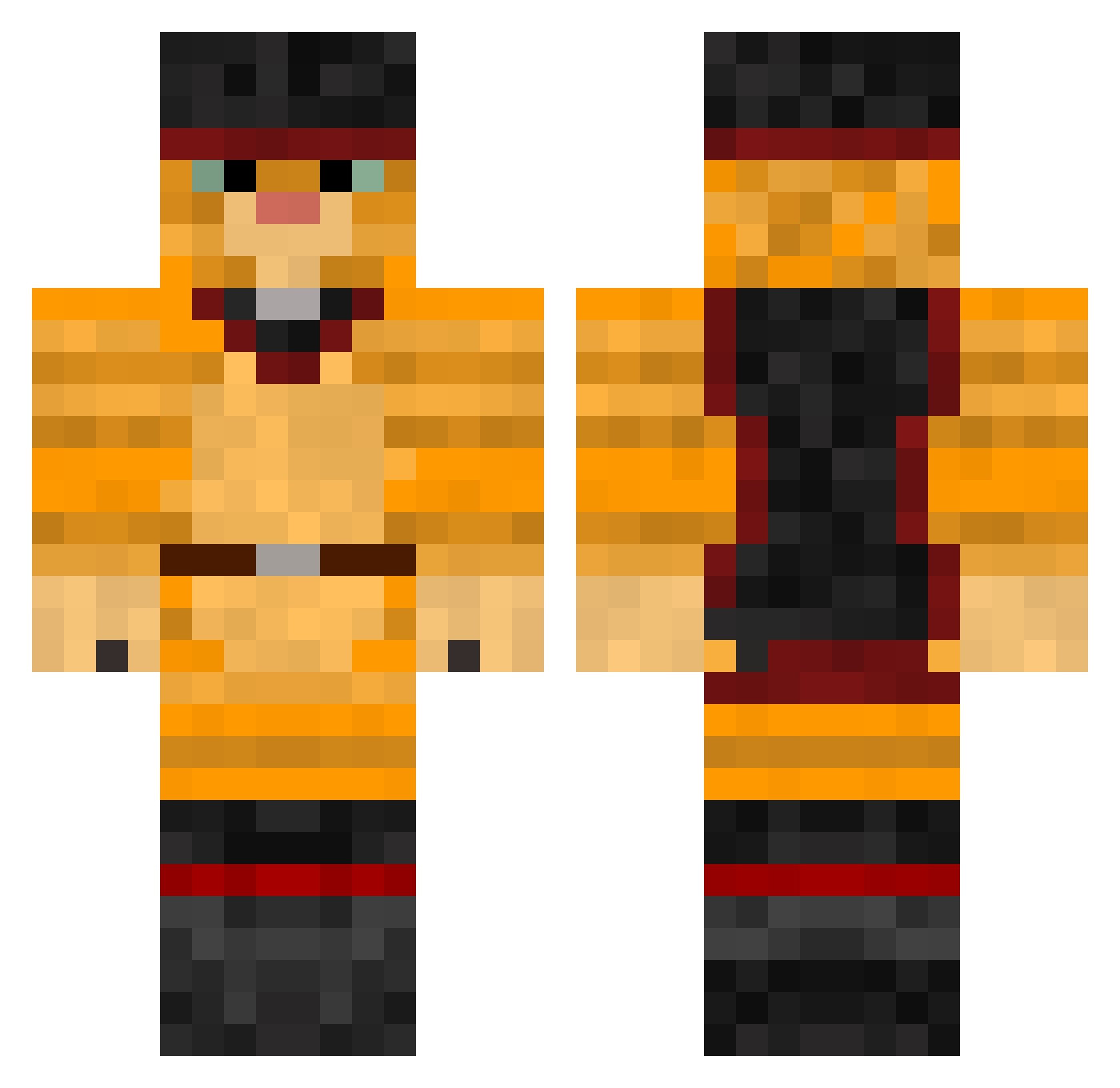
Current Minecraft skin of the player MrLink151, loaded from the official Mojang API. Rotate the 3D model with your mouse or finger, then download the skin as a PNG file and use it in Minecraft: Bedrock Edition or Java Edition for free. When MrLink151 changes their skin, this page updates automatically and the old skin stays in the history below.
Other players with this skin (257)
MrLink151 was the 101st player we have seen with this skin, first spotted on 30.08.2026. The same skin was seen on these players. Open a nickname to see their current skin and skin history.
 BigSpirit matildabh12 Althoha Labai_ Jean2b lioness2 Martijn_Konijn Brodwy GetKills DanilR catauthorized CatsTeam WorstOn3 yesfe_CWC strwberryicedtea gaolijie derStreller vovan8937 Mathesathor Crashik01 legitplay3r emotionalbeanz TravisNaTokk
 Imma_Cat Swazy0 wasabikirbo KingJeremy4913 piwit50 otmaru Moyett Aatch7 wDream_71 NoBEEE LuNoTiCo Mr__Olaf32 LachTech09 EliasSMertz _quiett_ TheWolf9626 TendizLeVrai kittykoya Roman_Pro_111 NickBlack22 Kwengzinho Goyuan LocalOnThe8s hayleyyynm PoeticMercury74 aitorr24 MeowstacheN7 tinaraes1337 Emslls
 zufyy only_sleeping K1Tt3n_33 neverwayt ChickenWings442 Elu_han BJGdu66 SpomlolZ
More Swashbuckler Minecraft skins
How to install the MrLink151 skin
- Press the Download button above to save the skin as a PNG file.
- Minecraft: Bedrock Edition (PE): open the Dressing Room from the main menu (or tap your character → Edit Character), go to Classic Skins → Owned, press the + (new skin) button, choose the downloaded PNG and pick the Classic (Steve) model. Works on PC and mobile; consoles cannot import custom skins.
- Minecraft: Java Edition: open the Minecraft Launcher, go to the Skins tab, click New Skin, load the PNG, pick the Classic (Steve) model and press Save & Use. You can also upload it at minecraft.net → Profile → Change Skin.
The skin does not show up after import - what should I do?
Restart Minecraft and open the Dressing Room again - imported skins sometimes appear only after a restart. Also make sure you selected the imported skin and picked the Classic (Steve) model.
Which model should I choose, Classic or Slim?
This skin is designed for the Classic (Steve) model. If you pick the wrong model, the arms of the skin will look stretched or squeezed.
Is the skin of MrLink151 free to download?
Yes. Press Download, save the PNG file and use it in Minecraft: Bedrock Edition or Java Edition - no payment or registration needed. The skin also works on multiplayer servers and Realms.
More skins
Looking for more? Go back to all Minecraft skins and check the top skins of the week, month and all time, or find any player's skin by nickname.