
MrHjort - Minecraft Skins & Skin History
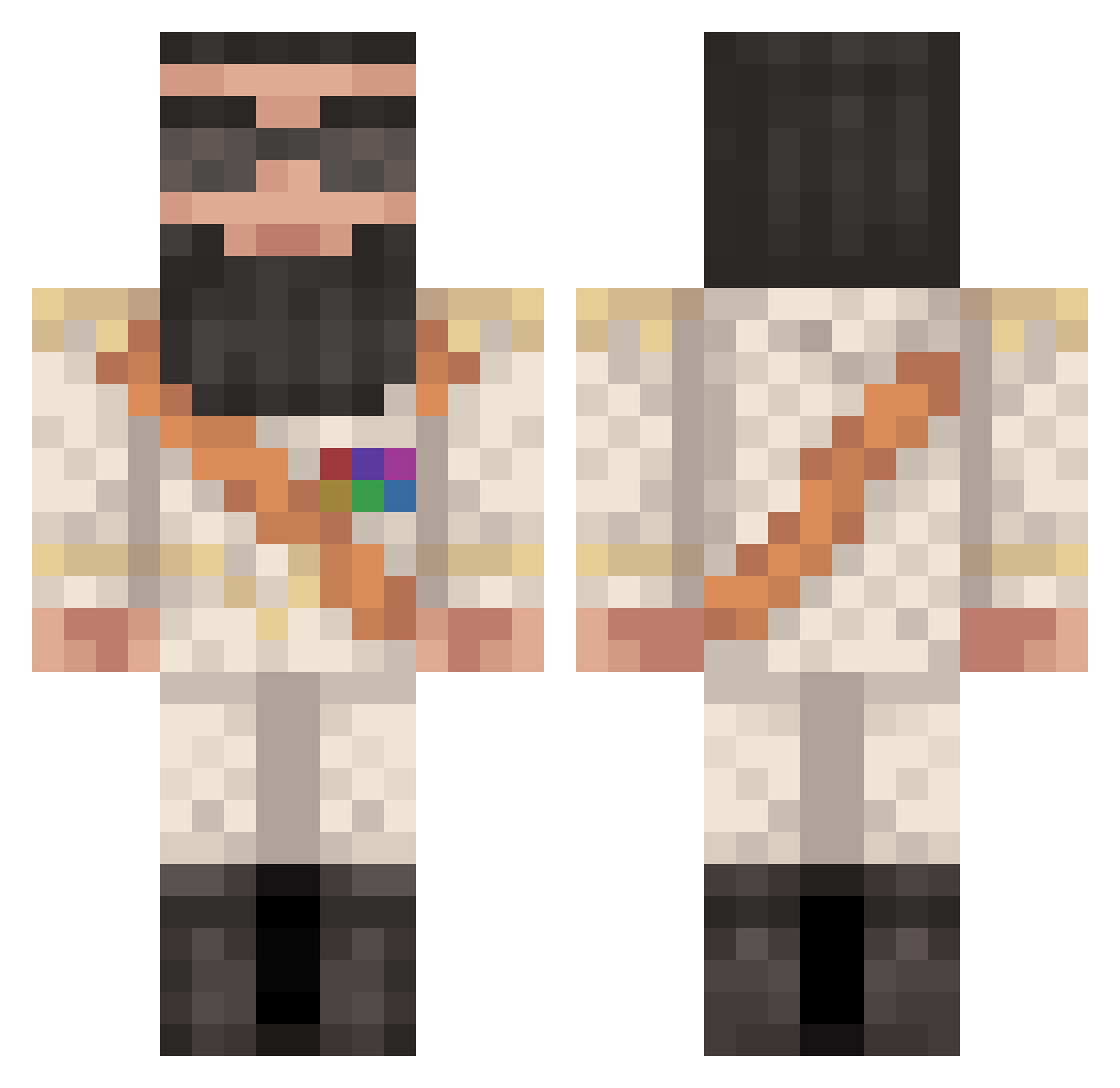
Current Minecraft skin of the player MrHjort, loaded from the official Mojang API. Rotate the 3D model with your mouse or finger, then download the skin as a PNG file and use it in Minecraft: Bedrock Edition or Java Edition for free. When MrHjort changes their skin, this page updates automatically and the old skin stays in the history below.
Other players with this skin (371)
MrHjort was the 244th player we have seen with this skin, first spotted on 24.09.2026. The same skin was seen on these players. Open a nickname to see their current skin and skin history.
 epicfrog699 simson987 Wager2003 asfandyar12 LiamFarrow_ CrazyPanda727 Arboran dbsights scarmichael AnnoyedBinkie07 FaLsE_gRaViTy sliversaint Laynecoleman pandaboy2324 jacob_twek Aedot JoshTheHoss toxiccreeper2001 xToxiic1x Camptechno MaxRexx AsharkNamedTobi Kokoskon dollah1990 JarecSK treapz Kerpsty BUBBY300 gandalfffg kithan Genji_Storm Hague513 NoseyArab Dave_Ramsey waffleman9890 tannerandi BigBouner Buzzzkill7 Asvp_Jason spasdickcow thomas34100 MrSimpsonator simplenmm McTweaker Devillgod purlie Roj_Oboy Netlok77 Diidounette Zycros acoostix KehJeh Lythiaz Kbot5 Nounouille7 ikbunmax London72 Neroking crash41 weezy22
More General Minecraft skins
How to install the MrHjort skin
- Press the Download button above to save the skin as a PNG file.
- Minecraft: Bedrock Edition (PE): open the Dressing Room from the main menu (or tap your character → Edit Character), go to Classic Skins → Owned, press the + (new skin) button, choose the downloaded PNG and pick the Classic (Steve) model. Works on PC and mobile; consoles cannot import custom skins.
- Minecraft: Java Edition: open the Minecraft Launcher, go to the Skins tab, click New Skin, load the PNG, pick the Classic (Steve) model and press Save & Use. You can also upload it at minecraft.net → Profile → Change Skin.
The skin does not show up after import - what should I do?
Restart Minecraft and open the Dressing Room again - imported skins sometimes appear only after a restart. Also make sure you selected the imported skin and picked the Classic (Steve) model.
Which model should I choose, Classic or Slim?
This skin is designed for the Classic (Steve) model. If you pick the wrong model, the arms of the skin will look stretched or squeezed.
Is the skin of MrHjort free to download?
Yes. Press Download, save the PNG file and use it in Minecraft: Bedrock Edition or Java Edition - no payment or registration needed. The skin also works on multiplayer servers and Realms.
More skins
Looking for more? Go back to all Minecraft skins and check the top skins of the week, month and all time, or find any player's skin by nickname.