
MrCepyus - Minecraft Skins & Skin History
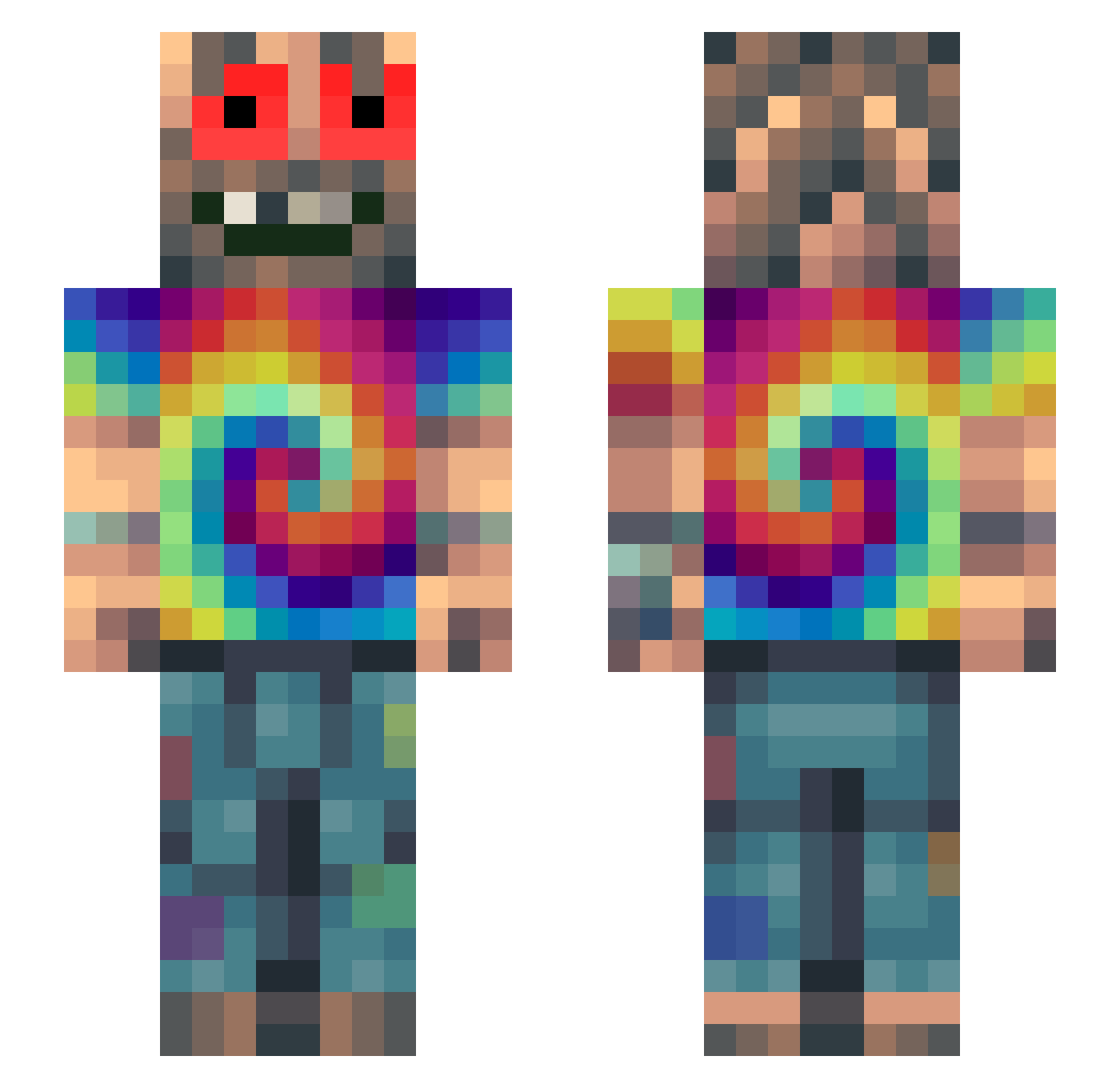
Current Minecraft skin of the player MrCepyus, loaded from the official Mojang API. Rotate the 3D model with your mouse or finger, then download the skin as a PNG file and use it in Minecraft: Bedrock Edition or Java Edition for free. When MrCepyus changes their skin, this page updates automatically and the old skin stays in the history below.
Other players with this skin (330)
MrCepyus was the 118th player we have seen with this skin, first spotted on 03.09.2026. The same skin was seen on these players. Open a nickname to see their current skin and skin history.
 ktmluvq Vectronice Iben007 Bobman67 rkffealess Petunio Freshpug Nocturno_Wet
 pave1350 benieos Splooot OlyMagic obekii colyn98 iMoudze sylviakuitula RickJames01 akoaki Ch1kOo Calvin1808 Conquerer733771 TheWitcher2427 hazeblunts Gartenlaube12 LILDOG04 vaibob Mreeeo charlie_thebest0 Sharklin12 IIGOOPIE A1one_Wurst Kirastark57 enfrijoladas WildGermanDude FakeAlpha73 ___BIL___ KitPvPMaster54 henribgames88 xXYoda_i_am_X onionpink frxnx_420 M4rBgAmInG Ignotrus Krokidile BaldBandit1 HerrTurTur_ EndermanAunt krisi3113 Cwaniakkooo jmmlgmml109 sugedababy LeckEiDuPic Nizz2tokyo Pitzone BJ_007 wouund MailManTim 636Kawasaki L4M4RR MAR0513
How to install the MrCepyus skin
- Press the Download button above to save the skin as a PNG file.
- Minecraft: Bedrock Edition (PE): open the Dressing Room from the main menu (or tap your character → Edit Character), go to Classic Skins → Owned, press the + (new skin) button, choose the downloaded PNG and pick the Slim (Alex) model. Works on PC and mobile; consoles cannot import custom skins.
- Minecraft: Java Edition: open the Minecraft Launcher, go to the Skins tab, click New Skin, load the PNG, pick the Slim (Alex) model and press Save & Use. You can also upload it at minecraft.net → Profile → Change Skin.
The skin does not show up after import - what should I do?
Restart Minecraft and open the Dressing Room again - imported skins sometimes appear only after a restart. Also make sure you selected the imported skin and picked the Slim (Alex) model.
Which model should I choose, Classic or Slim?
This skin is designed for the Slim (Alex) model. If you pick the wrong model, the arms of the skin will look stretched or squeezed.
Is the skin of MrCepyus free to download?
Yes. Press Download, save the PNG file and use it in Minecraft: Bedrock Edition or Java Edition - no payment or registration needed. The skin also works on multiplayer servers and Realms.
More skins
Looking for more? Go back to all Minecraft skins and check the top skins of the week, month and all time, or find any player's skin by nickname.