
Moula10 - Minecraft Skins & Skin History
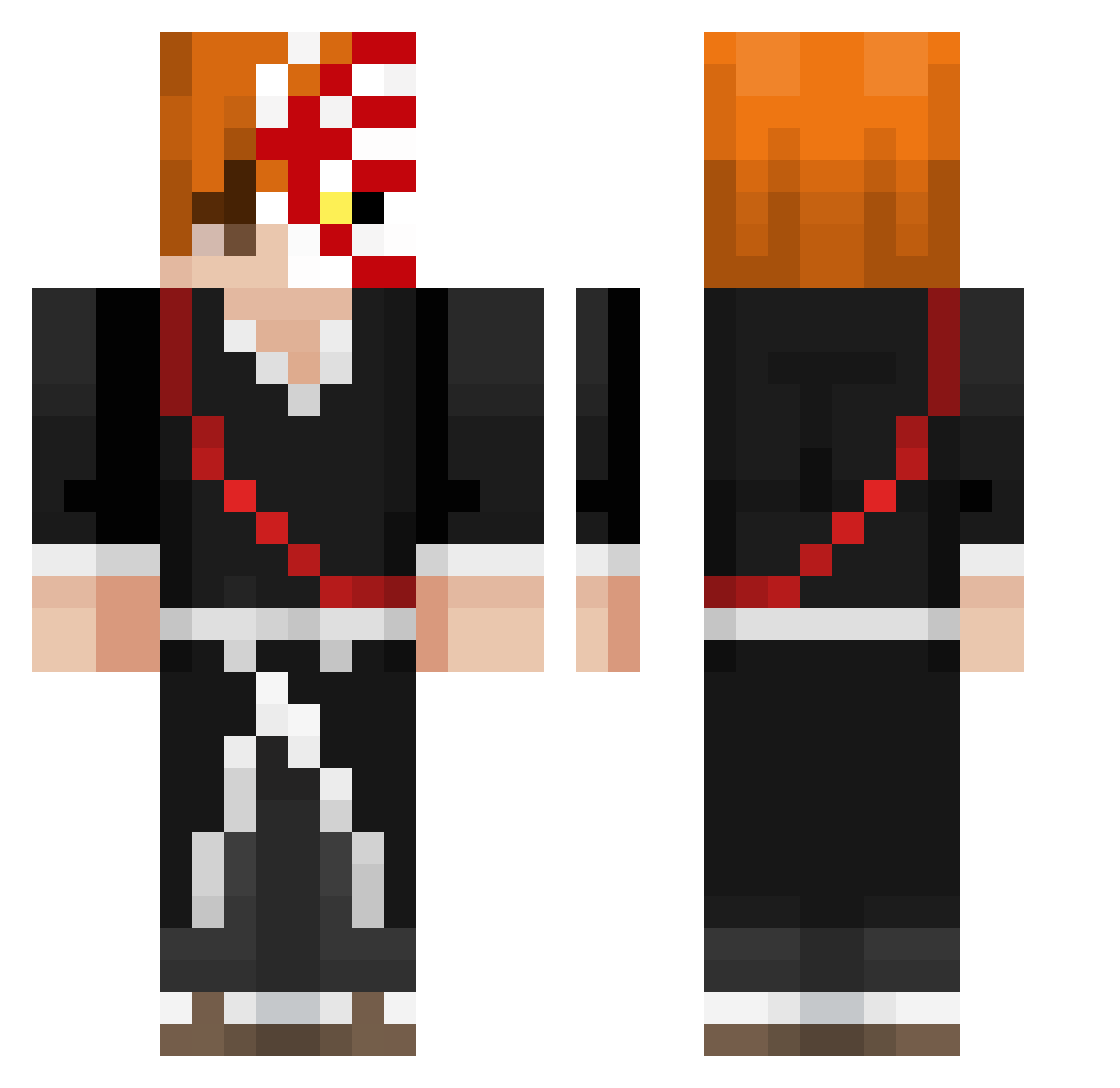
Current Minecraft skin of the player Moula10, loaded from the official Mojang API. Rotate the 3D model with your mouse or finger, then download the skin as a PNG file and use it in Minecraft: Bedrock Edition or Java Edition for free. When Moula10 changes their skin, this page updates automatically and the old skin stays in the history below.
Other players with this skin (344)
Moula10 was the 71st player we have seen with this skin, first spotted on 16.08.2026. The same skin was seen on these players. Open a nickname to see their current skin and skin history.
 xVicroX jay111512 Lulu0809 bingoboyy FlashLuigi grochu63 PKUEDU Loupiooo _Arthur_7 raincheck1 StrawHatPirate21 archie909909 Adamkambe rlaeodms_ xefiar Roomy69420 Watercansupplier mams77 jmonllorr Elbambie QuantumNano R3DD3LL ErikMitC its_ryker Albuz1 NySrok inpoverty mqxwelll Igara MrTunc Swish2118 Gabluu TriZIIP Biigode7
 Frizzy_9 Sniperledgend640 shironka
 _GreenAxel_ CLT_Gay Dalmace8 tomsaw95 JLBANKAI niti__ NipLick malakhyyy HalcyonEX Clemxx9 ForsakenDawn Garuntero TFrickinFizzle Mithy__ Marininoo
 MF_boss14 Scoobysan RyoShiro06 Tetsu05 MortalGames64 ItsNico_ LeoMaced Keinankills
More Shinigami Minecraft skins
How to install the Moula10 skin
- Press the Download button above to save the skin as a PNG file.
- Minecraft: Bedrock Edition (PE): open the Dressing Room from the main menu (or tap your character → Edit Character), go to Classic Skins → Owned, press the + (new skin) button, choose the downloaded PNG and pick the Classic (Steve) model. Works on PC and mobile; consoles cannot import custom skins.
- Minecraft: Java Edition: open the Minecraft Launcher, go to the Skins tab, click New Skin, load the PNG, pick the Classic (Steve) model and press Save & Use. You can also upload it at minecraft.net → Profile → Change Skin.
The skin does not show up after import - what should I do?
Restart Minecraft and open the Dressing Room again - imported skins sometimes appear only after a restart. Also make sure you selected the imported skin and picked the Classic (Steve) model.
Which model should I choose, Classic or Slim?
This skin is designed for the Classic (Steve) model. If you pick the wrong model, the arms of the skin will look stretched or squeezed.
Is the skin of Moula10 free to download?
Yes. Press Download, save the PNG file and use it in Minecraft: Bedrock Edition or Java Edition - no payment or registration needed. The skin also works on multiplayer servers and Realms.
More skins
Looking for more? Go back to all Minecraft skins and check the top skins of the week, month and all time, or find any player's skin by nickname.