
MonOlm - Minecraft Skins & Skin History
Current Minecraft skin of the player MonOlm, loaded from the official Mojang API. Rotate the 3D model with your mouse or finger, then download the skin as a PNG file and use it in Minecraft: Bedrock Edition or Java Edition for free. When MonOlm changes their skin, this page updates automatically and the old skin stays in the history below.
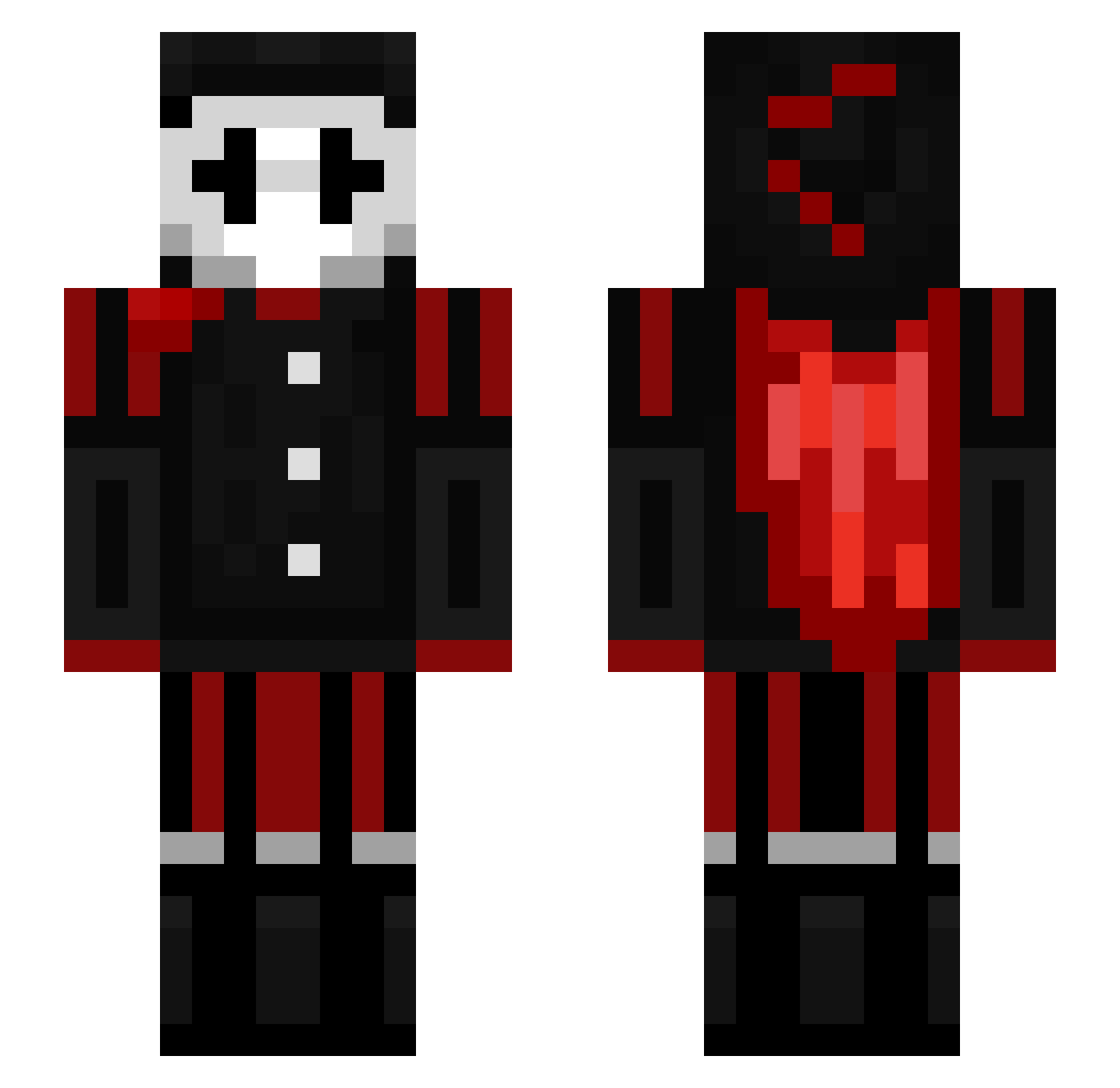
Other players with this skin (118)
MonOlm was the 55th player we have seen with this skin, first spotted on 12.09.2026. The same skin was seen on these players. Open a nickname to see their current skin and skin history.
 _xClown IAMPHYTON izomourne JuMa1302 777DeadCat enzosnol KingArgos FaylorMC EarasedData ProfElias1907 CloroxIsNice Polarbear616 Viperboy1140
 asherandfaster Preston980970 QuitsHaddock664 AstroX4
 jayjayCIT Shiqy2 roehddn Br49eXD PurpleGamer__ aestring _ItzMikronix LukasGamingLP Mad_juicequart
 NiqhtClaw xalanix78 mukuscafo Dragonbed blazegames19
 sequilz ImTheRealGod Aoi_kimois Ib6h vojtad17 KamalYT Bayon003 sky2802_ kakabubu2010
 VornexisTheGoat BastionGHG sickzada pointes DoYouLikeSauce zzzkali _ClownKing_ YTRexplays_yt telechian Noodles2331 Kaiaas L1ngotm uwuix Riciuuu FreakyWarthog 3tarf polcxh
 ChiefMan45 w0_o DaffyChip507935
Previous skins of MonOlm
Skins that MonOlm wore before, newest first. Click a skin to open its page and download it.
More Jester Minecraft skins
How to install the MonOlm skin
- Press the Download button above to save the skin as a PNG file.
- Minecraft: Bedrock Edition (PE): open the Dressing Room from the main menu (or tap your character → Edit Character), go to Classic Skins → Owned, press the + (new skin) button, choose the downloaded PNG and pick the Slim (Alex) model. Works on PC and mobile; consoles cannot import custom skins.
- Minecraft: Java Edition: open the Minecraft Launcher, go to the Skins tab, click New Skin, load the PNG, pick the Slim (Alex) model and press Save & Use. You can also upload it at minecraft.net → Profile → Change Skin.
The skin does not show up after import - what should I do?
Restart Minecraft and open the Dressing Room again - imported skins sometimes appear only after a restart. Also make sure you selected the imported skin and picked the Slim (Alex) model.
Which model should I choose, Classic or Slim?
This skin is designed for the Slim (Alex) model. If you pick the wrong model, the arms of the skin will look stretched or squeezed.
Is the skin of MonOlm free to download?
Yes. Press Download, save the PNG file and use it in Minecraft: Bedrock Edition or Java Edition - no payment or registration needed. The skin also works on multiplayer servers and Realms.
More skins
Looking for more? Go back to all Minecraft skins and check the top skins of the week, month and all time, or find any player's skin by nickname.