
Mommyfeetlover_1 - Minecraft Skins & Skin History
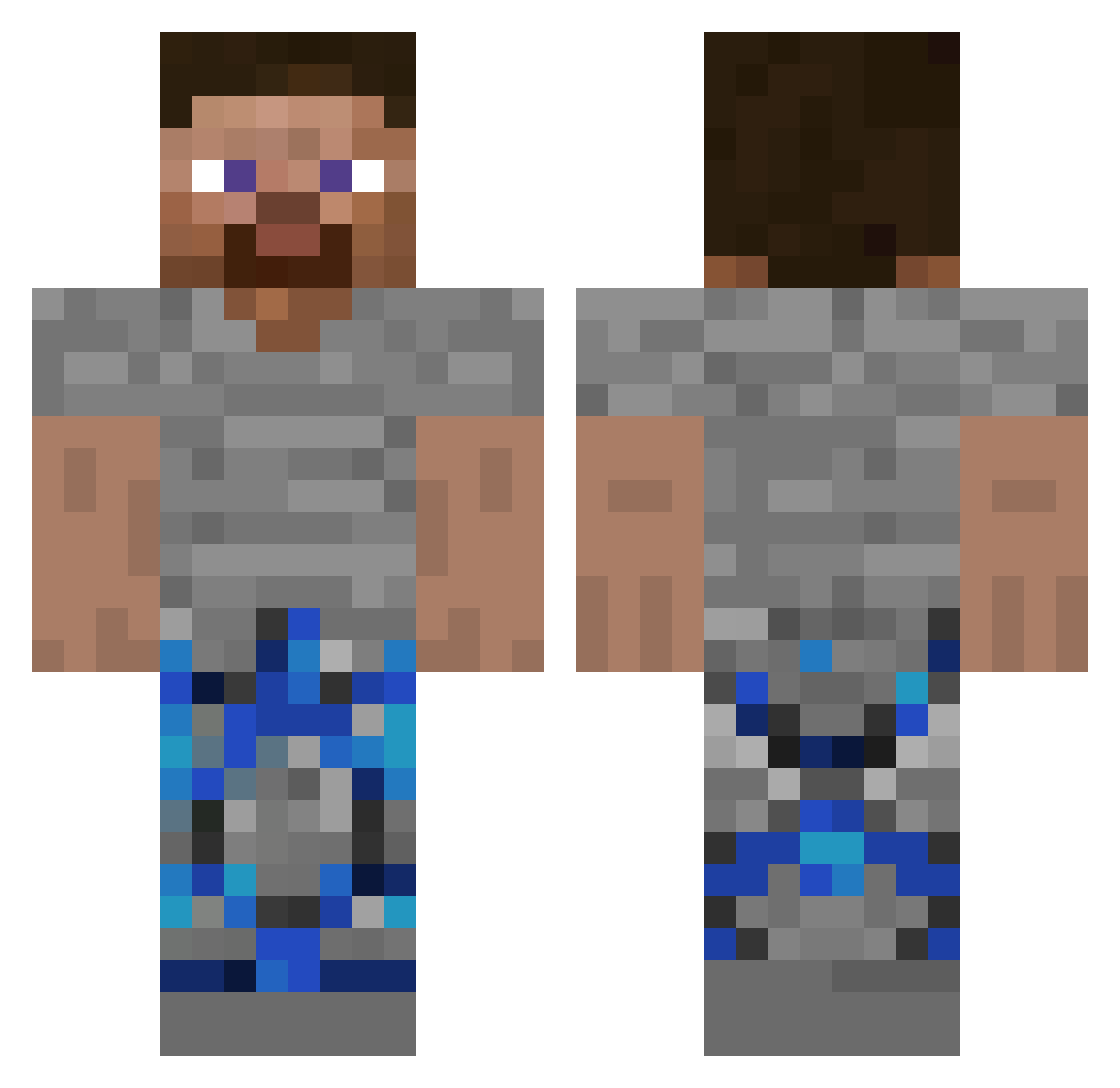
Current Minecraft skin of the player Mommyfeetlover_1, loaded from the official Mojang API. Rotate the 3D model with your mouse or finger, then download the skin as a PNG file and use it in Minecraft: Bedrock Edition or Java Edition for free. When Mommyfeetlover_1 changes their skin, this page updates automatically and the old skin stays in the history below.
Other players with this skin (250)
Mommyfeetlover_1 was the 65th player we have seen with this skin, first spotted on 15.08.2026. The same skin was seen on these players. Open a nickname to see their current skin and skin history.
 HPNoah JDbobz2 XX16k DarienMR_
 ajjot topanish Wyphu Bence129233 DrDount AIDrDonut DrDonuf wexzyy
 frysts
 TheMonkeyTwin kslvh Yvngducky29 _Afroditta_
 Tom_Aura_Farmer DrDonut5678 4dge SelectOne1 TheLinus11
 67drdonutt vrxeyi mommyfit Andy85320 SittingChunk504
 Sellelytrass ItsArvo Haha14367 Ikaecpvp_ DrArt_ Trenae bensonquick philipgfdh
 CooledApe DountSMP ItsAnguss Kamelisgoated HijauBuriQ x4nes myaccountstealed stompn1_ WhosMelo xHequ Snitch4lyfe VeryRefreshing Xtzzq1 MaxiGhgfuzooo uptoyoub
 GrieferMushroom Eminmasic IrsTaxEvader Semplex2775 Justin54sd Trallerotrallala OrDonut ReZek321 OGreturns67 Mocnygazee
How to install the Mommyfeetlover_1 skin
- Press the Download button above to save the skin as a PNG file.
- Minecraft: Bedrock Edition (PE): open the Dressing Room from the main menu (or tap your character → Edit Character), go to Classic Skins → Owned, press the + (new skin) button, choose the downloaded PNG and pick the Classic (Steve) model. Works on PC and mobile; consoles cannot import custom skins.
- Minecraft: Java Edition: open the Minecraft Launcher, go to the Skins tab, click New Skin, load the PNG, pick the Classic (Steve) model and press Save & Use. You can also upload it at minecraft.net → Profile → Change Skin.
The skin does not show up after import - what should I do?
Restart Minecraft and open the Dressing Room again - imported skins sometimes appear only after a restart. Also make sure you selected the imported skin and picked the Classic (Steve) model.
Which model should I choose, Classic or Slim?
This skin is designed for the Classic (Steve) model. If you pick the wrong model, the arms of the skin will look stretched or squeezed.
Is the skin of Mommyfeetlover_1 free to download?
Yes. Press Download, save the PNG file and use it in Minecraft: Bedrock Edition or Java Edition - no payment or registration needed. The skin also works on multiplayer servers and Realms.
More skins
Looking for more? Go back to all Minecraft skins and check the top skins of the week, month and all time, or find any player's skin by nickname.