
MoldyLunchb0x - Minecraft Skins & Skin History
Current Minecraft skin of the player MoldyLunchb0x, loaded from the official Mojang API. Rotate the 3D model with your mouse or finger, then download the skin as a PNG file and use it in Minecraft: Bedrock Edition or Java Edition for free. When MoldyLunchb0x changes their skin, this page updates automatically and the old skin stays in the history below.
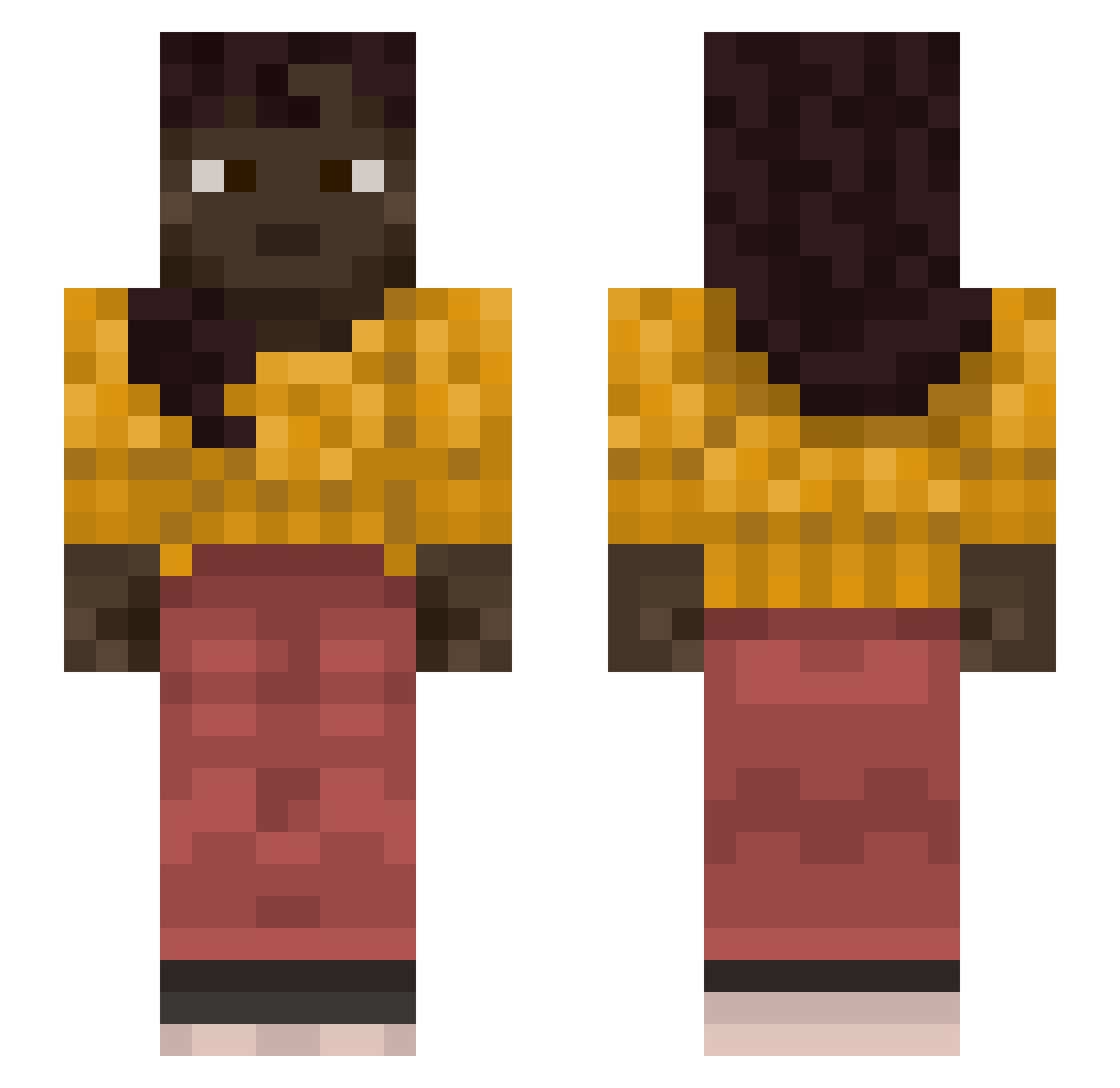
Other players with this skin (1127)
MoldyLunchb0x was the 14th player we have seen with this skin, first spotted on 23.07.2026. The same skin was seen on these players. Open a nickname to see their current skin and skin history.
 Acetylene rethwee_ PLPlacek12128 napoleon_le_bg Caite Ranim0e EvelynChiu Najako_ saifq NOVOX5 Unlead YWHA Nemixo Shurimama Losvlamos bobiksigma digue Piscataway McMoreMinecraft Hohi savinhao157 Ravish ThePenThief Jojo parksongho lolchangilseng
 Creance Sky_Lucht HenkkaK Antitruster matprobmx1 EntranceO QuandaleNingle EricsonT uncurrent Karazou
 ShovelDirt Francia Gu777 Alethea KarlSarr shof123 Hematonic Unbeamed Saltless Donsie CobbyG97 JSFX5 Mr_BlauBlau tartaric Zizzling Zaratusta Infuscate Rezonen larvacea erosfrmdao coldvepex Defloration LeoPella cort
More Braid Minecraft skins
How to install the MoldyLunchb0x skin
- Press the Download button above to save the skin as a PNG file.
- Minecraft: Bedrock Edition (PE): open the Dressing Room from the main menu (or tap your character → Edit Character), go to Classic Skins → Owned, press the + (new skin) button, choose the downloaded PNG and pick the Slim (Alex) model. Works on PC and mobile; consoles cannot import custom skins.
- Minecraft: Java Edition: open the Minecraft Launcher, go to the Skins tab, click New Skin, load the PNG, pick the Slim (Alex) model and press Save & Use. You can also upload it at minecraft.net → Profile → Change Skin.
The skin does not show up after import - what should I do?
Restart Minecraft and open the Dressing Room again - imported skins sometimes appear only after a restart. Also make sure you selected the imported skin and picked the Slim (Alex) model.
Which model should I choose, Classic or Slim?
This skin is designed for the Slim (Alex) model. If you pick the wrong model, the arms of the skin will look stretched or squeezed.
Is the skin of MoldyLunchb0x free to download?
Yes. Press Download, save the PNG file and use it in Minecraft: Bedrock Edition or Java Edition - no payment or registration needed. The skin also works on multiplayer servers and Realms.
More skins
Looking for more? Go back to all Minecraft skins and check the top skins of the week, month and all time, or find any player's skin by nickname.