
Minivester - Minecraft Skins & Skin History
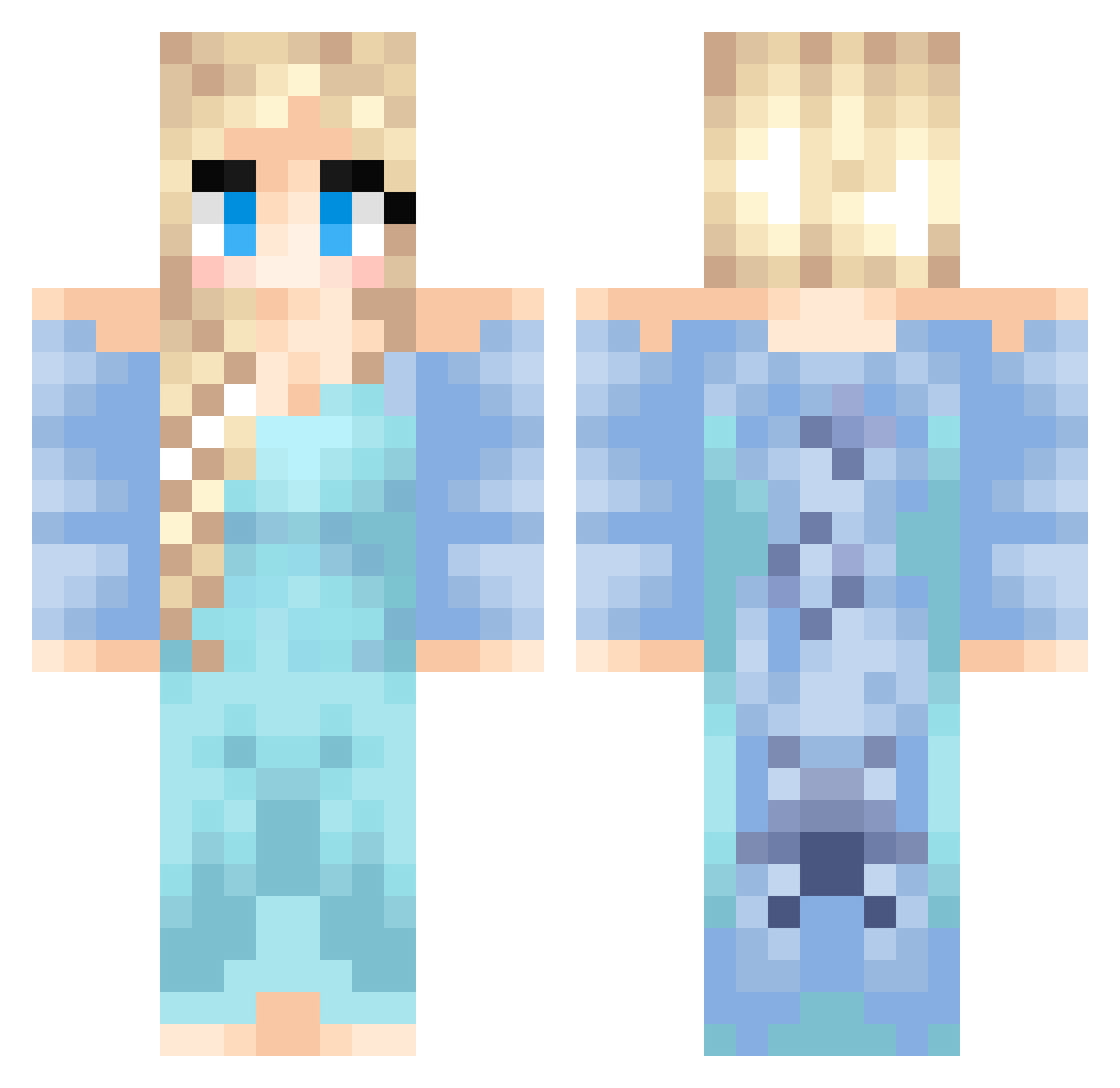
Current Minecraft skin of the player Minivester, loaded from the official Mojang API. Rotate the 3D model with your mouse or finger, then download the skin as a PNG file and use it in Minecraft: Bedrock Edition or Java Edition for free. When Minivester changes their skin, this page updates automatically and the old skin stays in the history below.
Other players with this skin (437)
Minivester was the 124th player we have seen with this skin, first spotted on 25.08.2026. The same skin was seen on these players. Open a nickname to see their current skin and skin history.
 Cat_Lady_9 Aikita linn0404 RadBoy9 willowweim gurax67 noob_killer1 Sutha_Talun sterph nekolein DarthYula safaiarina herobrine2oo2 jax0331 sarahhunter321 umbon123 payghon megamegan4321 quantum0128 SofieBj Jujubeana werwer devon_marie Momma_Fox olvfrncsc powergirl_jenny SuperWorm07 olivia_taytay MissOwl0801 wwoowwoo steinbce Laurilencia june613 msspartan jameswashy Payton_d cgsublimelee MangoPeaches Diamondlover1016 Jefe_99 OneDirection012 Befundled_ unikitty97 black_cat_00 Lollypop2007 epicperson095 Sol2005 Shimmer936 SamaWB Valmen oinkers59 emilymatthews09 Trintron0408 Behaelja ajbaca731 IoAmoLaPasta acmolee raeisfabulous Irishmama LivvyPandaGirl
More Elsa Minecraft skins
How to install the Minivester skin
- Press the Download button above to save the skin as a PNG file.
- Minecraft: Bedrock Edition (PE): open the Dressing Room from the main menu (or tap your character → Edit Character), go to Classic Skins → Owned, press the + (new skin) button, choose the downloaded PNG and pick the Classic (Steve) model. Works on PC and mobile; consoles cannot import custom skins.
- Minecraft: Java Edition: open the Minecraft Launcher, go to the Skins tab, click New Skin, load the PNG, pick the Classic (Steve) model and press Save & Use. You can also upload it at minecraft.net → Profile → Change Skin.
The skin does not show up after import - what should I do?
Restart Minecraft and open the Dressing Room again - imported skins sometimes appear only after a restart. Also make sure you selected the imported skin and picked the Classic (Steve) model.
Which model should I choose, Classic or Slim?
This skin is designed for the Classic (Steve) model. If you pick the wrong model, the arms of the skin will look stretched or squeezed.
Is the skin of Minivester free to download?
Yes. Press Download, save the PNG file and use it in Minecraft: Bedrock Edition or Java Edition - no payment or registration needed. The skin also works on multiplayer servers and Realms.
More skins
Looking for more? Go back to all Minecraft skins and check the top skins of the week, month and all time, or find any player's skin by nickname.