
MingTam - Minecraft Skins & Skin History
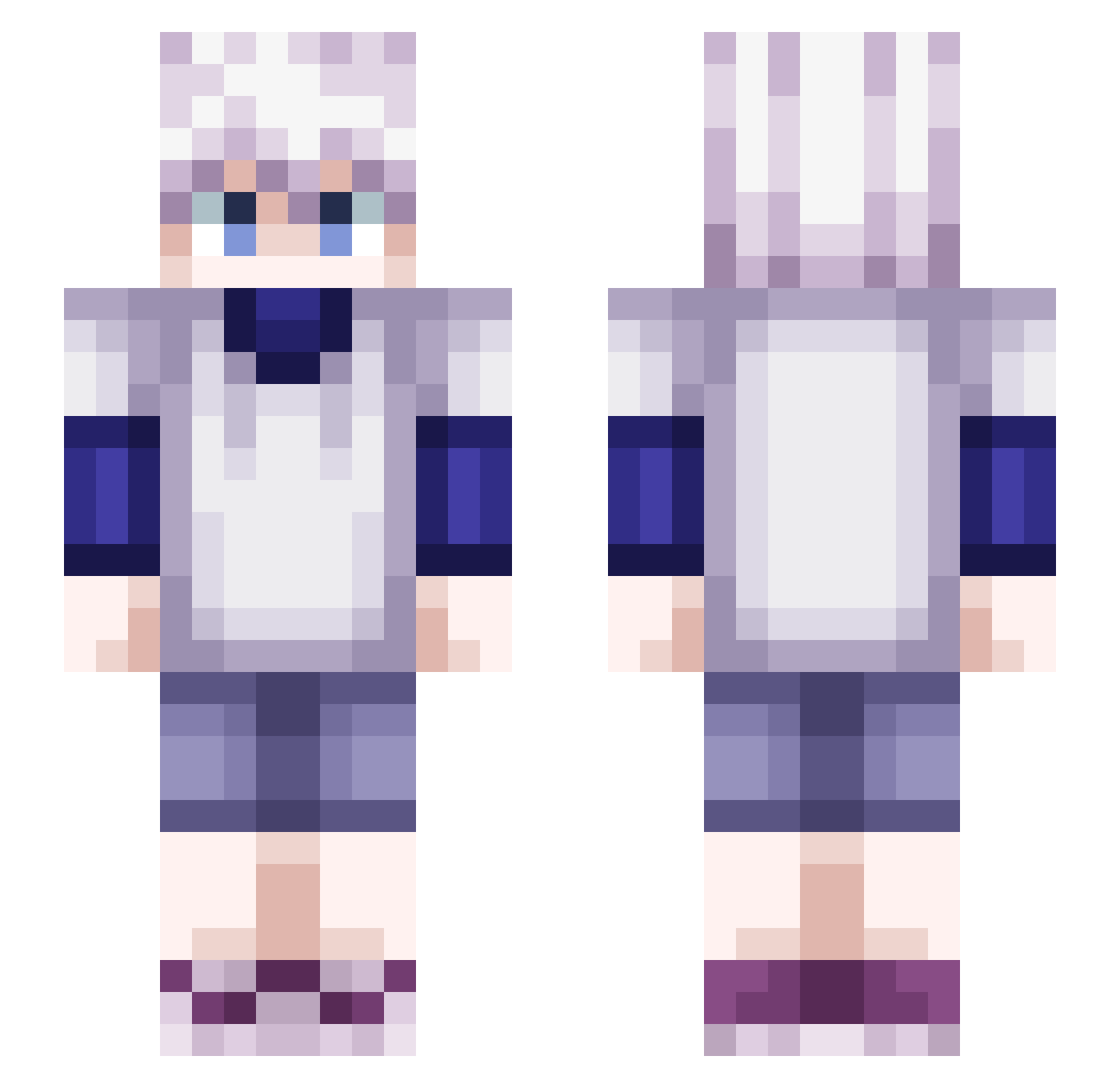
Current Minecraft skin of the player MingTam, loaded from the official Mojang API. Rotate the 3D model with your mouse or finger, then download the skin as a PNG file and use it in Minecraft: Bedrock Edition or Java Edition for free. When MingTam changes their skin, this page updates automatically and the old skin stays in the history below.
Other players with this skin (423)
MingTam was the 382nd player we have seen with this skin, first spotted on 13.10.2026. The same skin was seen on these players. Open a nickname to see their current skin and skin history.
 Yonbi_ SweIN__ Griffixx FusselsRasierer Beastlord629 Kiranzo Anananasic hobbygirl04 KilluaZoldyck666 noel_lol SjukeSaker The_Hunter37 A1oxe Chouyaqz oysrnz YturAptoCul DorianLeGrand TOWADAZO Vairax Paklusnumas abo_3of stupit1234 litzhu Jhlemes ozaix Nalfeim DrCrazzy eliminate6371 OntllxUshiwa wardeR_ zFlekys NxFrage Xiino nishiotaiwan RonnyNite Nolween TheMightyBTW PedroFoPrez amb1ent _CCT_ ARMORAMUR Lullzie aqkros Skeppo Dan72581 Kisuda iFayz Beno9292 kreijie TheRealGabbo Ryejin0 Uzioni lilnins RedRexRob roothair Next_temple Perty61 Yukine1337 TheWaveman1337 lucdnitz
More Killua Zoldyck Minecraft skins
See all 161 Killua Zoldyck skins
How to install the MingTam skin
- Press the Download button above to save the skin as a PNG file.
- Minecraft: Bedrock Edition (PE): open the Dressing Room from the main menu (or tap your character → Edit Character), go to Classic Skins → Owned, press the + (new skin) button, choose the downloaded PNG and pick the Slim (Alex) model. Works on PC and mobile; consoles cannot import custom skins.
- Minecraft: Java Edition: open the Minecraft Launcher, go to the Skins tab, click New Skin, load the PNG, pick the Slim (Alex) model and press Save & Use. You can also upload it at minecraft.net → Profile → Change Skin.
The skin does not show up after import - what should I do?
Restart Minecraft and open the Dressing Room again - imported skins sometimes appear only after a restart. Also make sure you selected the imported skin and picked the Slim (Alex) model.
Which model should I choose, Classic or Slim?
This skin is designed for the Slim (Alex) model. If you pick the wrong model, the arms of the skin will look stretched or squeezed.
Is the skin of MingTam free to download?
Yes. Press Download, save the PNG file and use it in Minecraft: Bedrock Edition or Java Edition - no payment or registration needed. The skin also works on multiplayer servers and Realms.
More skins
Looking for more? Go back to all Minecraft skins and check the top skins of the week, month and all time, or find any player's skin by nickname.