
MetaKabu - Minecraft Skins & Skin History
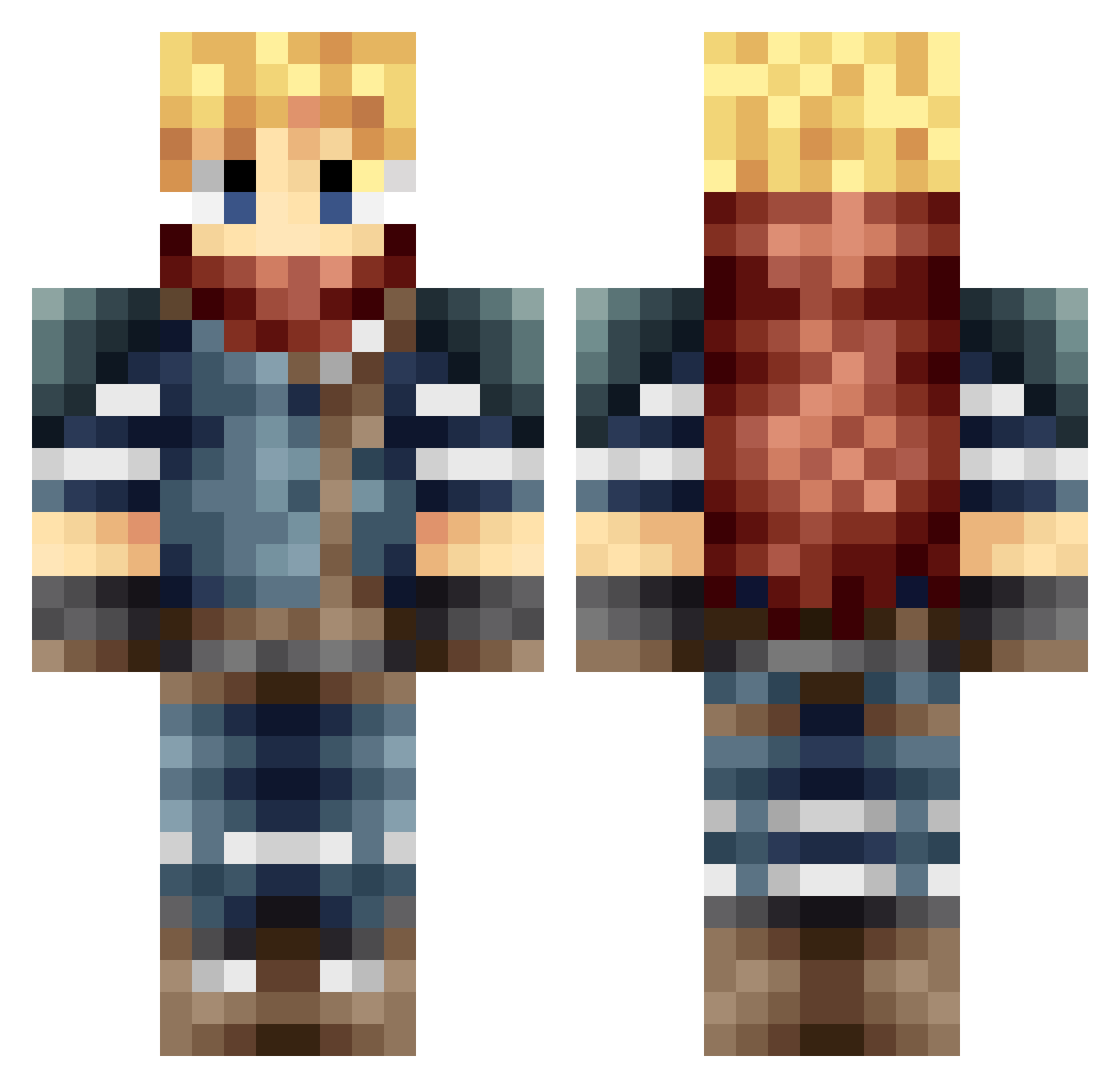
Current Minecraft skin of the player MetaKabu, loaded from the official Mojang API. Rotate the 3D model with your mouse or finger, then download the skin as a PNG file and use it in Minecraft: Bedrock Edition or Java Edition for free. When MetaKabu changes their skin, this page updates automatically and the old skin stays in the history below.
Other players with this skin (166)
MetaKabu was the 48th player we have seen with this skin, first spotted on 23.08.2026. The same skin was seen on these players. Open a nickname to see their current skin and skin history.
 Sergeant_Bender XMadiganMadnessX Licurgus NEFI2000 gAsterblAster042 lukedekul Cybertimelord5 midymike yBoni Mimo013 Gizanuk Fernac100 armormen
 SepiTwolf LookItzKami ChildDeleter1234 Hichich2 Hexi_42 YukiRayuko manvites SilverEgnogg81 Aroxs23 abai09078 weilai1 abandon1121 CaptainASmart ptmcreeper InoSwy Raiverick zhiyou_you Exxyo YHT_09 DragonF1re325 Novaasso okuzawakokoro OnionYan Poggera GK_nameless EchoTango86 RiseDuo melophobiac RichBrian5t5 Shemaow Some_xin Wuppi77 Okkay_23 Firathor M_a_z_Q Ghilliebean Nambro ArronKC cupcake98 masterkaneki27 TheCloudShooter MickeMuis Hikariloll TKOSkelitor66 Judicator_12345 ourenbg DaBabyMasta
More Traveler Minecraft skins
How to install the MetaKabu skin
- Press the Download button above to save the skin as a PNG file.
- Minecraft: Bedrock Edition (PE): open the Dressing Room from the main menu (or tap your character → Edit Character), go to Classic Skins → Owned, press the + (new skin) button, choose the downloaded PNG and pick the Classic (Steve) model. Works on PC and mobile; consoles cannot import custom skins.
- Minecraft: Java Edition: open the Minecraft Launcher, go to the Skins tab, click New Skin, load the PNG, pick the Classic (Steve) model and press Save & Use. You can also upload it at minecraft.net → Profile → Change Skin.
The skin does not show up after import - what should I do?
Restart Minecraft and open the Dressing Room again - imported skins sometimes appear only after a restart. Also make sure you selected the imported skin and picked the Classic (Steve) model.
Which model should I choose, Classic or Slim?
This skin is designed for the Classic (Steve) model. If you pick the wrong model, the arms of the skin will look stretched or squeezed.
Is the skin of MetaKabu free to download?
Yes. Press Download, save the PNG file and use it in Minecraft: Bedrock Edition or Java Edition - no payment or registration needed. The skin also works on multiplayer servers and Realms.
More skins
Looking for more? Go back to all Minecraft skins and check the top skins of the week, month and all time, or find any player's skin by nickname.