
Mazetus1616 - Minecraft Skins & Skin History
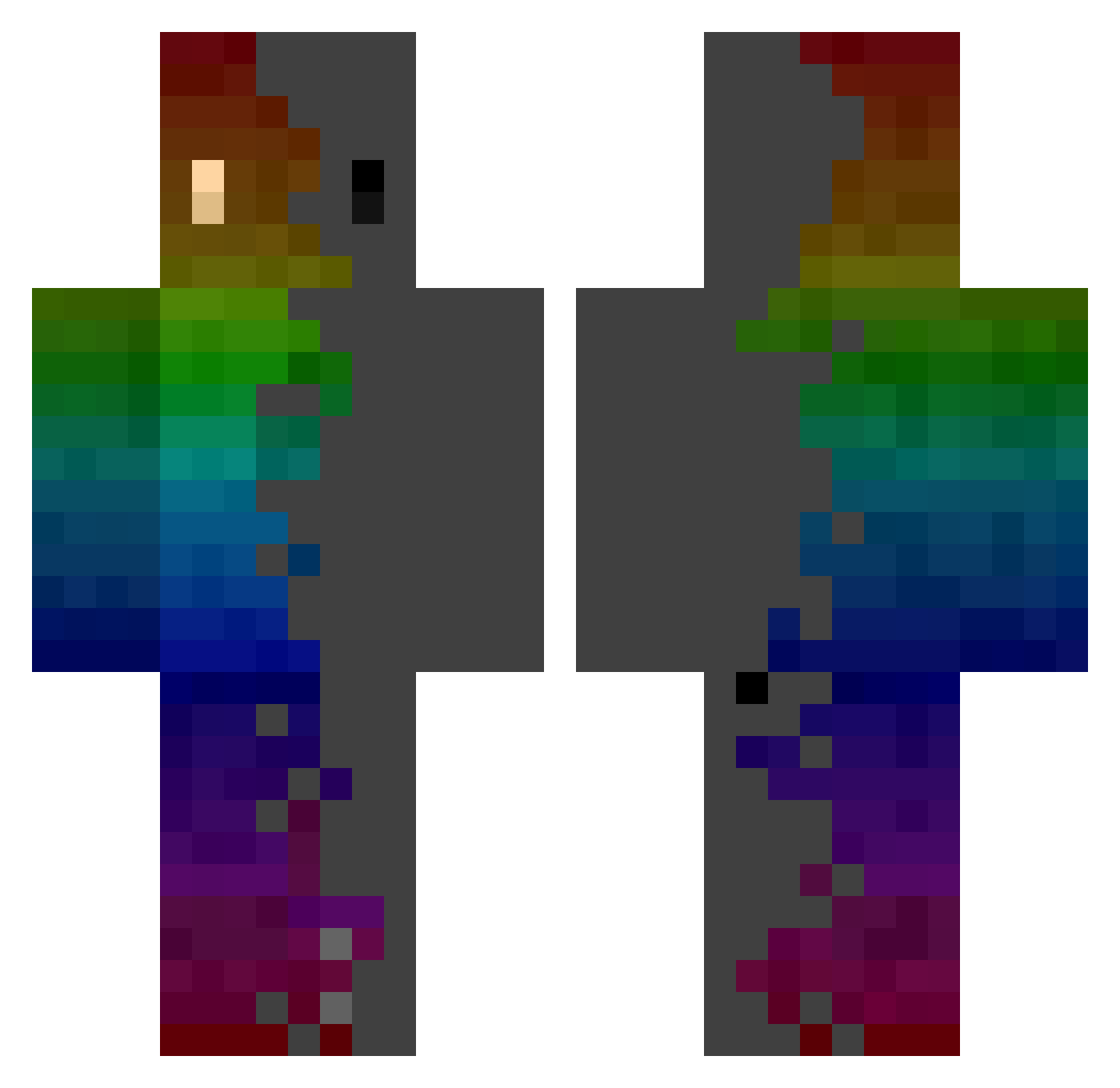
Current Minecraft skin of the player Mazetus1616, loaded from the official Mojang API. Rotate the 3D model with your mouse or finger, then download the skin as a PNG file and use it in Minecraft: Bedrock Edition or Java Edition for free. When Mazetus1616 changes their skin, this page updates automatically and the old skin stays in the history below.
Other players with this skin (742)
Mazetus1616 was the 692nd player we have seen with this skin, first spotted on 14.10.2026. The same skin was seen on these players. Open a nickname to see their current skin and skin history.
 jinwoo5279a Rottieb543 muh69 GGininDerQAQ ImOnAZoomCall RussianNooob hyun42 Iuddi alyhjg0901 PIHDgfn GraffizPlays Eclipse_music nanoc4 eLsOrDaS Bl00dynugget Snakky MuetzeZocktHD ProSkepsis Saze_Ice Sowelu_q1q SMT77 ItsNavi MugenKusho Lukeihs Lamentable019 _clickmix_ SCOOPER7 AirinaSeryth Guisoles Ytzers NotHaxJustApple GyGi Kodiak68 MaoRider Hail_St8ner141 Trujillooooo_ VoiceChat123 carolgostosa derUser6969 SentinelIBx momizi225 Koro30 Xxblastermaster Yellow_cloud_O_o MeatDude4 Nayn_miao JSRK beniboyer2 Quw apertXre Is_Artem Golden_Mackerel Magno27 Papynova PeterGGs wskj Fre3kk Promillo1804 ADEX710 Maalthiir
How to install the Mazetus1616 skin
- Press the Download button above to save the skin as a PNG file.
- Minecraft: Bedrock Edition (PE): open the Dressing Room from the main menu (or tap your character → Edit Character), go to Classic Skins → Owned, press the + (new skin) button, choose the downloaded PNG and pick the Classic (Steve) model. Works on PC and mobile; consoles cannot import custom skins.
- Minecraft: Java Edition: open the Minecraft Launcher, go to the Skins tab, click New Skin, load the PNG, pick the Classic (Steve) model and press Save & Use. You can also upload it at minecraft.net → Profile → Change Skin.
The skin does not show up after import - what should I do?
Restart Minecraft and open the Dressing Room again - imported skins sometimes appear only after a restart. Also make sure you selected the imported skin and picked the Classic (Steve) model.
Which model should I choose, Classic or Slim?
This skin is designed for the Classic (Steve) model. If you pick the wrong model, the arms of the skin will look stretched or squeezed.
Is the skin of Mazetus1616 free to download?
Yes. Press Download, save the PNG file and use it in Minecraft: Bedrock Edition or Java Edition - no payment or registration needed. The skin also works on multiplayer servers and Realms.
More skins
Looking for more? Go back to all Minecraft skins and check the top skins of the week, month and all time, or find any player's skin by nickname.