
Maverikar - Minecraft Skins & Skin History
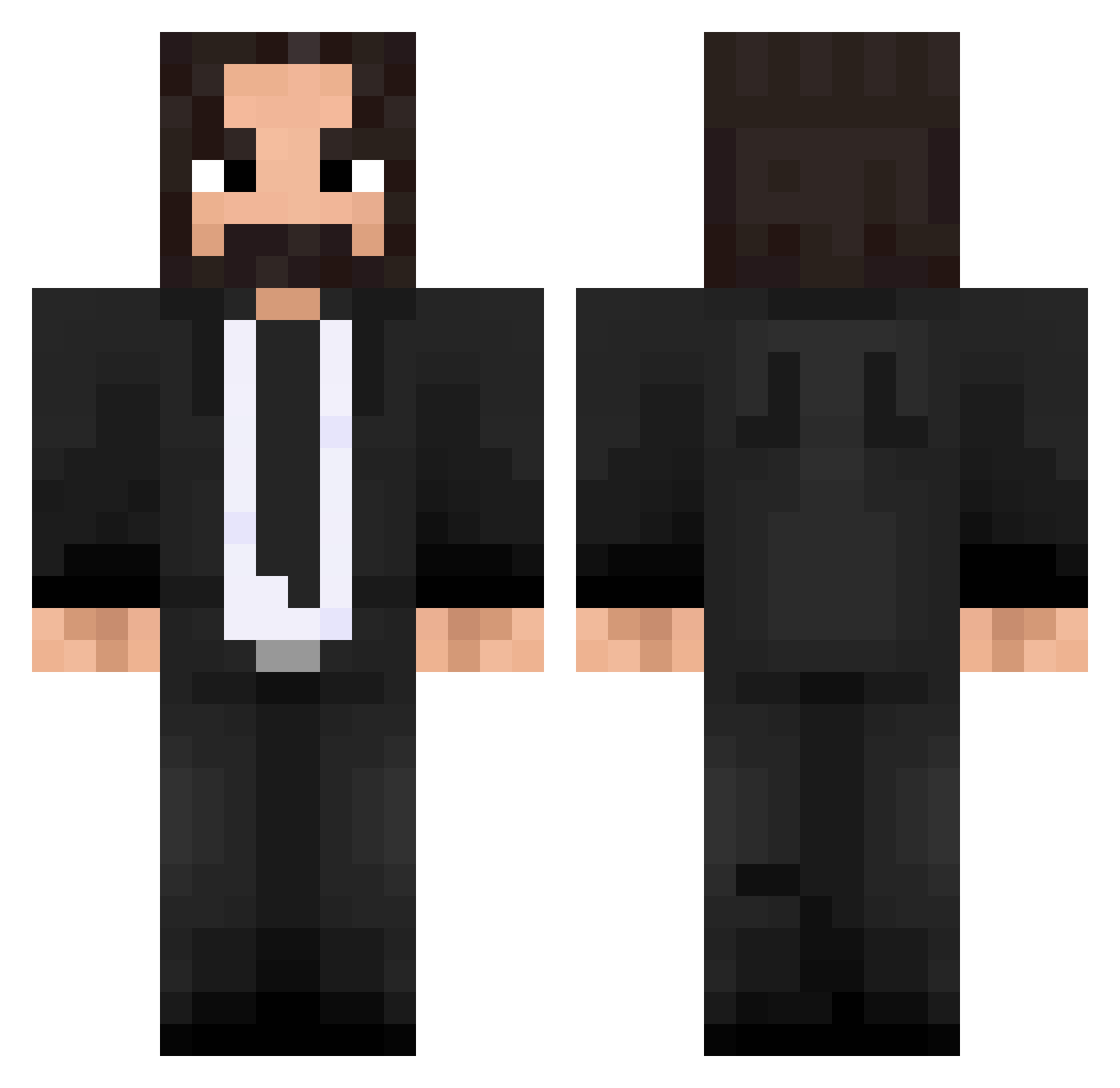
Current Minecraft skin of the player Maverikar, loaded from the official Mojang API. Rotate the 3D model with your mouse or finger, then download the skin as a PNG file and use it in Minecraft: Bedrock Edition or Java Edition for free. When Maverikar changes their skin, this page updates automatically and the old skin stays in the history below.
Other players with this skin (475)
Maverikar was the 14th player we have seen with this skin, first spotted on 26.07.2026. The same skin was seen on these players. Open a nickname to see their current skin and skin history.
 isaacsurvives dyllieYT Figloalds PrestigeLemon56 yanis__bct MidNight_Spirit Don_nadie drfallen25 sadnessicecube THOROX111 Tomastock MrStussy _Bell_ aayanshaikh phantomtiger99 Millenium_Slayer snayzyz FelipeFeitos HerskaHeikki BornHyperion Myriwoll zack754 PaggiusIT silence4913 Mart1600 NeckHsiang Tomjake BandofBrothers1 OctoOtter Aqqush LordSayrin dandi202 Kyonkichi72 Johnthewickker Prumbl3 axelesky fish9225 MadDog1180 emailo97
 KuaPain DrDroman hwh0059 Tayllines
 Heart_Disabled
 Admiral_47 Broleather HopperMM LehFuzz Nick_63 CringeEmoji BiGbOySa Fl0r3nz TerribleThief BuildCorp Malbong JohnWickPro God1ac FILOGamingmc Oze_Burns SS1337
More John Wick Minecraft skins
How to install the Maverikar skin
- Press the Download button above to save the skin as a PNG file.
- Minecraft: Bedrock Edition (PE): open the Dressing Room from the main menu (or tap your character → Edit Character), go to Classic Skins → Owned, press the + (new skin) button, choose the downloaded PNG and pick the Classic (Steve) model. Works on PC and mobile; consoles cannot import custom skins.
- Minecraft: Java Edition: open the Minecraft Launcher, go to the Skins tab, click New Skin, load the PNG, pick the Classic (Steve) model and press Save & Use. You can also upload it at minecraft.net → Profile → Change Skin.
The skin does not show up after import - what should I do?
Restart Minecraft and open the Dressing Room again - imported skins sometimes appear only after a restart. Also make sure you selected the imported skin and picked the Classic (Steve) model.
Which model should I choose, Classic or Slim?
This skin is designed for the Classic (Steve) model. If you pick the wrong model, the arms of the skin will look stretched or squeezed.
Is the skin of Maverikar free to download?
Yes. Press Download, save the PNG file and use it in Minecraft: Bedrock Edition or Java Edition - no payment or registration needed. The skin also works on multiplayer servers and Realms.
More skins
Looking for more? Go back to all Minecraft skins and check the top skins of the week, month and all time, or find any player's skin by nickname.