
MattiaWolf - Minecraft Skins & Skin History
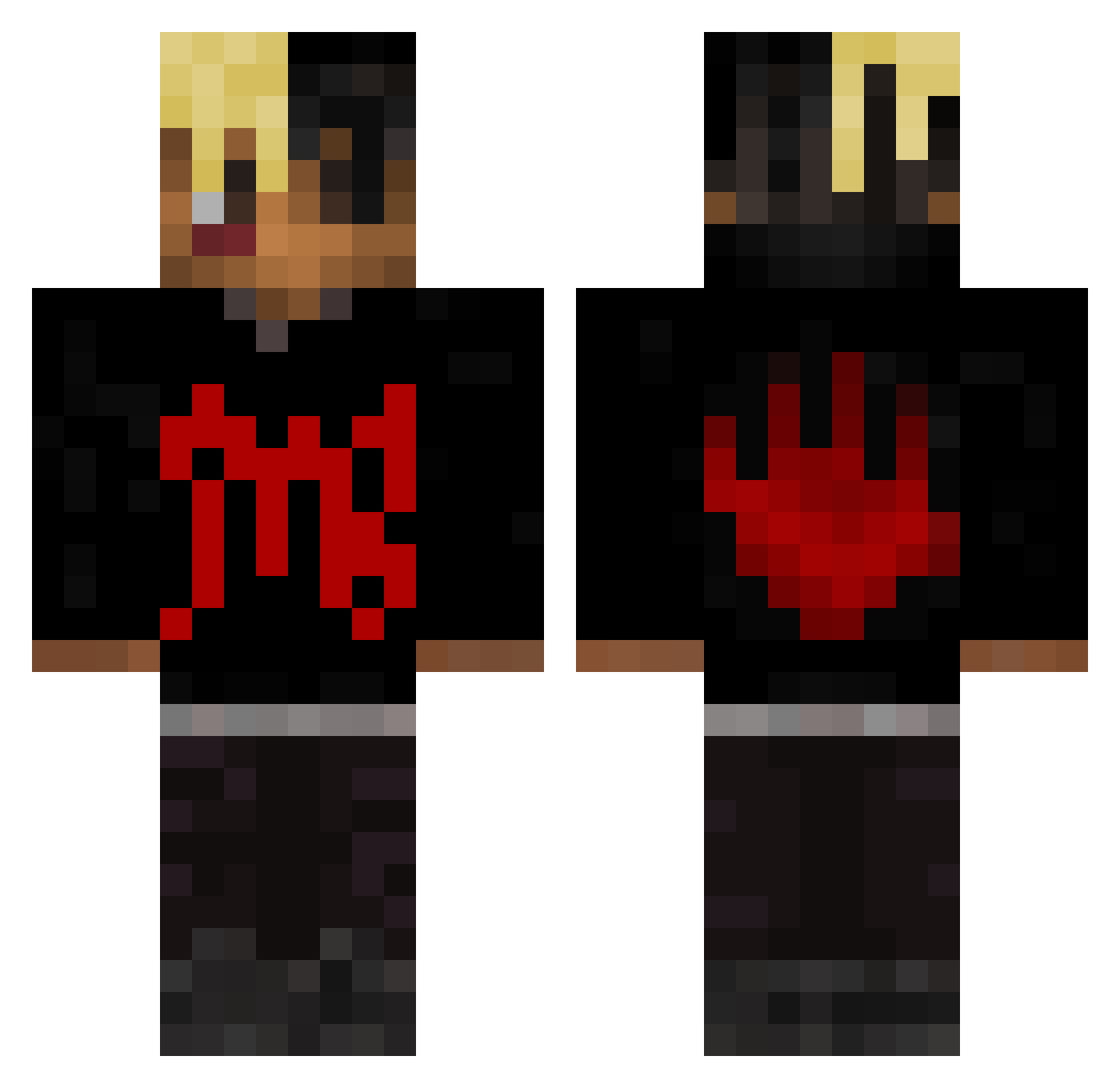
Current Minecraft skin of the player MattiaWolf, loaded from the official Mojang API. Rotate the 3D model with your mouse or finger, then download the skin as a PNG file and use it in Minecraft: Bedrock Edition or Java Edition for free. When MattiaWolf changes their skin, this page updates automatically and the old skin stays in the history below.
Other players with this skin (415)
MattiaWolf was the 197th player we have seen with this skin, first spotted on 13.09.2026. The same skin was seen on these players. Open a nickname to see their current skin and skin history.
 JahsehOnfroid yelpingYODA Hudzee_fosho zFlammyngo shiaure GRIFFO4707 TheAkberov pinpondEoro Samuleux _YDD_ customality WhiteBoyBouncy lekazo_ ALIMATE casablanca444 domi_ghost009 Nxuulnz martincito666 Newaar7 7ft uMelloo T0X1C0 Vini_Careca Fynn_187_420 Kyubikyu Cheezitzjr steffie10 Birbante RalfCR6 Carl_Wheezer12 CRACKGIRL666 Lockmc69 ChapaDeSilva fsikf euioaz mfdraco sevenxthree PlvyyHD Athuh nba_ed Smoked_BOLT Raikouu kataxv1 relik06 Jahseh__Onfroy Deex27_ VanNoire bencejordan BurntPeener Garyonkeyboart Fonsecash phaeton_91 ZephGB distroyzip GrimLucius revengeonmybody Laith47 flowey666 JPUZZ ParadiseCalypso
More Xxxtentacion Minecraft skins
See all 407 Xxxtentacion skins
How to install the MattiaWolf skin
- Press the Download button above to save the skin as a PNG file.
- Minecraft: Bedrock Edition (PE): open the Dressing Room from the main menu (or tap your character → Edit Character), go to Classic Skins → Owned, press the + (new skin) button, choose the downloaded PNG and pick the Classic (Steve) model. Works on PC and mobile; consoles cannot import custom skins.
- Minecraft: Java Edition: open the Minecraft Launcher, go to the Skins tab, click New Skin, load the PNG, pick the Classic (Steve) model and press Save & Use. You can also upload it at minecraft.net → Profile → Change Skin.
The skin does not show up after import - what should I do?
Restart Minecraft and open the Dressing Room again - imported skins sometimes appear only after a restart. Also make sure you selected the imported skin and picked the Classic (Steve) model.
Which model should I choose, Classic or Slim?
This skin is designed for the Classic (Steve) model. If you pick the wrong model, the arms of the skin will look stretched or squeezed.
Is the skin of MattiaWolf free to download?
Yes. Press Download, save the PNG file and use it in Minecraft: Bedrock Edition or Java Edition - no payment or registration needed. The skin also works on multiplayer servers and Realms.
More skins
Looking for more? Go back to all Minecraft skins and check the top skins of the week, month and all time, or find any player's skin by nickname.