
Martalamolletta - Minecraft Skins & Skin History
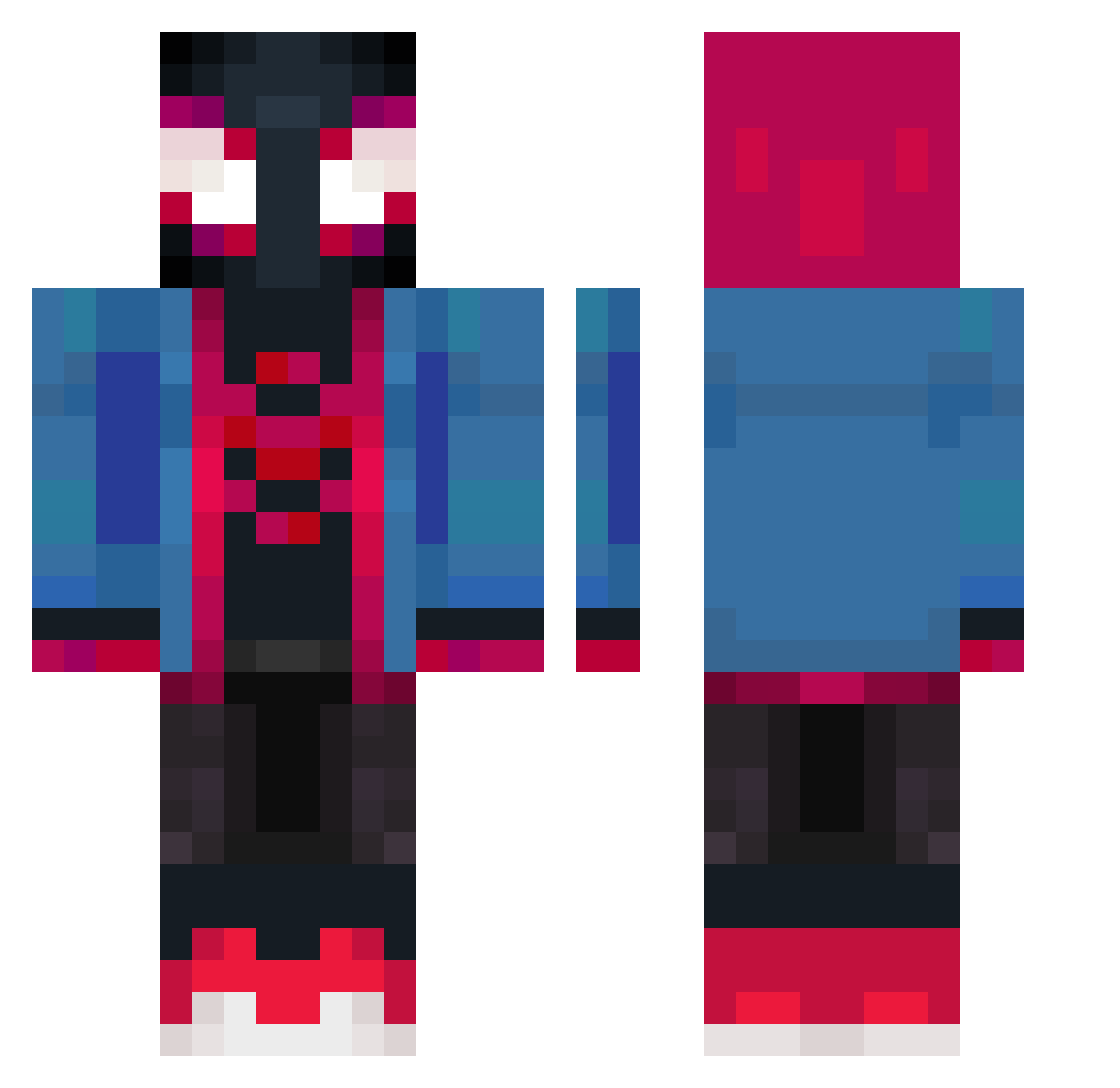
Current Minecraft skin of the player Martalamolletta, loaded from the official Mojang API. Rotate the 3D model with your mouse or finger, then download the skin as a PNG file and use it in Minecraft: Bedrock Edition or Java Edition for free. When Martalamolletta changes their skin, this page updates automatically and the old skin stays in the history below.
Other players with this skin (372)
Martalamolletta was the 148th player we have seen with this skin, first spotted on 31.08.2026. The same skin was seen on these players. Open a nickname to see their current skin and skin history.
 WINSTON83 cyrus239 Huangrong LilHuppy AkiraxBw YoungMark4 Isaac_DMC correa18 NazdrovyAlp DrakTim SjSnoop_ StarryLook00 abhorredd HeartShapedBox25 pepik061 TC_Striker Seebs7w7 Diego_alecG Rockeiropx addyylol ZenMaster5 ToloCooki OraZio_974 SamixX08 Boomboo1 chenyuuuu spiderUr Spectre221k Higoor7 davidanevem Alterato2810 Tjikomen xabls SamuelDLP codiiiiii IXE_16 GodRizzler Tortugakun El_Gran_jeff DavekQ Theuso77 TCM16 xUxiel Tayto44 ItsMa07 Soulsly
 roxyraphi Ahysus09 akaLyseTTV dagilmapipetg Moses_HolyWater Exkutiv_boss custardcup Smarkacz78 glocky17 JdaBurger Alexmond Vynyxx XDeathFrostX Dark4364
More Miles Morales Minecraft skins
See all 231 Miles Morales skins
How to install the Martalamolletta skin
- Press the Download button above to save the skin as a PNG file.
- Minecraft: Bedrock Edition (PE): open the Dressing Room from the main menu (or tap your character → Edit Character), go to Classic Skins → Owned, press the + (new skin) button, choose the downloaded PNG and pick the Classic (Steve) model. Works on PC and mobile; consoles cannot import custom skins.
- Minecraft: Java Edition: open the Minecraft Launcher, go to the Skins tab, click New Skin, load the PNG, pick the Classic (Steve) model and press Save & Use. You can also upload it at minecraft.net → Profile → Change Skin.
The skin does not show up after import - what should I do?
Restart Minecraft and open the Dressing Room again - imported skins sometimes appear only after a restart. Also make sure you selected the imported skin and picked the Classic (Steve) model.
Which model should I choose, Classic or Slim?
This skin is designed for the Classic (Steve) model. If you pick the wrong model, the arms of the skin will look stretched or squeezed.
Is the skin of Martalamolletta free to download?
Yes. Press Download, save the PNG file and use it in Minecraft: Bedrock Edition or Java Edition - no payment or registration needed. The skin also works on multiplayer servers and Realms.
More skins
Looking for more? Go back to all Minecraft skins and check the top skins of the week, month and all time, or find any player's skin by nickname.