
Mark_0ugh - Minecraft Skins & Skin History
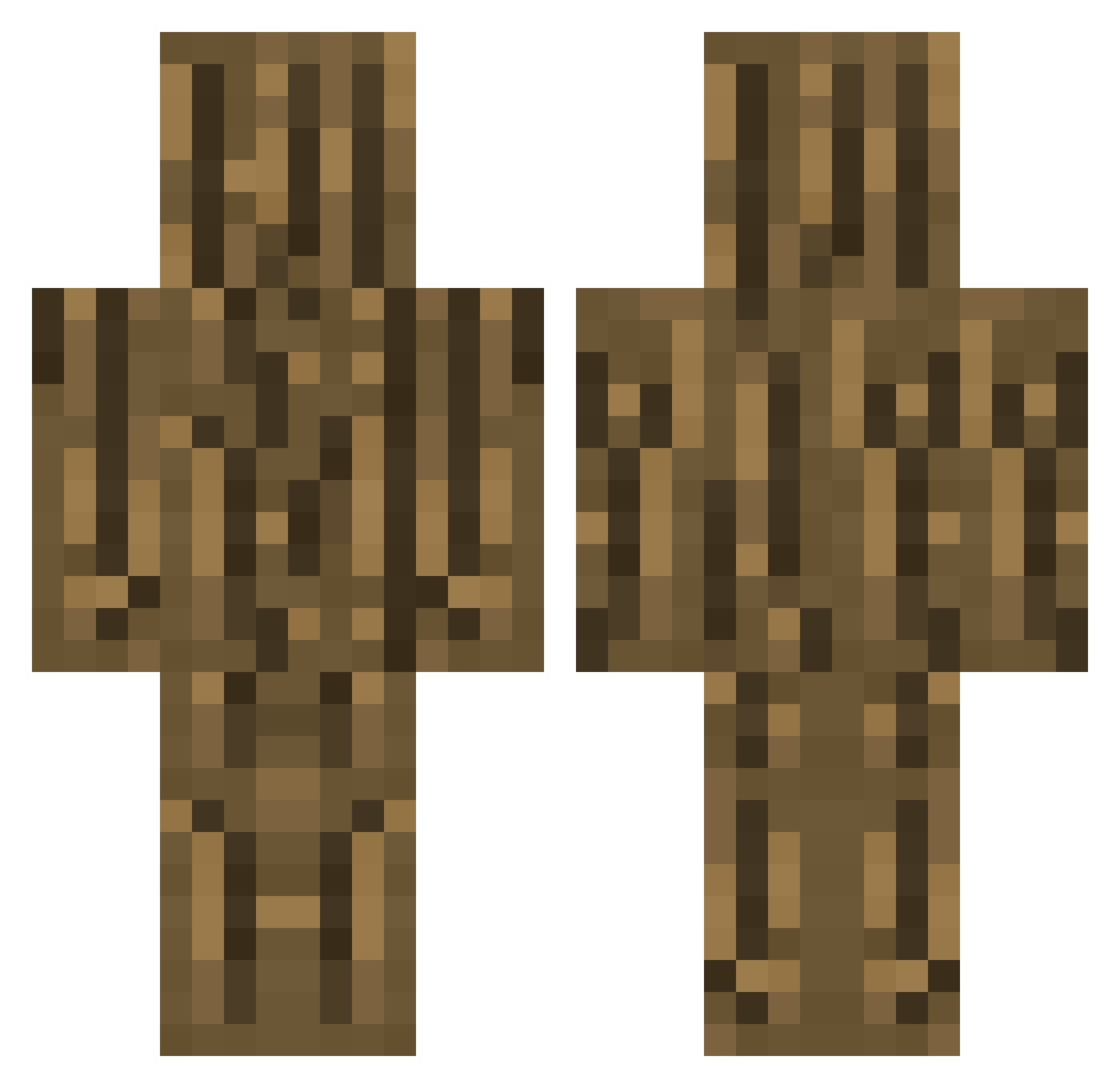
Current Minecraft skin of the player Mark_0ugh, loaded from the official Mojang API. Rotate the 3D model with your mouse or finger, then download the skin as a PNG file and use it in Minecraft: Bedrock Edition or Java Edition for free. When Mark_0ugh changes their skin, this page updates automatically and the old skin stays in the history below.
Other players with this skin (302)
Mark_0ugh was the 146th player we have seen with this skin, first spotted on 18.09.2026. The same skin was seen on these players. Open a nickname to see their current skin and skin history.
 Luffy_Mario christuab daegariejigun Pakano04 carrotx_32 Hahnei07 kuri0229 THEBIGBLOCKMAN lazurus02 swag_master12 dueno70034 skipouille seta312 Ginkobilobo surfin1230 mracorn10 Emantaray lenxkl JacobOli iVoLTr Rolep Onedandragon guangmang Kenmerk letibs Mcunhagamer ran2000 puring08 alex_audiv8 chocolinho WoodMasterMan ALFA1212 Sub2ImHugo Atrand0m S3D_12 moluit Fefe_2005 Randy0511_TW mokoyo0000 dollganger harrada256 debitz GansHeld ryu_muffin KXDFZ jhord4n PearlHarborPart2 dongmakri LukeCorgi12 _adabana sunisasi Joshikiwa Macacolan TapWOOD69 YoungerSam Yuss__0 tutinokko58 Doooooms ItouLion ImBurningMan
More Oak Log Minecraft skins
How to install the Mark_0ugh skin
- Press the Download button above to save the skin as a PNG file.
- Minecraft: Bedrock Edition (PE): open the Dressing Room from the main menu (or tap your character → Edit Character), go to Classic Skins → Owned, press the + (new skin) button, choose the downloaded PNG and pick the Classic (Steve) model. Works on PC and mobile; consoles cannot import custom skins.
- Minecraft: Java Edition: open the Minecraft Launcher, go to the Skins tab, click New Skin, load the PNG, pick the Classic (Steve) model and press Save & Use. You can also upload it at minecraft.net → Profile → Change Skin.
The skin does not show up after import - what should I do?
Restart Minecraft and open the Dressing Room again - imported skins sometimes appear only after a restart. Also make sure you selected the imported skin and picked the Classic (Steve) model.
Which model should I choose, Classic or Slim?
This skin is designed for the Classic (Steve) model. If you pick the wrong model, the arms of the skin will look stretched or squeezed.
Is the skin of Mark_0ugh free to download?
Yes. Press Download, save the PNG file and use it in Minecraft: Bedrock Edition or Java Edition - no payment or registration needed. The skin also works on multiplayer servers and Realms.
More skins
Looking for more? Go back to all Minecraft skins and check the top skins of the week, month and all time, or find any player's skin by nickname.