
Marc1e14 - Minecraft Skins & Skin History
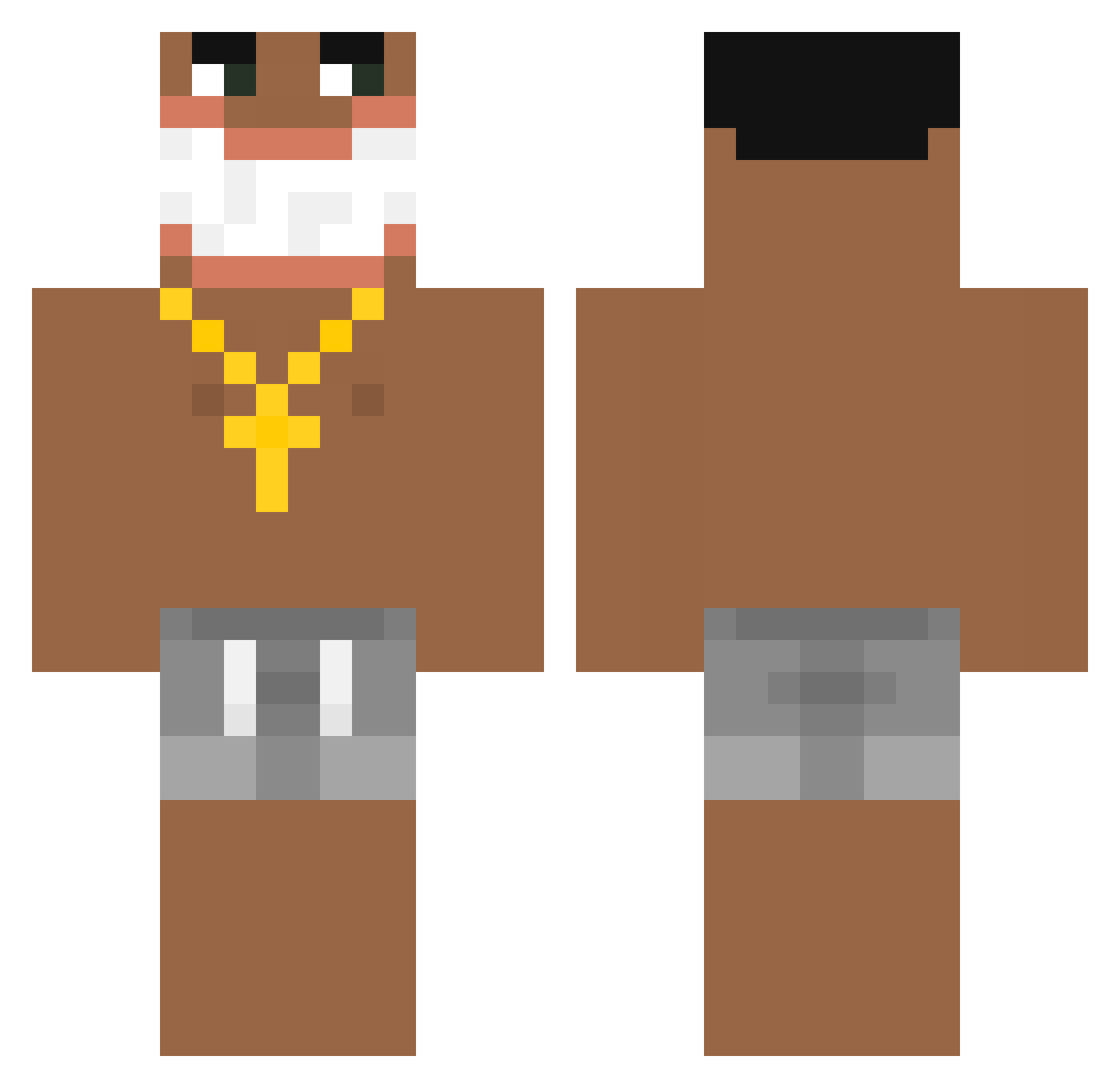
Current Minecraft skin of the player Marc1e14, loaded from the official Mojang API. Rotate the 3D model with your mouse or finger, then download the skin as a PNG file and use it in Minecraft: Bedrock Edition or Java Edition for free. When Marc1e14 changes their skin, this page updates automatically and the old skin stays in the history below.
Other players with this skin (224)
Marc1e14 was the 190th player we have seen with this skin, first spotted on 02.11.2026. The same skin was seen on these players. Open a nickname to see their current skin and skin history.
 DERYMO_DESTROYER Gonas4142 CholoRob T3xorben abldyE samuelmcxy Boa_9 pavle09 WeaBoii casic_ DavidFridge borecorleone hugedihfemboy DiaperLicker3000 inspirationalin Vzsk tommythetank46 ericaxyj kapixd Kanaex VenomVibez marad_aswad4 aomzupp Nigguar69 eMORON xiaozi83 XarQ2137 Ejlexx Navet974 Pigszy KezzyCarson antonio12431 brandaoosm Czarny690 Chiyuko_ xbxbn Kridy Here_Lies_Henry B_LB Dyrkwinder icourtney77 Mbappe_Pword ThreeDeadlySeeds Kinglyft MrGoonTuff Ambork_ Loose4K XaryDelBulla sebasos_A enigma0324 jltoodiddy 41ess Mekiou PiotrJabuszko hisocser2 KellCheifsMuhas oneHart Axxail Hizuk lipton84
More Ishowspeed Minecraft skins
How to install the Marc1e14 skin
- Press the Download button above to save the skin as a PNG file.
- Minecraft: Bedrock Edition (PE): open the Dressing Room from the main menu (or tap your character → Edit Character), go to Classic Skins → Owned, press the + (new skin) button, choose the downloaded PNG and pick the Classic (Steve) model. Works on PC and mobile; consoles cannot import custom skins.
- Minecraft: Java Edition: open the Minecraft Launcher, go to the Skins tab, click New Skin, load the PNG, pick the Classic (Steve) model and press Save & Use. You can also upload it at minecraft.net → Profile → Change Skin.
The skin does not show up after import - what should I do?
Restart Minecraft and open the Dressing Room again - imported skins sometimes appear only after a restart. Also make sure you selected the imported skin and picked the Classic (Steve) model.
Which model should I choose, Classic or Slim?
This skin is designed for the Classic (Steve) model. If you pick the wrong model, the arms of the skin will look stretched or squeezed.
Is the skin of Marc1e14 free to download?
Yes. Press Download, save the PNG file and use it in Minecraft: Bedrock Edition or Java Edition - no payment or registration needed. The skin also works on multiplayer servers and Realms.
More skins
Looking for more? Go back to all Minecraft skins and check the top skins of the week, month and all time, or find any player's skin by nickname.