
Malcallam - Minecraft Skins & Skin History
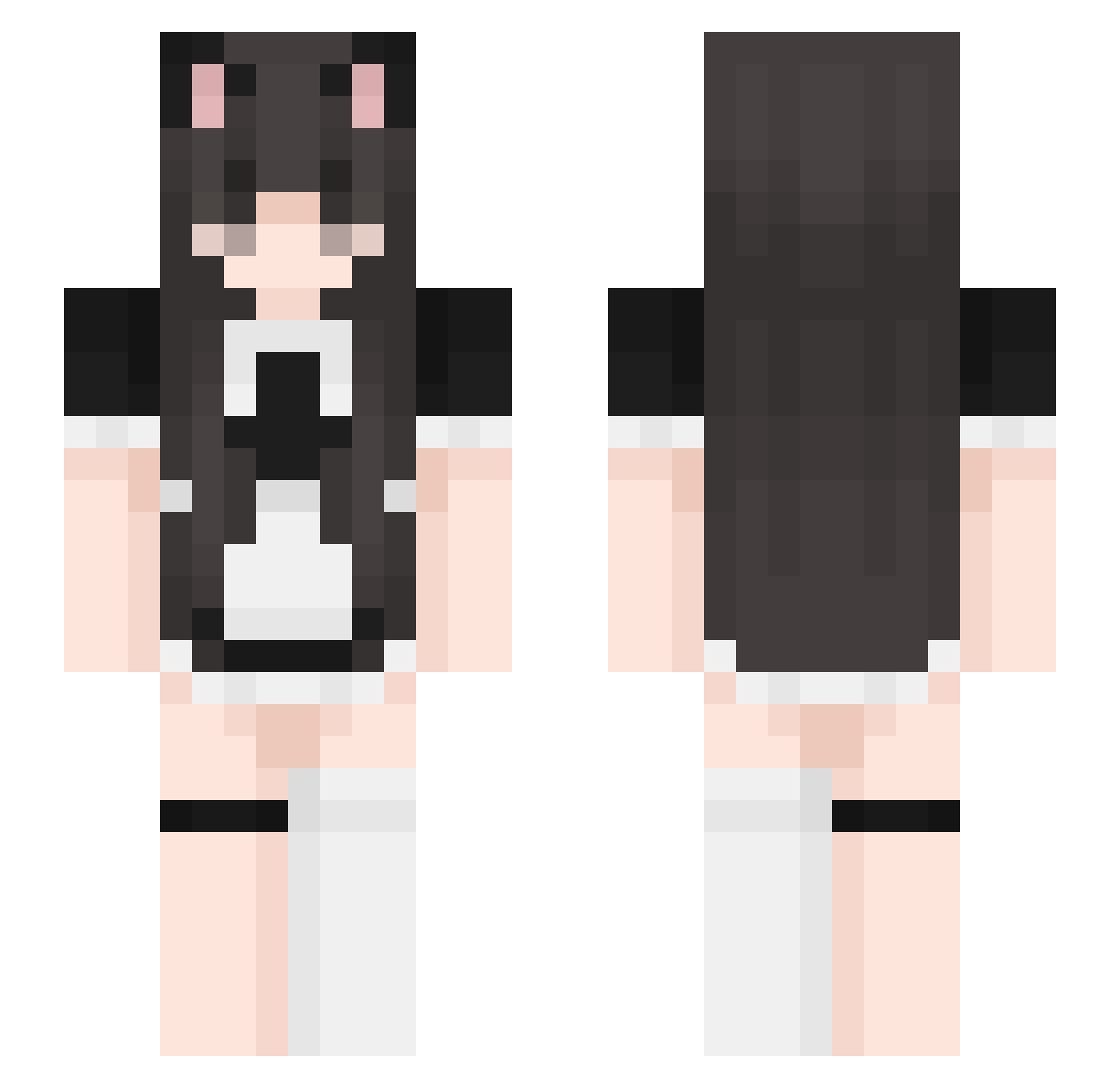
Current Minecraft skin of the player Malcallam, loaded from the official Mojang API. Rotate the 3D model with your mouse or finger, then download the skin as a PNG file and use it in Minecraft: Bedrock Edition or Java Edition for free. When Malcallam changes their skin, this page updates automatically and the old skin stays in the history below.
Other players with this skin (527)
Malcallam was the 504th player we have seen with this skin, first spotted on 15.11.2026. The same skin was seen on these players. Open a nickname to see their current skin and skin history.
 Bellaroxs911 Fox80rus thesinfulrose pollito_noob256 AiCiBanYa emmyah KCDisDisPanem aliscide NoTengoEnemigos MMCRIP_Dewgs znlq EvilPepper66698 GGONG2 gostosatriste wavu_xyx niebby rillayy misspanelly Gamer_Wolf05 MC_Kitten69 NekoSenpai42 JensTheGloat 0_o_____ y4nar dami3861 CoolMonster1212 Skiloyuux Hi3238 S3ffy tnaxo Zzae__ Bebop_Dog likbin tricksin CIASTKO2345 LuckyHXQ lewdropebunny chaming20 XIN_N_ 0omikami0 BMStylish qttc Box06 Octaviiia fluufyyy AllenLaughs21 EvilKitty85 4ndream NakanoMikumywifu jungkookisvvfit tostperstoaster AokiDoki qtjuls kennibung MuffinAlex30 Ikaros_29 hy0dor _Idos_ Lepezito LinXinChen
More Maid Minecraft skins
How to install the Malcallam skin
- Press the Download button above to save the skin as a PNG file.
- Minecraft: Bedrock Edition (PE): open the Dressing Room from the main menu (or tap your character → Edit Character), go to Classic Skins → Owned, press the + (new skin) button, choose the downloaded PNG and pick the Slim (Alex) model. Works on PC and mobile; consoles cannot import custom skins.
- Minecraft: Java Edition: open the Minecraft Launcher, go to the Skins tab, click New Skin, load the PNG, pick the Slim (Alex) model and press Save & Use. You can also upload it at minecraft.net → Profile → Change Skin.
The skin does not show up after import - what should I do?
Restart Minecraft and open the Dressing Room again - imported skins sometimes appear only after a restart. Also make sure you selected the imported skin and picked the Slim (Alex) model.
Which model should I choose, Classic or Slim?
This skin is designed for the Slim (Alex) model. If you pick the wrong model, the arms of the skin will look stretched or squeezed.
Is the skin of Malcallam free to download?
Yes. Press Download, save the PNG file and use it in Minecraft: Bedrock Edition or Java Edition - no payment or registration needed. The skin also works on multiplayer servers and Realms.
More skins
Looking for more? Go back to all Minecraft skins and check the top skins of the week, month and all time, or find any player's skin by nickname.