
Makiraa - Minecraft Skins & Skin History
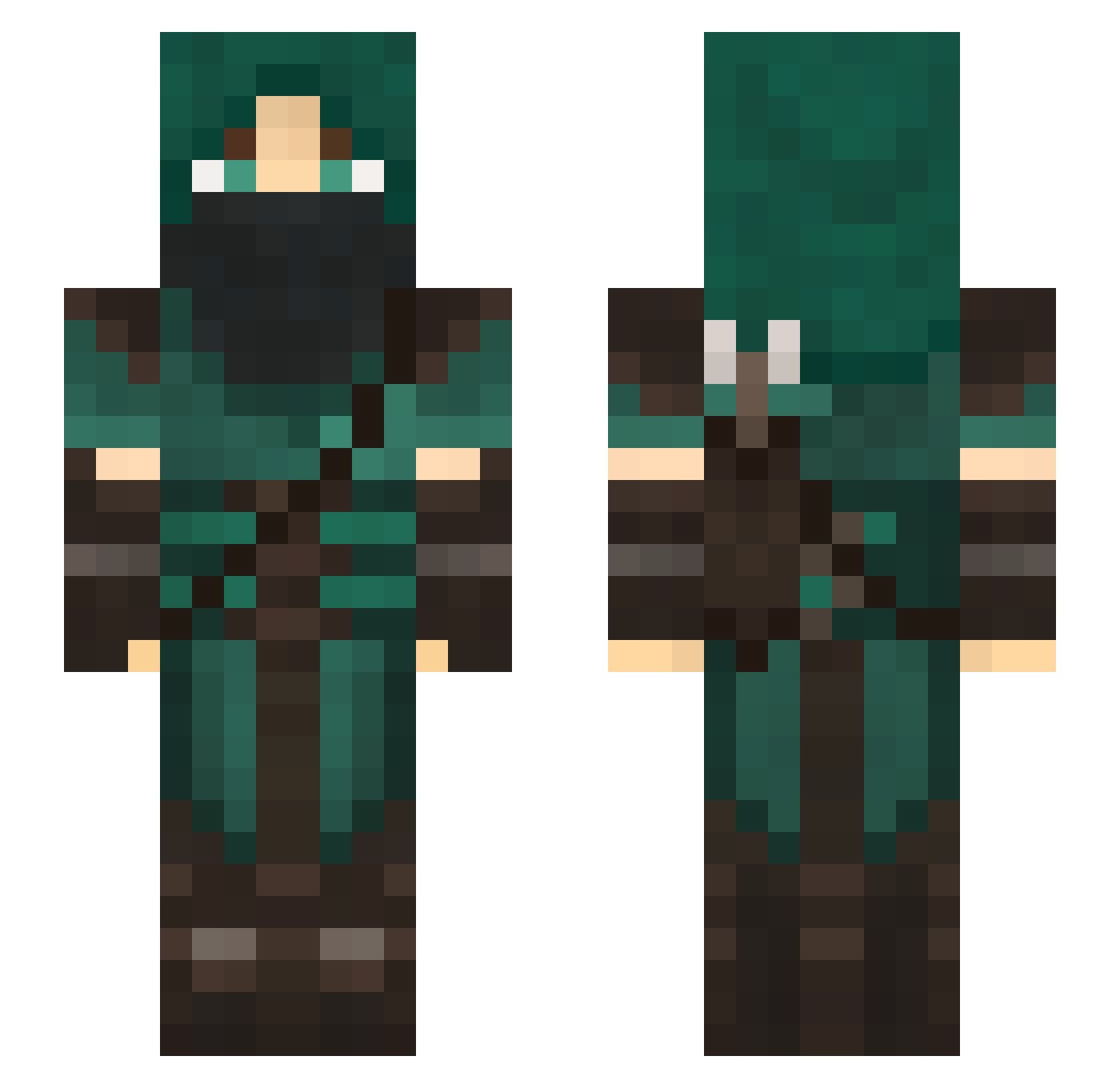
Current Minecraft skin of the player Makiraa, loaded from the official Mojang API. Rotate the 3D model with your mouse or finger, then download the skin as a PNG file and use it in Minecraft: Bedrock Edition or Java Edition for free. When Makiraa changes their skin, this page updates automatically and the old skin stays in the history below.
Other players with this skin (123)
Makiraa was the 18th player we have seen with this skin, first spotted on 08.08.2026. The same skin was seen on these players. Open a nickname to see their current skin and skin history.
 Mor9rim hirraree Hawkeye4401 Devrog_ ishokime xieze666 joek3 TribalC7 ShadowhunterYabu guitarisepic8957 kaiyangleong JaxTalon preoge Veylir FalconZac pandaFi ando208 Masukei OniKai Ranrik66 edj21 inovei6un Shu_ora robozach KhoghazJr Big_nut3112 _Teych_ MarcusMiner72 W4D4M5 EAPraven CoolHandLuyk cidisthename HappySheep11451 _Rogu3_ madhatcat Aubin Yohhakkai Fallensniper4 Truitouille basketbean Evaliss varjo_vaikutus ChrispyCremee Fenrir1326 Nameless1996 Briceman15 HeIbrahim Nisukii Conradicus69 jediknight110 tazthespaz1 LastDarkWard dgavec ___Lyam_ Bollek23 Anemalech absorbentwheat Farseli gypsie177 lonewolverine80
More Rogue Minecraft skins
How to install the Makiraa skin
- Press the Download button above to save the skin as a PNG file.
- Minecraft: Bedrock Edition (PE): open the Dressing Room from the main menu (or tap your character → Edit Character), go to Classic Skins → Owned, press the + (new skin) button, choose the downloaded PNG and pick the Slim (Alex) model. Works on PC and mobile; consoles cannot import custom skins.
- Minecraft: Java Edition: open the Minecraft Launcher, go to the Skins tab, click New Skin, load the PNG, pick the Slim (Alex) model and press Save & Use. You can also upload it at minecraft.net → Profile → Change Skin.
The skin does not show up after import - what should I do?
Restart Minecraft and open the Dressing Room again - imported skins sometimes appear only after a restart. Also make sure you selected the imported skin and picked the Slim (Alex) model.
Which model should I choose, Classic or Slim?
This skin is designed for the Slim (Alex) model. If you pick the wrong model, the arms of the skin will look stretched or squeezed.
Is the skin of Makiraa free to download?
Yes. Press Download, save the PNG file and use it in Minecraft: Bedrock Edition or Java Edition - no payment or registration needed. The skin also works on multiplayer servers and Realms.
More skins
Looking for more? Go back to all Minecraft skins and check the top skins of the week, month and all time, or find any player's skin by nickname.