
Majik_7 - Minecraft Skins & Skin History
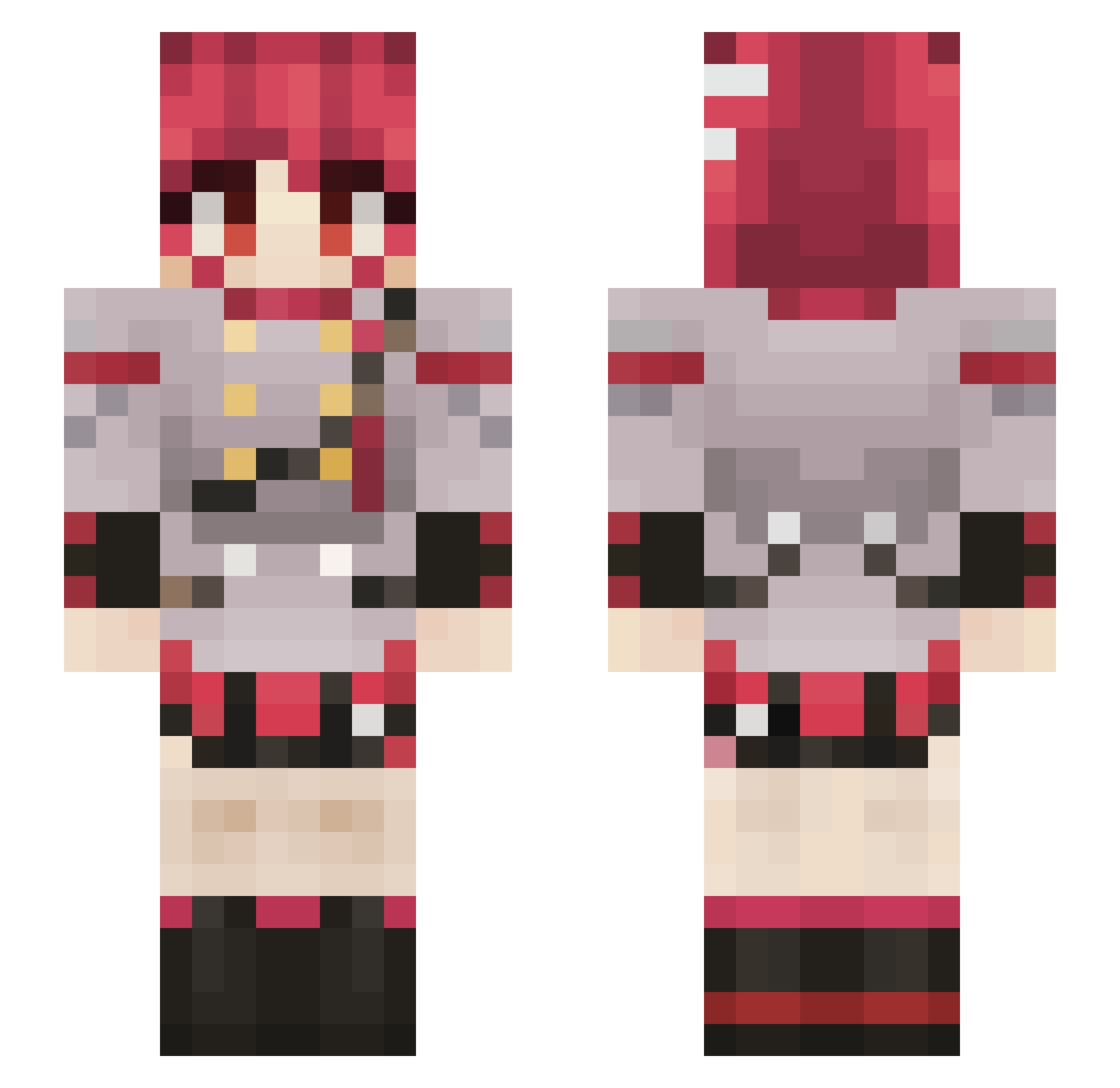
Current Minecraft skin of the player Majik_7, loaded from the official Mojang API. Rotate the 3D model with your mouse or finger, then download the skin as a PNG file and use it in Minecraft: Bedrock Edition or Java Edition for free. When Majik_7 changes their skin, this page updates automatically and the old skin stays in the history below.
Other players with this skin (916)
Majik_7 was the 869th player we have seen with this skin, first spotted on 12.11.2026. The same skin was seen on these players. Open a nickname to see their current skin and skin history.
 Karololek8 Cris_b2910 WinRAR64bit dyikis FatTetoo green_kroby206 Norlandic E4z3n Spooky787 Rhaastcista Bow_i Tebe_e Sonic312 fridge_rave mirx_is MiksCrusade soft_kooki 1stHipster Speeding_ BEDROCKAMAN Whip9063 EThorn0917 sushi5006 Pointlessfredo kevinGY10 ApyNoider tymyshoe34 Desiderium_007 P0RTUGALz dappercogs17 BBWithAFireStick Themind0 Tink4ton ina_ranger PrincessMonkeyA6 0hJuanes_ ScottWinns1 McFroggz OdinnS245 Wedge3D ArcendW PinkString_W0rm Duck_yy_y Igotsmacked ImNotMonster WanaSan Random_Ari223 Antuk4s moth4rent _Owy Jepepaecri tertiant Hyang5 VOCAL0ID DecentOffline Demento8922 Danecho09 moo5100 StaleUser Nose004
More Idol Minecraft skins
How to install the Majik_7 skin
- Press the Download button above to save the skin as a PNG file.
- Minecraft: Bedrock Edition (PE): open the Dressing Room from the main menu (or tap your character → Edit Character), go to Classic Skins → Owned, press the + (new skin) button, choose the downloaded PNG and pick the Slim (Alex) model. Works on PC and mobile; consoles cannot import custom skins.
- Minecraft: Java Edition: open the Minecraft Launcher, go to the Skins tab, click New Skin, load the PNG, pick the Slim (Alex) model and press Save & Use. You can also upload it at minecraft.net → Profile → Change Skin.
The skin does not show up after import - what should I do?
Restart Minecraft and open the Dressing Room again - imported skins sometimes appear only after a restart. Also make sure you selected the imported skin and picked the Slim (Alex) model.
Which model should I choose, Classic or Slim?
This skin is designed for the Slim (Alex) model. If you pick the wrong model, the arms of the skin will look stretched or squeezed.
Is the skin of Majik_7 free to download?
Yes. Press Download, save the PNG file and use it in Minecraft: Bedrock Edition or Java Edition - no payment or registration needed. The skin also works on multiplayer servers and Realms.
More skins
Looking for more? Go back to all Minecraft skins and check the top skins of the week, month and all time, or find any player's skin by nickname.