
Maaaaaaartin - Minecraft Skins & Skin History
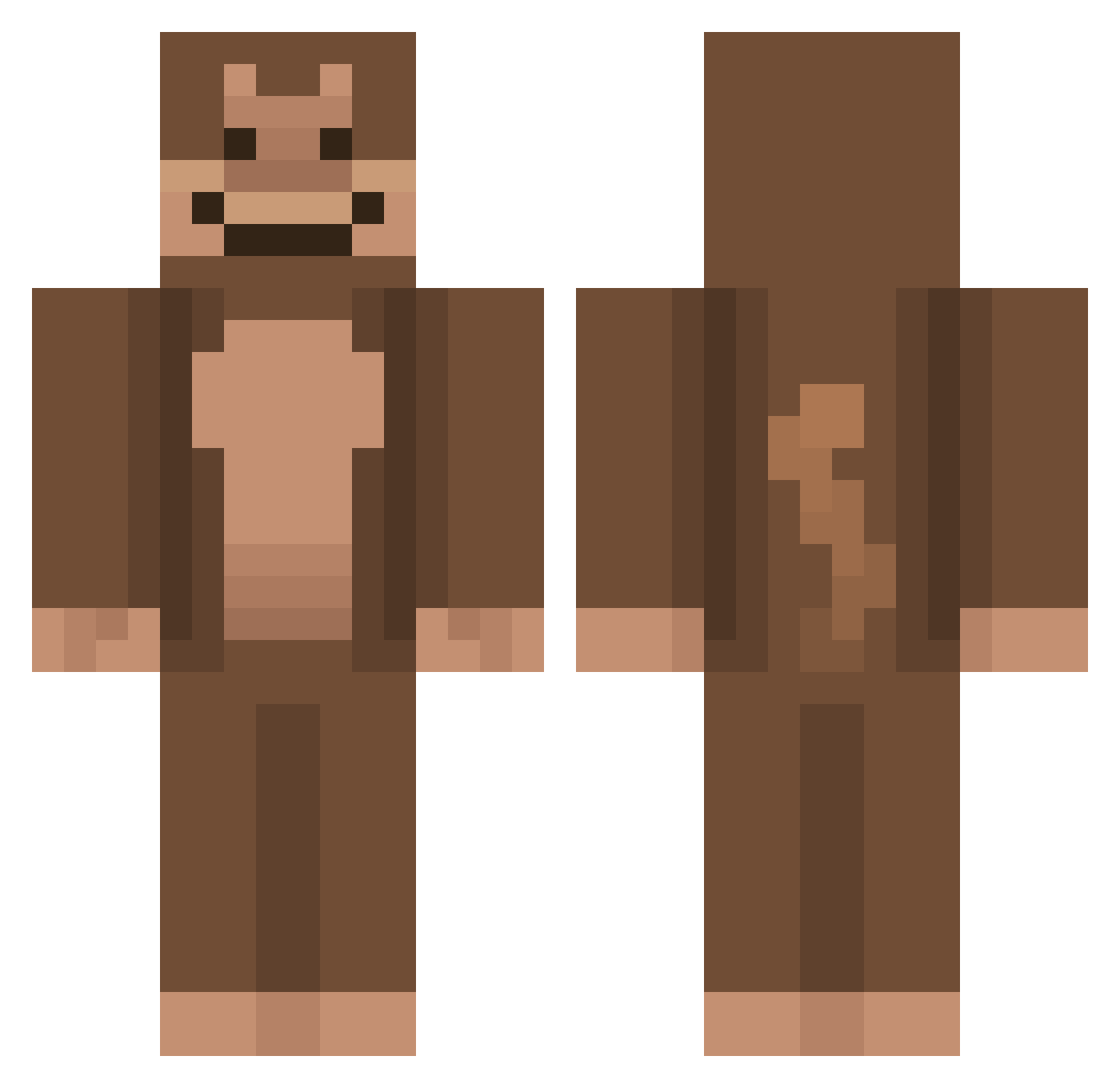
Current Minecraft skin of the player Maaaaaaartin, loaded from the official Mojang API. Rotate the 3D model with your mouse or finger, then download the skin as a PNG file and use it in Minecraft: Bedrock Edition or Java Edition for free. When Maaaaaaartin changes their skin, this page updates automatically and the old skin stays in the history below.
Other players with this skin (736)
Maaaaaaartin was the 516th player we have seen with this skin, first spotted on 06.10.2026. The same skin was seen on these players. Open a nickname to see their current skin and skin history.
 Cujoxx CoolioFatty Jorski_7 CroutonnP albalobao floppavip mingyu0924 _notvivian chuhlie mooorg Playveee albinobaboon999 FALEHS ms_gav Leavitt24 Biscuiteeer godyungu Roni_Pham TamarinMan antanmaxxing Dark_legend11 minsuny02 Ryzx49 aloco9 Erinator6000 fiksel_ TheMichelinMan8 Camping_Steve HernandezWiz JustBenmo BOS_AAP SUPERMONKEYLION MamypokoPants LOLDRAKE21 LilYumiko cheesesticks212 Elias613 dankbaboon monkeygirlnat AvaTheDummy BzzNeki kimseongi01 CLOWN1E Soccersquid06 SvenSpandex Kotilp2 WomboCombo30 HomelessBunn Binguap waZElhk RemaskedMonkey SparklyBubblez topfloorboss22 etienne123456 HoodApe74 Sosa87 iSneakey_ exvynickher hibou1 PhantomFire377
More Ape Minecraft skins
How to install the Maaaaaaartin skin
- Press the Download button above to save the skin as a PNG file.
- Minecraft: Bedrock Edition (PE): open the Dressing Room from the main menu (or tap your character → Edit Character), go to Classic Skins → Owned, press the + (new skin) button, choose the downloaded PNG and pick the Classic (Steve) model. Works on PC and mobile; consoles cannot import custom skins.
- Minecraft: Java Edition: open the Minecraft Launcher, go to the Skins tab, click New Skin, load the PNG, pick the Classic (Steve) model and press Save & Use. You can also upload it at minecraft.net → Profile → Change Skin.
The skin does not show up after import - what should I do?
Restart Minecraft and open the Dressing Room again - imported skins sometimes appear only after a restart. Also make sure you selected the imported skin and picked the Classic (Steve) model.
Which model should I choose, Classic or Slim?
This skin is designed for the Classic (Steve) model. If you pick the wrong model, the arms of the skin will look stretched or squeezed.
Is the skin of Maaaaaaartin free to download?
Yes. Press Download, save the PNG file and use it in Minecraft: Bedrock Edition or Java Edition - no payment or registration needed. The skin also works on multiplayer servers and Realms.
More skins
Looking for more? Go back to all Minecraft skins and check the top skins of the week, month and all time, or find any player's skin by nickname.