
MIGMIRD - Minecraft Skins & Skin History
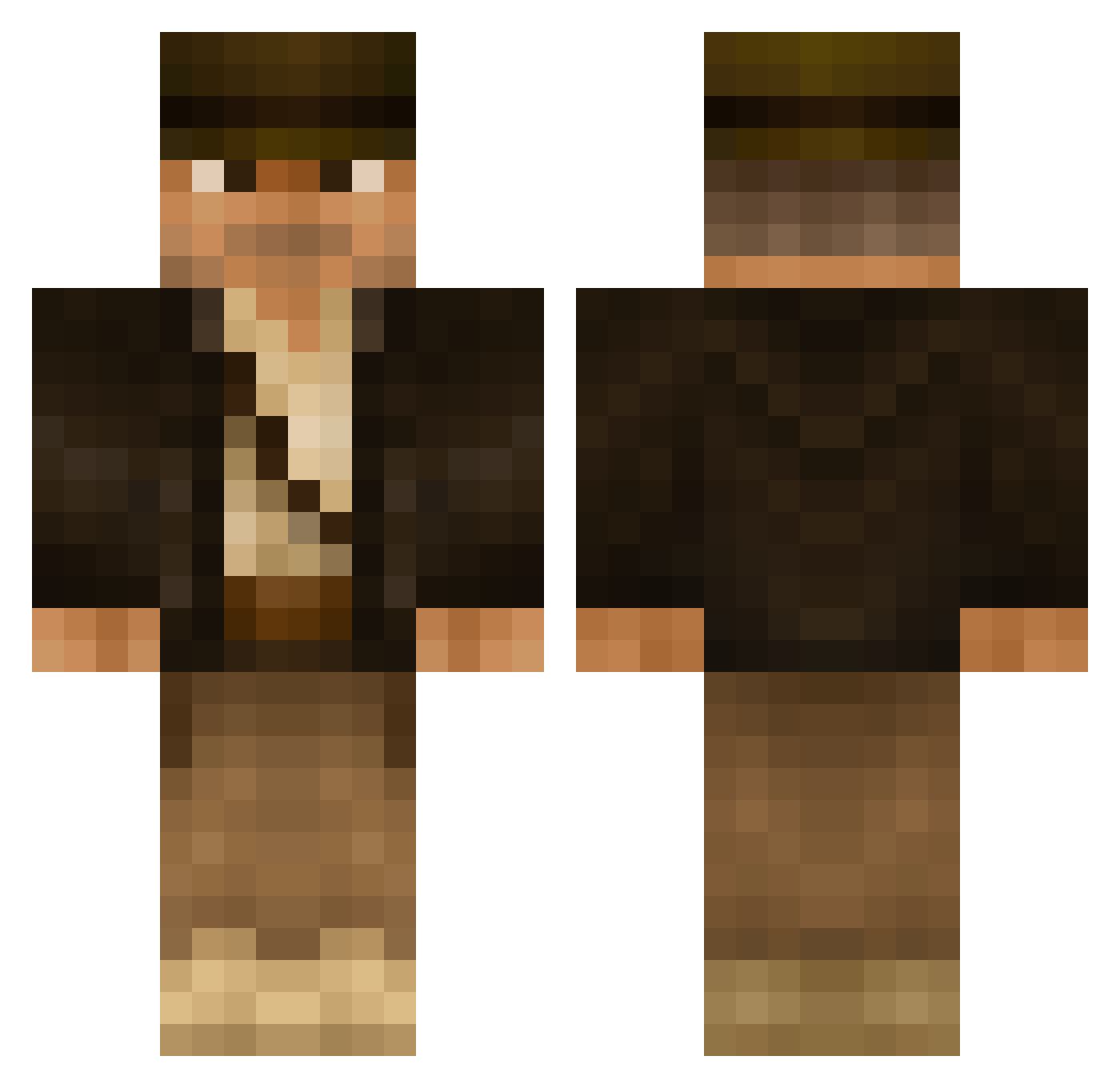
Current Minecraft skin of the player MIGMIRD, loaded from the official Mojang API. Rotate the 3D model with your mouse or finger, then download the skin as a PNG file and use it in Minecraft: Bedrock Edition or Java Edition for free. When MIGMIRD changes their skin, this page updates automatically and the old skin stays in the history below.
Other players with this skin (506)
MIGMIRD was the 176th player we have seen with this skin, first spotted on 02.09.2026. The same skin was seen on these players. Open a nickname to see their current skin and skin history.
 Gz0s Glennish Mo7_ muntoris oMONKEo EvilLincoln14 Trenchgun96 lewis1991 Demolia Grumpz65 Comradeo NekroLizard zorfric_ Whakakaka CarbonHal DiddyCrafter Ghosty938 Ausschreitung duff03 robinabobin SaxyThing EvilBreed08 RachelTruman Grism1138 UpcomingChris raingruber Tomster_R AnAbidingDude94 captainkayak JoeRobins YourTeamName AxlFoxx Grazy79 Garglfluz Aksu86 James_Usari Epicmonkey_gamer subdiver45 Waterboyeee SiggiSigmann 733tdad Iucian Richy290 Will_Knott NetoBrioschi heroichotdog Jasper_Beardly kingpingxing CWilmoth TuttiFrutti101 MattyRadio _SJR_ Tbcrow Swifty25 Euna_GOM jman199909 AnosMarkt Netboygold sublake Cursa
More Indiana Jones Minecraft skins
See all 80 Indiana Jones skins
How to install the MIGMIRD skin
- Press the Download button above to save the skin as a PNG file.
- Minecraft: Bedrock Edition (PE): open the Dressing Room from the main menu (or tap your character → Edit Character), go to Classic Skins → Owned, press the + (new skin) button, choose the downloaded PNG and pick the Classic (Steve) model. Works on PC and mobile; consoles cannot import custom skins.
- Minecraft: Java Edition: open the Minecraft Launcher, go to the Skins tab, click New Skin, load the PNG, pick the Classic (Steve) model and press Save & Use. You can also upload it at minecraft.net → Profile → Change Skin.
The skin does not show up after import - what should I do?
Restart Minecraft and open the Dressing Room again - imported skins sometimes appear only after a restart. Also make sure you selected the imported skin and picked the Classic (Steve) model.
Which model should I choose, Classic or Slim?
This skin is designed for the Classic (Steve) model. If you pick the wrong model, the arms of the skin will look stretched or squeezed.
Is the skin of MIGMIRD free to download?
Yes. Press Download, save the PNG file and use it in Minecraft: Bedrock Edition or Java Edition - no payment or registration needed. The skin also works on multiplayer servers and Realms.
More skins
Looking for more? Go back to all Minecraft skins and check the top skins of the week, month and all time, or find any player's skin by nickname.