
Lukyplex - Minecraft Skins & Skin History
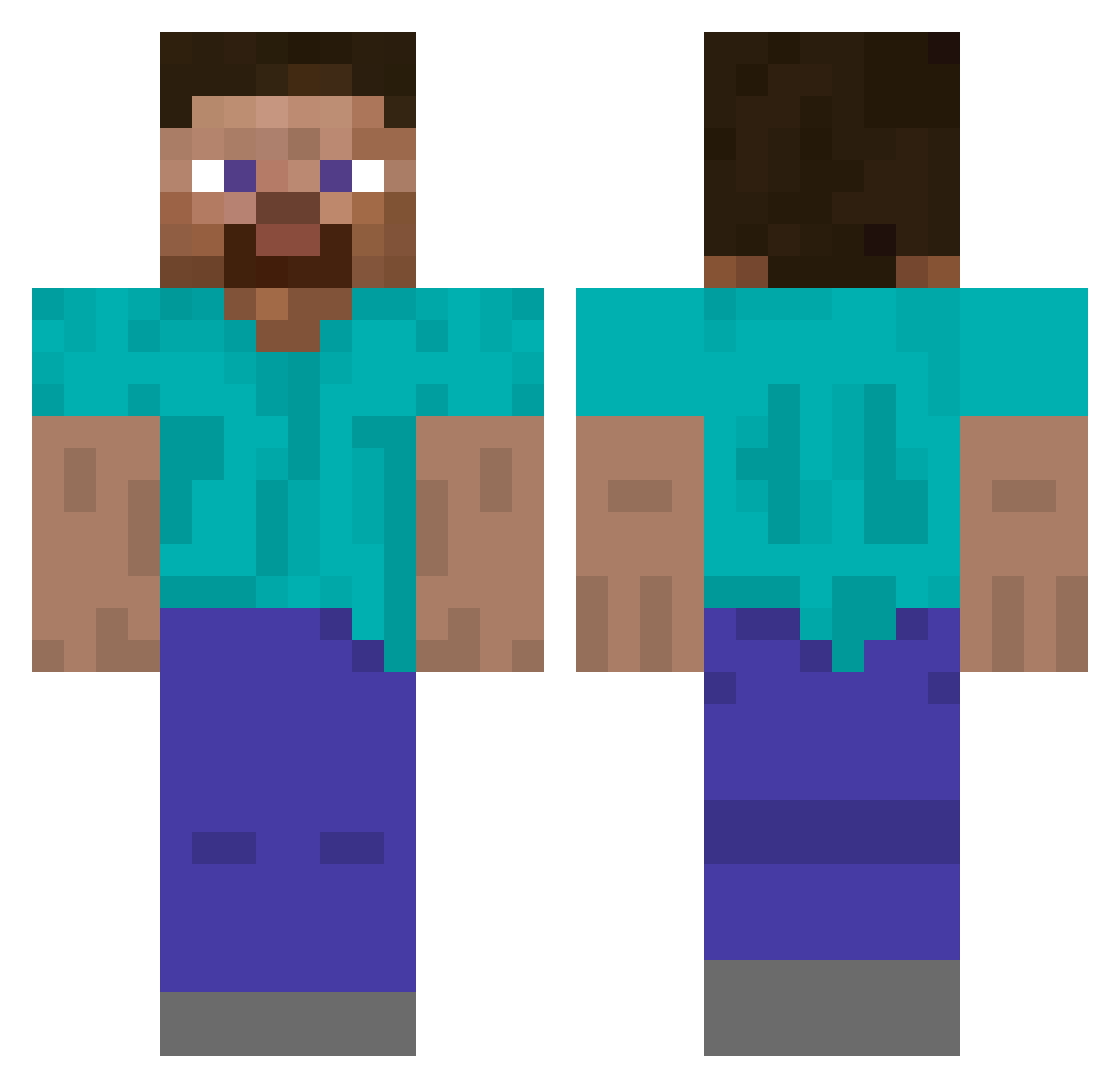
Current Minecraft skin of the player Lukyplex, loaded from the official Mojang API. Rotate the 3D model with your mouse or finger, then download the skin as a PNG file and use it in Minecraft: Bedrock Edition or Java Edition for free. When Lukyplex changes their skin, this page updates automatically and the old skin stays in the history below.
Other players with this skin (68)
Lukyplex was the 40th player we have seen with this skin, first spotted on 28.09.2026. The same skin was seen on these players. Open a nickname to see their current skin and skin history.
 stxrz2 Milk_o knackebrood openbread archiveofmykel JapekNoCortisool GamesGharles666 swn12 Diminson User iqzr _mahne youmakemelaugh akazaya crazyturk70 Scolder kp20x hebe_e Mr_Man_123 nich M1no_O Drimber jonko_piloot hydraa_a Za3tour Asmodeee Axst0o BlojeFanBoy amoungussssss MyGospel ITS_Muchacho SrMek Foiler StarFind eahrt5z3w4aehr45 caulkandballs yolotroll5000 HoppaOnDaOpps abying
 sokzah kahnthenoob Namlex Conflingo yemeinn QasperXD Zeakyer
 _NightFury1 RiceX3 sncv
 k2yo unaccredited
 cheeboludo ilaaaaaw Tarseelie El_Tio_Limonxrd bertkiewicztop1 Mxoodz JoshuaJFox kamilpro2010pl cerko
How to install the Lukyplex skin
- Press the Download button above to save the skin as a PNG file.
- Minecraft: Bedrock Edition (PE): open the Dressing Room from the main menu (or tap your character → Edit Character), go to Classic Skins → Owned, press the + (new skin) button, choose the downloaded PNG and pick the Classic (Steve) model. Works on PC and mobile; consoles cannot import custom skins.
- Minecraft: Java Edition: open the Minecraft Launcher, go to the Skins tab, click New Skin, load the PNG, pick the Classic (Steve) model and press Save & Use. You can also upload it at minecraft.net → Profile → Change Skin.
The skin does not show up after import - what should I do?
Restart Minecraft and open the Dressing Room again - imported skins sometimes appear only after a restart. Also make sure you selected the imported skin and picked the Classic (Steve) model.
Which model should I choose, Classic or Slim?
This skin is designed for the Classic (Steve) model. If you pick the wrong model, the arms of the skin will look stretched or squeezed.
Is the skin of Lukyplex free to download?
Yes. Press Download, save the PNG file and use it in Minecraft: Bedrock Edition or Java Edition - no payment or registration needed. The skin also works on multiplayer servers and Realms.
More skins
Looking for more? Go back to all Minecraft skins and check the top skins of the week, month and all time, or find any player's skin by nickname.