
LostWarrior455 - Minecraft Skins & Skin History
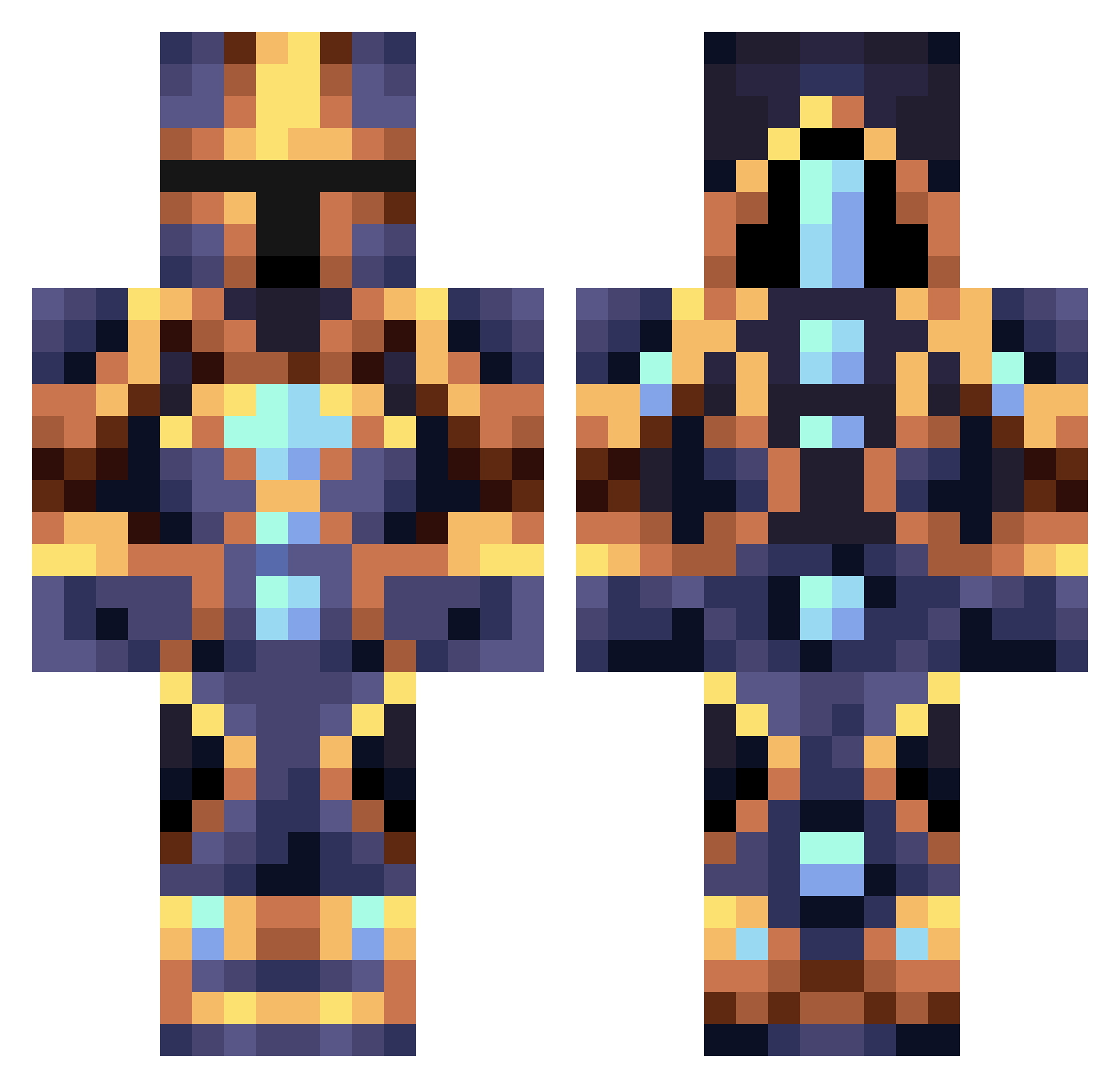
Current Minecraft skin of the player LostWarrior455, loaded from the official Mojang API. Rotate the 3D model with your mouse or finger, then download the skin as a PNG file and use it in Minecraft: Bedrock Edition or Java Edition for free. When LostWarrior455 changes their skin, this page updates automatically and the old skin stays in the history below.
Other players with this skin (363)
LostWarrior455 was the 141st player we have seen with this skin, first spotted on 02.09.2026. The same skin was seen on these players. Open a nickname to see their current skin and skin history.
 morski Dedro_21 LordDishwasher Sssme Huntzmanstein Ferru123 CZGame Astalehan dragon8gaming TheOniEmpire TrueCreeper258 Norn2 DragynWarrior earthbuffalo Lucienchili HJVNova elfmagnificent AkiNum CreeperHeadBoo CelestialOfWar soriwon capohimself xSweeties Cheese0602 polikchlorviniL KnowingOrca Coue Lobby18 Big_Gay_HAHAHAHA LordTryhard JUJU87A AkuVanVan Fizky PotatoPatata123 TragicFate DarkinRakan Firestorm2K_ saram_saram Raveioli Oblivv AcTiveElite1075 Alero17 oxford99 zxswitch Aerathos MrSilverSnake MrKlocek Lxvdy irca73 _Wizzzy_ Hindilya UraniumCOW4092 F4LL_DAMAGE SusheeBoi MOUSTACHE4959 Guatero rnr_2007 Deiru666
 TeyZZero1997 DieVax
More Sci Fi Minecraft skins
How to install the LostWarrior455 skin
- Press the Download button above to save the skin as a PNG file.
- Minecraft: Bedrock Edition (PE): open the Dressing Room from the main menu (or tap your character → Edit Character), go to Classic Skins → Owned, press the + (new skin) button, choose the downloaded PNG and pick the Classic (Steve) model. Works on PC and mobile; consoles cannot import custom skins.
- Minecraft: Java Edition: open the Minecraft Launcher, go to the Skins tab, click New Skin, load the PNG, pick the Classic (Steve) model and press Save & Use. You can also upload it at minecraft.net → Profile → Change Skin.
The skin does not show up after import - what should I do?
Restart Minecraft and open the Dressing Room again - imported skins sometimes appear only after a restart. Also make sure you selected the imported skin and picked the Classic (Steve) model.
Which model should I choose, Classic or Slim?
This skin is designed for the Classic (Steve) model. If you pick the wrong model, the arms of the skin will look stretched or squeezed.
Is the skin of LostWarrior455 free to download?
Yes. Press Download, save the PNG file and use it in Minecraft: Bedrock Edition or Java Edition - no payment or registration needed. The skin also works on multiplayer servers and Realms.
More skins
Looking for more? Go back to all Minecraft skins and check the top skins of the week, month and all time, or find any player's skin by nickname.