
Lil_mist - Minecraft Skins & Skin History
Current Minecraft skin of the player Lil_mist, loaded from the official Mojang API. Rotate the 3D model with your mouse or finger, then download the skin as a PNG file and use it in Minecraft: Bedrock Edition or Java Edition for free. When Lil_mist changes their skin, this page updates automatically and the old skin stays in the history below.
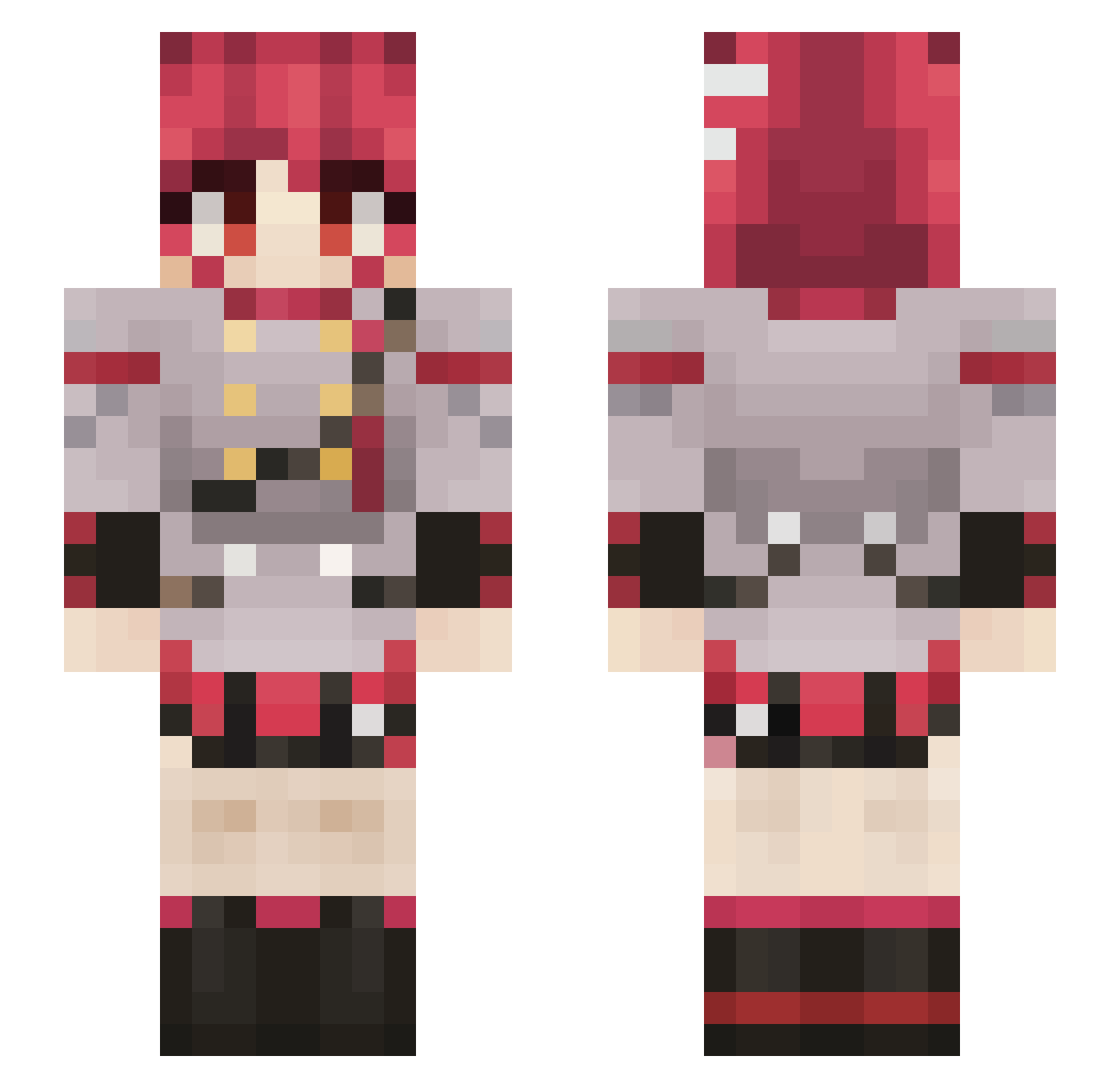
Other players with this skin (688)
Lil_mist was the 93rd player we have seen with this skin, first spotted on 05.08.2026. The same skin was seen on these players. Open a nickname to see their current skin and skin history.
 Axtofe2 Stelph205 Dee_Bean Horuni bibo910
 PizaBOM HollowExo GranularBow8340 KawaiiPotato66 BMC916 Kerlio Sno0op_craft sk_elz pinto124 Sana2357 Endermaster18 nekto_o Angie__Dust Wanarodos TuttoRagnarok Pananagiotis Ajax1933 Xcoverx Mossylord AK4TFR4N swnmyno
 Atroxer Roxans_KH_UT neocraftt Teto8ade7 Pondajaaaa jncastor Majudx_x RealKageTsu MiniMartin5 Tacosalpastor44 vuikc EggEPlayz SophieKitty_ _LaidtoRest_ BlueCrrane catdog130 GAS_DRAWLS Yail_Rhul Kinsou47 metalkid666
 ReboundOre Shaags Cookiepro1965 Grimpargg Aloonnn MachuPikachu03 weirdoom Melonseedissad
 ArkEnoch Kokorech1 Whacker88 dmnn12 GrugHimself MarktR16
More Idol Minecraft skins
How to install the Lil_mist skin
- Press the Download button above to save the skin as a PNG file.
- Minecraft: Bedrock Edition (PE): open the Dressing Room from the main menu (or tap your character → Edit Character), go to Classic Skins → Owned, press the + (new skin) button, choose the downloaded PNG and pick the Slim (Alex) model. Works on PC and mobile; consoles cannot import custom skins.
- Minecraft: Java Edition: open the Minecraft Launcher, go to the Skins tab, click New Skin, load the PNG, pick the Slim (Alex) model and press Save & Use. You can also upload it at minecraft.net → Profile → Change Skin.
The skin does not show up after import - what should I do?
Restart Minecraft and open the Dressing Room again - imported skins sometimes appear only after a restart. Also make sure you selected the imported skin and picked the Slim (Alex) model.
Which model should I choose, Classic or Slim?
This skin is designed for the Slim (Alex) model. If you pick the wrong model, the arms of the skin will look stretched or squeezed.
Is the skin of Lil_mist free to download?
Yes. Press Download, save the PNG file and use it in Minecraft: Bedrock Edition or Java Edition - no payment or registration needed. The skin also works on multiplayer servers and Realms.
More skins
Looking for more? Go back to all Minecraft skins and check the top skins of the week, month and all time, or find any player's skin by nickname.