
Levraifuse - Minecraft Skins & Skin History
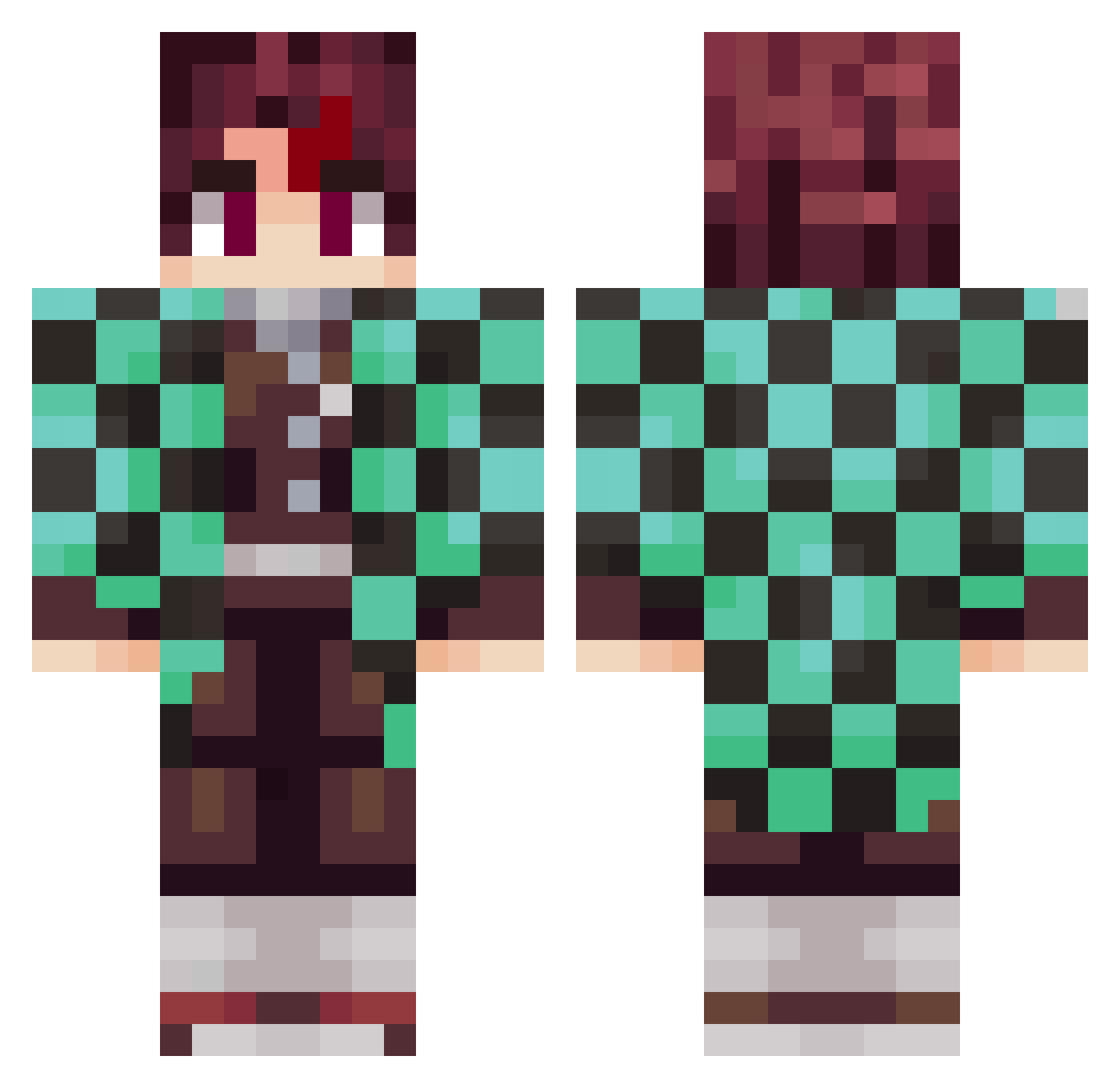
Current Minecraft skin of the player Levraifuse, loaded from the official Mojang API. Rotate the 3D model with your mouse or finger, then download the skin as a PNG file and use it in Minecraft: Bedrock Edition or Java Edition for free. When Levraifuse changes their skin, this page updates automatically and the old skin stays in the history below.
Other players with this skin (797)
Levraifuse was the 187th player we have seen with this skin, first spotted on 16.08.2026. The same skin was seen on these players. Open a nickname to see their current skin and skin history.
 damarismv JBT67 Sapgeto justtobiass75 michiru1986 aaarYan GmateusM Liquid_eMori Zooptrox1337 thethib28 LAMO00 Gkoga Ziad_2009 Skylord_fr77120 Phisito BRABIMtbest Arthur_504 daew167 SethisSoda diegodtz Kiimablu Bass_Sprite marazy78 Legendsliyer Aiiyoku EnricoSRT frede001e DizzyNRG CaedusSW taxna xDyvyde geoffray_420 xDxrK_ DylanBear2016 order25 14gabe14 jjnumero1 Pascal_99 FN_FUSE YoungRazzy KANHA181818 SpaceCowboy951 pozziz
 Gaura03 XuanYue_TW R0N9IE Rellsh AyushLegendOP 89er_Zigeuner Deadshooter yigitefedanis elarbuzos Darkxify BlackFireKing97 emperororionn enatsuki94 Shargivargi kiwamin76 black_santos Kawaii_Doggo
More Tanjiro Kamado Minecraft skins
See all 389 Tanjiro Kamado skins
How to install the Levraifuse skin
- Press the Download button above to save the skin as a PNG file.
- Minecraft: Bedrock Edition (PE): open the Dressing Room from the main menu (or tap your character → Edit Character), go to Classic Skins → Owned, press the + (new skin) button, choose the downloaded PNG and pick the Classic (Steve) model. Works on PC and mobile; consoles cannot import custom skins.
- Minecraft: Java Edition: open the Minecraft Launcher, go to the Skins tab, click New Skin, load the PNG, pick the Classic (Steve) model and press Save & Use. You can also upload it at minecraft.net → Profile → Change Skin.
The skin does not show up after import - what should I do?
Restart Minecraft and open the Dressing Room again - imported skins sometimes appear only after a restart. Also make sure you selected the imported skin and picked the Classic (Steve) model.
Which model should I choose, Classic or Slim?
This skin is designed for the Classic (Steve) model. If you pick the wrong model, the arms of the skin will look stretched or squeezed.
Is the skin of Levraifuse free to download?
Yes. Press Download, save the PNG file and use it in Minecraft: Bedrock Edition or Java Edition - no payment or registration needed. The skin also works on multiplayer servers and Realms.
More skins
Looking for more? Go back to all Minecraft skins and check the top skins of the week, month and all time, or find any player's skin by nickname.