
Leovyza - Minecraft Skins & Skin History
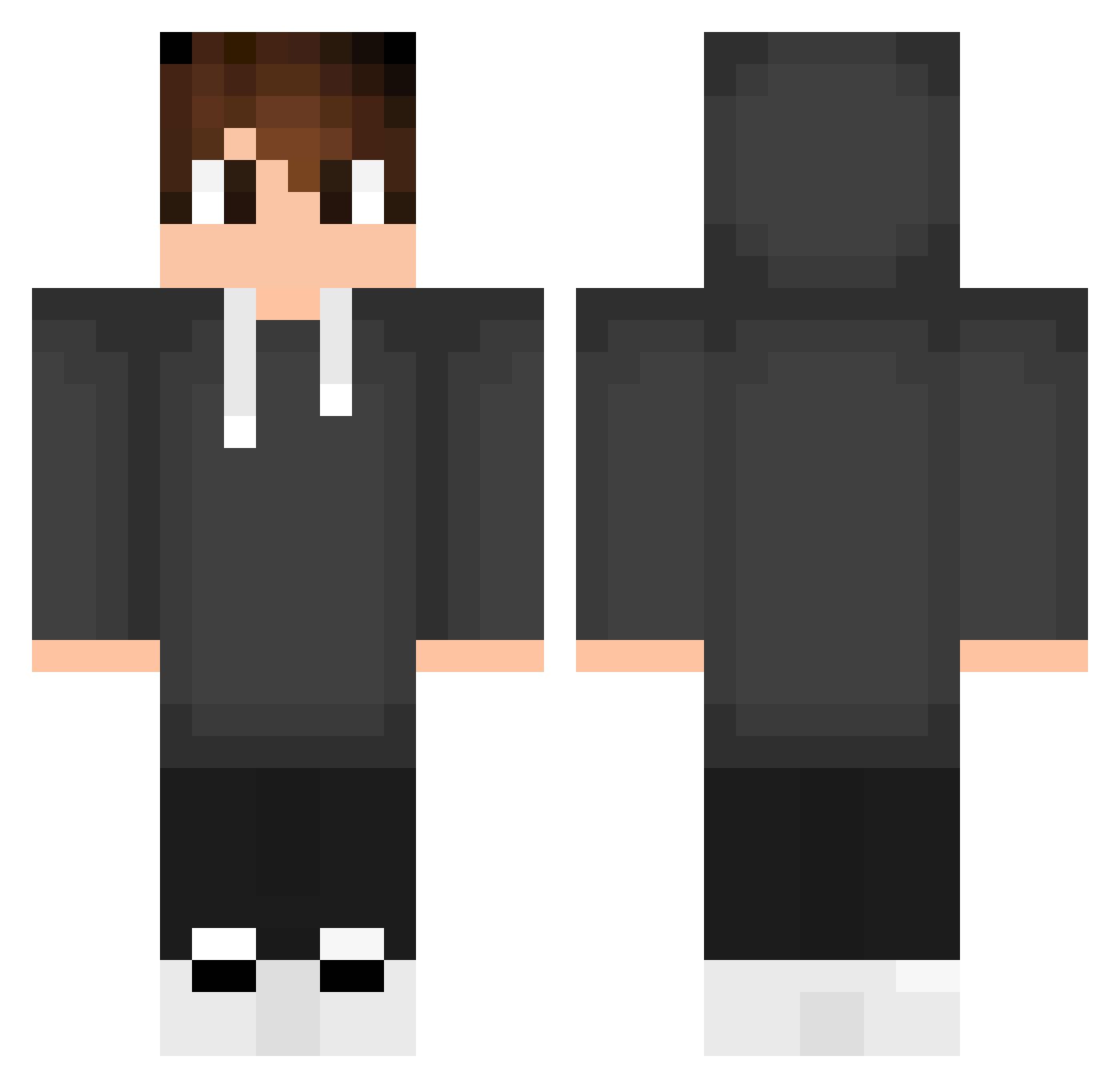
Current Minecraft skin of the player Leovyza, loaded from the official Mojang API. Rotate the 3D model with your mouse or finger, then download the skin as a PNG file and use it in Minecraft: Bedrock Edition or Java Edition for free. When Leovyza changes their skin, this page updates automatically and the old skin stays in the history below.
Other players with this skin (554)
Leovyza was the 289th player we have seen with this skin, first spotted on 25.09.2026. The same skin was seen on these players. Open a nickname to see their current skin and skin history.
 BarakXP zfire_200 PineapplesXHD Louax31 darkdeku13 Kakadan Piresx epannnn libertyw ByArdanow uhKYS Brunooftw NeCeng Markov21 ZRToxic777 Gerixx10 Suxfian gaiposo Mojiw98 AndsonSS Delson_Santana Seisi104 BILLDOZERGAMING Dafko21 Ajous Ghost_br6969 KingOfLuiz IleraMars Perre594 MINDOFNIGHTMARE zLordPvPz Alveragon Juninho_ZR Jayberus mcburgerssimp Raffagames xrakoZ Schnibbes Bonci2008 xZephyrum ZoleeHun boabymctager AdiexTV GR_mAmbA Reyzo0 Elliottleplushot ArgaaYow arjun_m Chubiruba007 Branko07 MichRu333 yann2 technerdlorenz NURULLAHCKR78 Kanucu28 n3tzPox DawidMatak YanzinGameplay kacperkit1 NoKzt2121
How to install the Leovyza skin
- Press the Download button above to save the skin as a PNG file.
- Minecraft: Bedrock Edition (PE): open the Dressing Room from the main menu (or tap your character → Edit Character), go to Classic Skins → Owned, press the + (new skin) button, choose the downloaded PNG and pick the Classic (Steve) model. Works on PC and mobile; consoles cannot import custom skins.
- Minecraft: Java Edition: open the Minecraft Launcher, go to the Skins tab, click New Skin, load the PNG, pick the Classic (Steve) model and press Save & Use. You can also upload it at minecraft.net → Profile → Change Skin.
The skin does not show up after import - what should I do?
Restart Minecraft and open the Dressing Room again - imported skins sometimes appear only after a restart. Also make sure you selected the imported skin and picked the Classic (Steve) model.
Which model should I choose, Classic or Slim?
This skin is designed for the Classic (Steve) model. If you pick the wrong model, the arms of the skin will look stretched or squeezed.
Is the skin of Leovyza free to download?
Yes. Press Download, save the PNG file and use it in Minecraft: Bedrock Edition or Java Edition - no payment or registration needed. The skin also works on multiplayer servers and Realms.
More skins
Looking for more? Go back to all Minecraft skins and check the top skins of the week, month and all time, or find any player's skin by nickname.