
Lay_folk - Minecraft Skins & Skin History
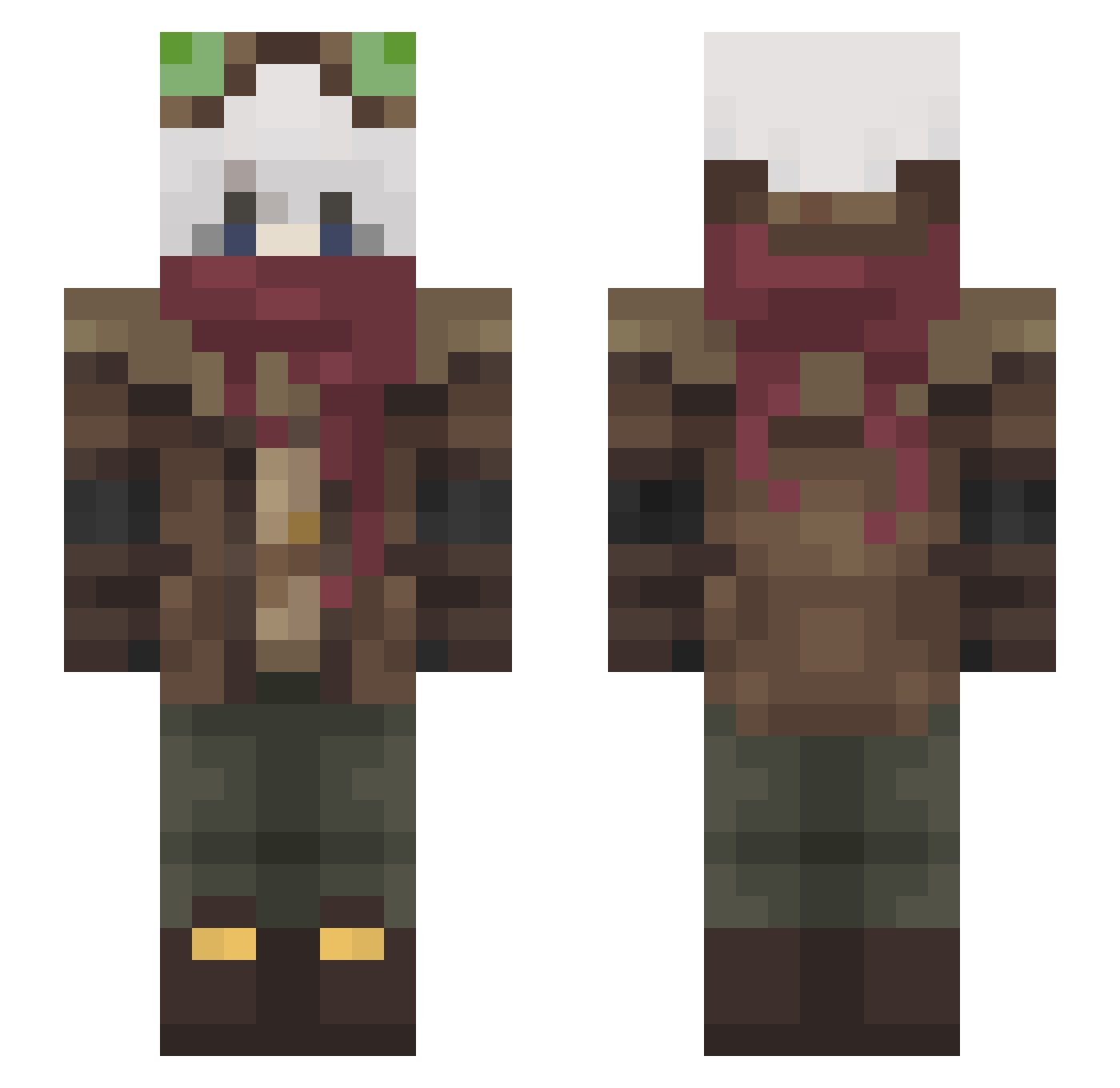
Current Minecraft skin of the player Lay_folk, loaded from the official Mojang API. Rotate the 3D model with your mouse or finger, then download the skin as a PNG file and use it in Minecraft: Bedrock Edition or Java Edition for free. When Lay_folk changes their skin, this page updates automatically and the old skin stays in the history below.
Other players with this skin (465)
Lay_folk was the 207th player we have seen with this skin, first spotted on 09.09.2026. The same skin was seen on these players. Open a nickname to see their current skin and skin history.
 Staticrevin ShadowMize9899 zeit1505 infierno12 Zeph_here Kirinaya dorris23 Spectroscope TheBigToasty Dynamitas Albee82 Master_Man209 Youaresus88 VulpZzZ dragon149 YourFriendStone Yssey Calloome Notca467 Csakoska80 XelzTnT Hawk_thefrog LakeWolf FellerTac Khayasha L0sxrFri3zZ Turquoise_Comet auri_i Mimezi SyrupDreamer Perdita005 Scadubaum finn_angel Dogtomahawkr Lev15 Deliwarp Wesley199823 SnakeyPie deathrowners jaaecket SrDingo TheWreckedGiant1 Archird Ju2st Audacityyyy Z1p1x Fire99_ Tilpop1 Ninjaperler BoyRadish Dillexx ArtemisEn
 Insane1sK SashkataONe D3u5Max1mu5 TryKamui UnchainedXenos Dan962k Oomile AdrianTheNoob
More Pilot Minecraft skins
How to install the Lay_folk skin
- Press the Download button above to save the skin as a PNG file.
- Minecraft: Bedrock Edition (PE): open the Dressing Room from the main menu (or tap your character → Edit Character), go to Classic Skins → Owned, press the + (new skin) button, choose the downloaded PNG and pick the Slim (Alex) model. Works on PC and mobile; consoles cannot import custom skins.
- Minecraft: Java Edition: open the Minecraft Launcher, go to the Skins tab, click New Skin, load the PNG, pick the Slim (Alex) model and press Save & Use. You can also upload it at minecraft.net → Profile → Change Skin.
The skin does not show up after import - what should I do?
Restart Minecraft and open the Dressing Room again - imported skins sometimes appear only after a restart. Also make sure you selected the imported skin and picked the Slim (Alex) model.
Which model should I choose, Classic or Slim?
This skin is designed for the Slim (Alex) model. If you pick the wrong model, the arms of the skin will look stretched or squeezed.
Is the skin of Lay_folk free to download?
Yes. Press Download, save the PNG file and use it in Minecraft: Bedrock Edition or Java Edition - no payment or registration needed. The skin also works on multiplayer servers and Realms.
More skins
Looking for more? Go back to all Minecraft skins and check the top skins of the week, month and all time, or find any player's skin by nickname.