
LaLaMover - Minecraft Skins & Skin History
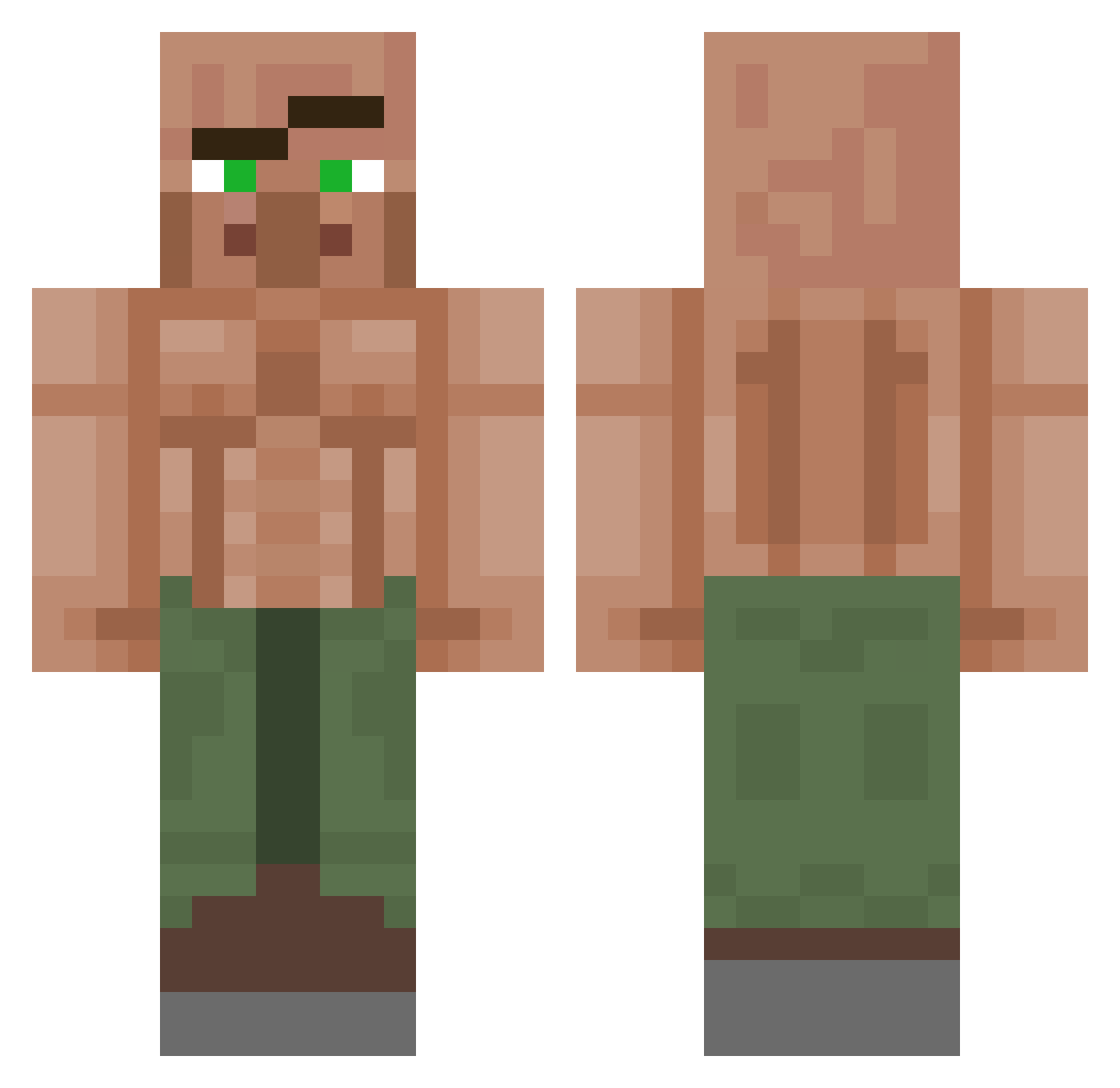
Current Minecraft skin of the player LaLaMover, loaded from the official Mojang API. Rotate the 3D model with your mouse or finger, then download the skin as a PNG file and use it in Minecraft: Bedrock Edition or Java Edition for free. When LaLaMover changes their skin, this page updates automatically and the old skin stays in the history below.
Other players with this skin (1150)
LaLaMover was the 101st player we have seen with this skin, first spotted on 03.08.2026. The same skin was seen on these players. Open a nickname to see their current skin and skin history.
 MoistWlof Dat_Boyo PuntCuncher HydroXVV
 TimmiTheOne Tueraufkleber
 AlonsoEsquizo33 CrafterBOSS42 Nothing511 MajicSope Dampkin CeleClown RyogaHBK
 IconicFlensi BurGOD2 trooll2 RenanFXD ____Bonkers_____ samuCv Azke4 fraudPL AUCUC TheSentine1 Omasones BirkoSnirko Milamn123 BerndSchniepel prepyour5nus MegaMaster45789 Thgipro StarDiDust Fvz_z ambikPL WanderingRanger_ seaspin Xx_JackingIt_xX BEEGYANU kokoloz ziad3131 Bovine1471 Coldynn LunchMoney1 Swenks MarkusTheRuhler BLIZZZE Vladimirtod69 GrognakTheLesbin Glodogost Uzi_11 REIGENx Zedman44 m_y690 ParallelMajkel iNevaD shermmano
 hlmmJ Tysermusic augenijus123 meatoballz THICKOLAS
More Buff Villager Minecraft skins
See all 40 Buff Villager skins
How to install the LaLaMover skin
- Press the Download button above to save the skin as a PNG file.
- Minecraft: Bedrock Edition (PE): open the Dressing Room from the main menu (or tap your character → Edit Character), go to Classic Skins → Owned, press the + (new skin) button, choose the downloaded PNG and pick the Classic (Steve) model. Works on PC and mobile; consoles cannot import custom skins.
- Minecraft: Java Edition: open the Minecraft Launcher, go to the Skins tab, click New Skin, load the PNG, pick the Classic (Steve) model and press Save & Use. You can also upload it at minecraft.net → Profile → Change Skin.
The skin does not show up after import - what should I do?
Restart Minecraft and open the Dressing Room again - imported skins sometimes appear only after a restart. Also make sure you selected the imported skin and picked the Classic (Steve) model.
Which model should I choose, Classic or Slim?
This skin is designed for the Classic (Steve) model. If you pick the wrong model, the arms of the skin will look stretched or squeezed.
Is the skin of LaLaMover free to download?
Yes. Press Download, save the PNG file and use it in Minecraft: Bedrock Edition or Java Edition - no payment or registration needed. The skin also works on multiplayer servers and Realms.
More skins
Looking for more? Go back to all Minecraft skins and check the top skins of the week, month and all time, or find any player's skin by nickname.