
LaBigMenace - Minecraft Skins & Skin History
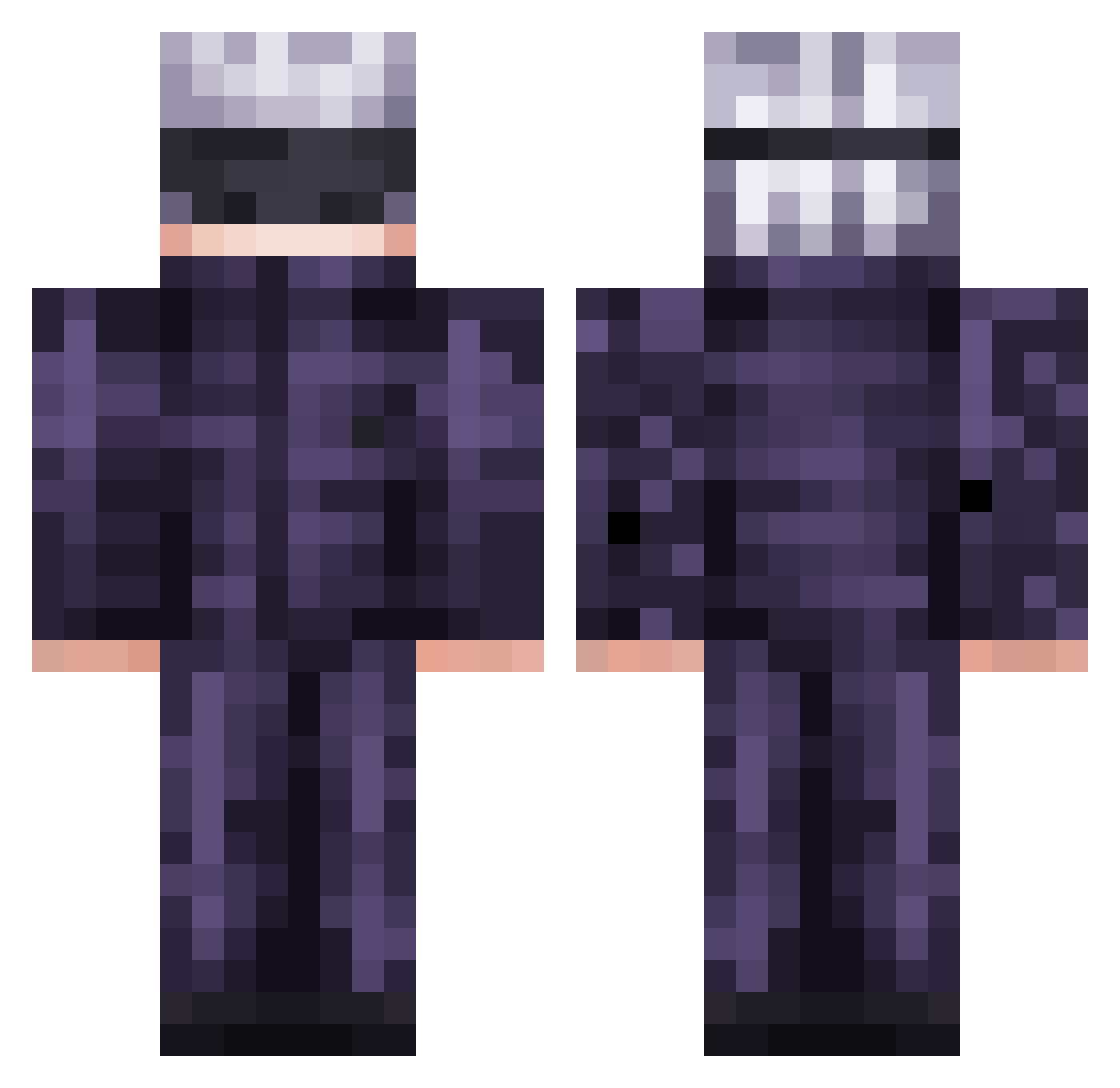
Current Minecraft skin of the player LaBigMenace, loaded from the official Mojang API. Rotate the 3D model with your mouse or finger, then download the skin as a PNG file and use it in Minecraft: Bedrock Edition or Java Edition for free. When LaBigMenace changes their skin, this page updates automatically and the old skin stays in the history below.
Other players with this skin (598)
LaBigMenace was the 572nd player we have seen with this skin, first spotted on 07.11.2026. The same skin was seen on these players. Open a nickname to see their current skin and skin history.
 NK_FlxxYT Willy_senz Exktitan Nameless_Jager vinanit Brulow1204 yam67 Skowp kageinu Amogus_Fard hermannho WetWipes gabbddj THEknockout1 LALAMove Wradatad aboyjoyride IThinkImMario jojojo777 D3ZIRE_ Muladzhikov 5kywa1ker2 Kloz1505 Crystalskull_ Benny1223lin EuphoriaRLC GhostedNYX cwonsies MinecraftEmber25 Andarilhoz illfitted ianmccallion1112 Lingwapz ANNzo7 NuggetTheHamster John1110MMV Ododo_Cyclops jaredaquino nO1lA Moinsen94 ElJoruq CUat6 KCWok iAMKINNG Neeyx NIckPremium Triferum KFR1234 zoro750 gameer6767 Gon136 RochaWRLD CebollaRaton jesusmtztj NopiFishy YUDURU322 Zyienn Genchiro makTsz ThePurpleKoi
More Satoru Gojo Minecraft skins
See all 1423 Satoru Gojo skins
How to install the LaBigMenace skin
- Press the Download button above to save the skin as a PNG file.
- Minecraft: Bedrock Edition (PE): open the Dressing Room from the main menu (or tap your character → Edit Character), go to Classic Skins → Owned, press the + (new skin) button, choose the downloaded PNG and pick the Classic (Steve) model. Works on PC and mobile; consoles cannot import custom skins.
- Minecraft: Java Edition: open the Minecraft Launcher, go to the Skins tab, click New Skin, load the PNG, pick the Classic (Steve) model and press Save & Use. You can also upload it at minecraft.net → Profile → Change Skin.
The skin does not show up after import - what should I do?
Restart Minecraft and open the Dressing Room again - imported skins sometimes appear only after a restart. Also make sure you selected the imported skin and picked the Classic (Steve) model.
Which model should I choose, Classic or Slim?
This skin is designed for the Classic (Steve) model. If you pick the wrong model, the arms of the skin will look stretched or squeezed.
Is the skin of LaBigMenace free to download?
Yes. Press Download, save the PNG file and use it in Minecraft: Bedrock Edition or Java Edition - no payment or registration needed. The skin also works on multiplayer servers and Realms.
More skins
Looking for more? Go back to all Minecraft skins and check the top skins of the week, month and all time, or find any player's skin by nickname.