
Krysdae - Minecraft Skins & Skin History
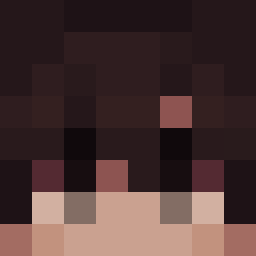
Current Minecraft skin of the player Krysdae, loaded from the official Mojang API. Rotate the 3D model with your mouse or finger, then download the skin as a PNG file and use it in Minecraft: Bedrock Edition or Java Edition for free. When Krysdae changes their skin, this page updates automatically and the old skin stays in the history below.

Other players with this skin (11453)
Krysdae was the 3093rd player we have seen with this skin, first spotted on 20.08.2026. The same skin was seen on these players. Open a nickname to see their current skin and skin history.
 on_op b_dem24
 ebien GeovanyKC aatsu_ Disengaged
 lul6 XXXMilekXXX Jeongtaek_ Sitrixk oLogical ashleykirsten KingPig7714 tatkyu Menelekkkkkkk Christiansen0501 MikeyGooby reemancan yoon3391
 LQL8543 Seb_32 fatxboxwhale426 Krakinakakin azbat100 Yang_Jelly ivanfyodorovich zq31 BrownBananaGuy gavdude MarloBerrMC_YT Bannoch __OKINAWA__ BlancBlanc Flaggings PotatoMaster974 YxnniMC Kozu___
 Pavlitus887 Velstrah nicochat redbarron11 Player1811141214 TheLinus11 damilon1234 Yuidesuwa Serrou2 LEGERETE zloykostya Mylan007 Revymountie Nightrogent strv_1 xiaomochi Malih55 Mvrt1nk 7Iron elite_kitten355
 AbuelitaGamer69 UltraGoku68 RealMladen_
How to install the Krysdae skin
- Press the Download button above to save the skin as a PNG file.
- Minecraft: Bedrock Edition (PE): open the Dressing Room from the main menu (or tap your character → Edit Character), go to Classic Skins → Owned, press the + (new skin) button, choose the downloaded PNG and pick the Classic (Steve) model. Works on PC and mobile; consoles cannot import custom skins.
- Minecraft: Java Edition: open the Minecraft Launcher, go to the Skins tab, click New Skin, load the PNG, pick the Classic (Steve) model and press Save & Use. You can also upload it at minecraft.net → Profile → Change Skin.
The skin does not show up after import - what should I do?
Restart Minecraft and open the Dressing Room again - imported skins sometimes appear only after a restart. Also make sure you selected the imported skin and picked the Classic (Steve) model.
Which model should I choose, Classic or Slim?
This skin is designed for the Classic (Steve) model. If you pick the wrong model, the arms of the skin will look stretched or squeezed.
Is the skin of Krysdae free to download?
Yes. Press Download, save the PNG file and use it in Minecraft: Bedrock Edition or Java Edition - no payment or registration needed. The skin also works on multiplayer servers and Realms.
More skins
Looking for more? Go back to all Minecraft skins and check the top skins of the week, month and all time, or find any player's skin by nickname.