
Kobbie_Mainooo - Minecraft Skins & Skin History
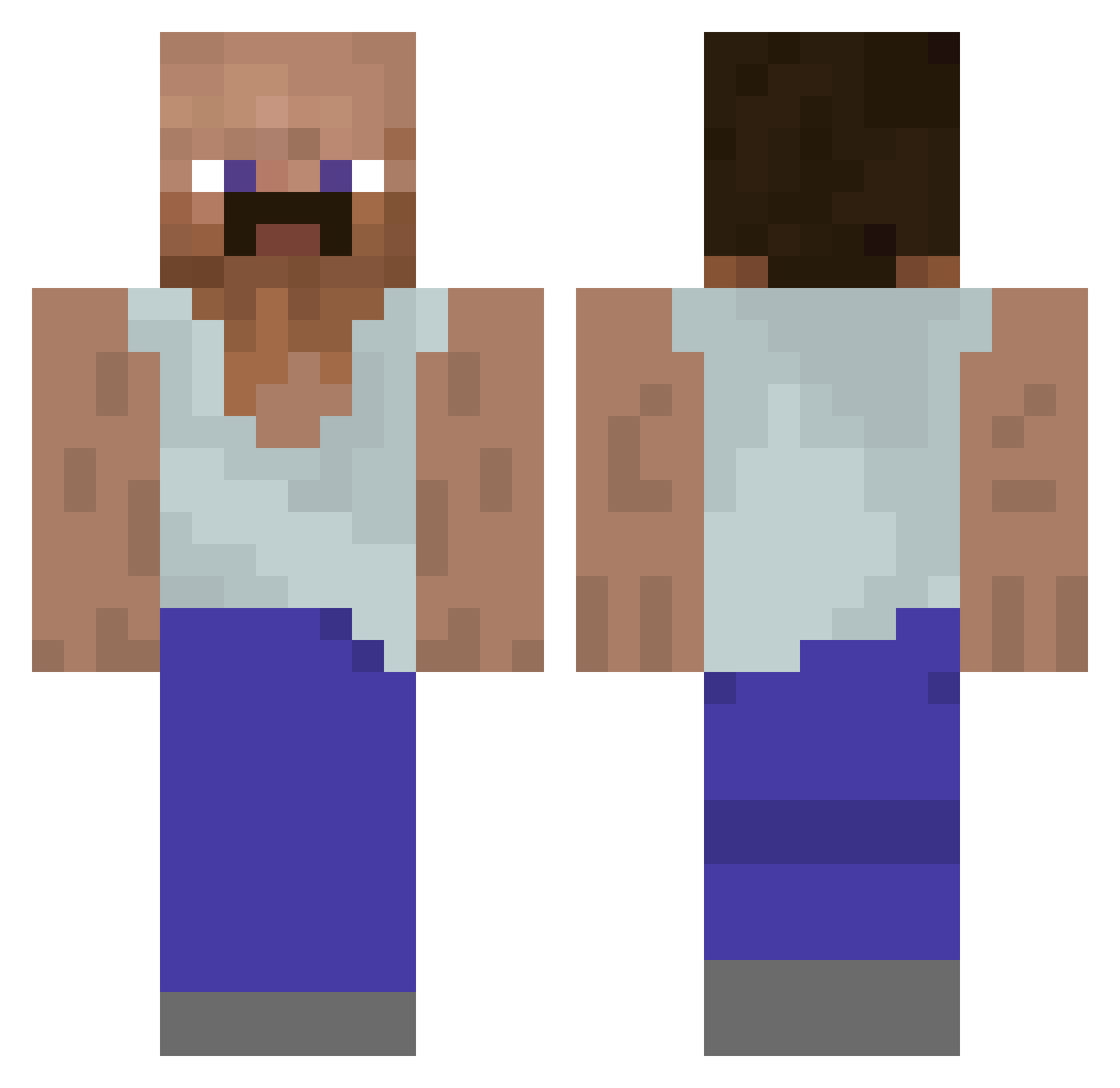
Current Minecraft skin of the player Kobbie_Mainooo, loaded from the official Mojang API. Rotate the 3D model with your mouse or finger, then download the skin as a PNG file and use it in Minecraft: Bedrock Edition or Java Edition for free. When Kobbie_Mainooo changes their skin, this page updates automatically and the old skin stays in the history below.
Other players with this skin (928)
Kobbie_Mainooo was the 813th player we have seen with this skin, first spotted on 20.10.2026. The same skin was seen on these players. Open a nickname to see their current skin and skin history.
 SwagLord6896 420NOREK Steffen07S kobebryantbeef f0om1ngus cno8 Lazzy_Foox Lggjotinha_ Juju4047 Kayque_Butterfly W10D jordan_prodz JustinNoob Joe_Ballss JaroslawPeksa Lexys__ Wanecque AWS0M3S leVentus McYARP ConquestYT_ Gueart unbiaseddd BinJotgga Lenashark Yasar457 tdrunner095 perfect37 Shodenius Nomadji p1k1chowsky JAJEK__ EmiHG Dolantero m_play1234 N2G4V5 Zippi89 sn1pxyt Blockchain18 diegoryes imake619 Kaxao TaunahiLover69 cxyzz MagedGlokta SatelliteMilk Prespro kak4u esenkral MYU_GO chickenmiss Fennecmikizeta SimpleSam546 ashleypj07 BBe1o2 MyAimIsLame bagieta13 yodrumm Lord_Helmi pyrka5555
More Mustache Minecraft skins
How to install the Kobbie_Mainooo skin
- Press the Download button above to save the skin as a PNG file.
- Minecraft: Bedrock Edition (PE): open the Dressing Room from the main menu (or tap your character → Edit Character), go to Classic Skins → Owned, press the + (new skin) button, choose the downloaded PNG and pick the Classic (Steve) model. Works on PC and mobile; consoles cannot import custom skins.
- Minecraft: Java Edition: open the Minecraft Launcher, go to the Skins tab, click New Skin, load the PNG, pick the Classic (Steve) model and press Save & Use. You can also upload it at minecraft.net → Profile → Change Skin.
The skin does not show up after import - what should I do?
Restart Minecraft and open the Dressing Room again - imported skins sometimes appear only after a restart. Also make sure you selected the imported skin and picked the Classic (Steve) model.
Which model should I choose, Classic or Slim?
This skin is designed for the Classic (Steve) model. If you pick the wrong model, the arms of the skin will look stretched or squeezed.
Is the skin of Kobbie_Mainooo free to download?
Yes. Press Download, save the PNG file and use it in Minecraft: Bedrock Edition or Java Edition - no payment or registration needed. The skin also works on multiplayer servers and Realms.
More skins
Looking for more? Go back to all Minecraft skins and check the top skins of the week, month and all time, or find any player's skin by nickname.