
KingZz1 - Minecraft Skins & Skin History
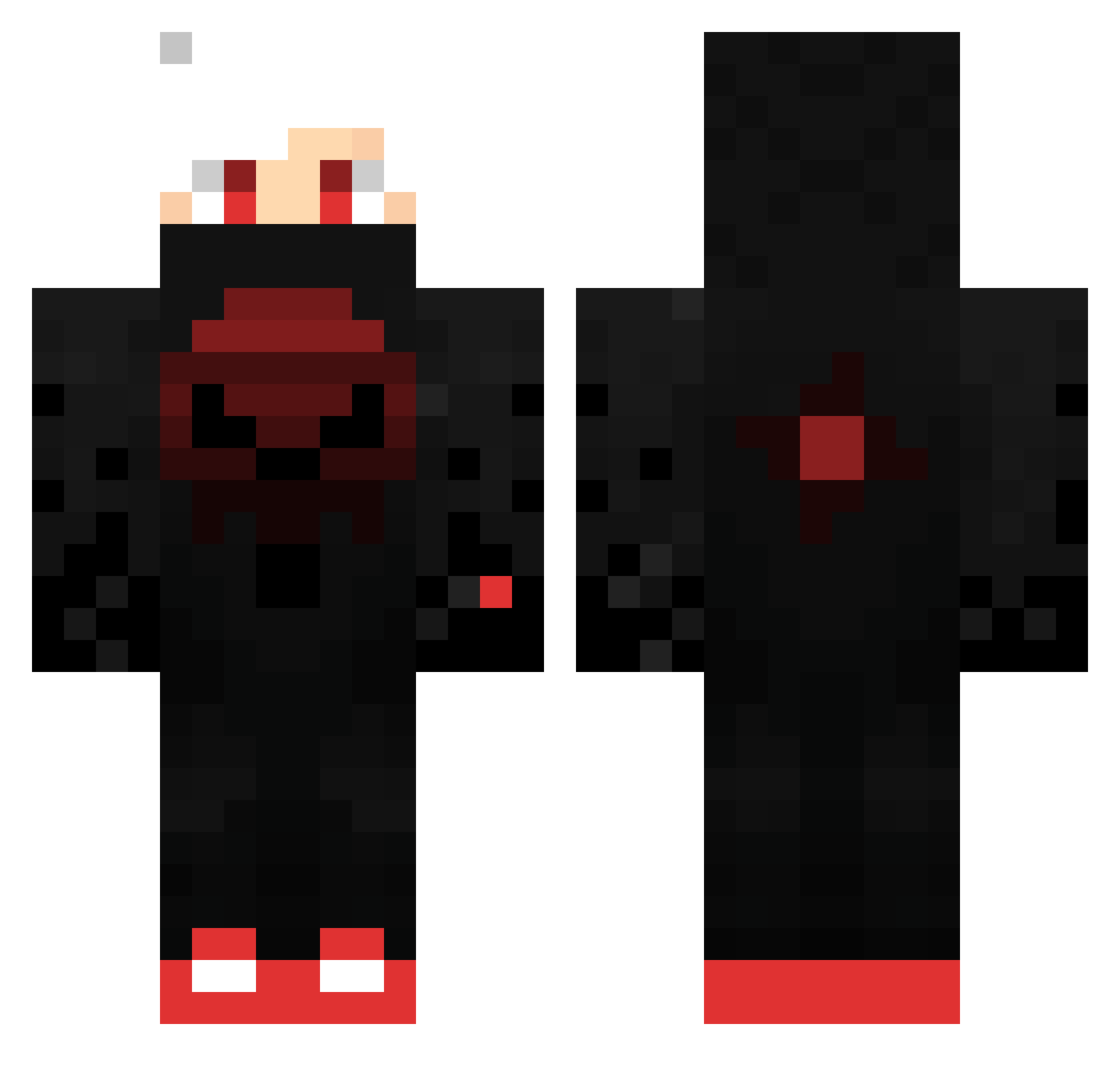
Current Minecraft skin of the player KingZz1, loaded from the official Mojang API. Rotate the 3D model with your mouse or finger, then download the skin as a PNG file and use it in Minecraft: Bedrock Edition or Java Edition for free. When KingZz1 changes their skin, this page updates automatically and the old skin stays in the history below.
Other players with this skin (451)
KingZz1 was the 48th player we have seen with this skin, first spotted on 06.08.2026. The same skin was seen on these players. Open a nickname to see their current skin and skin history.
 Ga_Ju_Caesar
 Ramixy Ziya1907 rjose2002 ChefGamerMC Xerez_Eternis Lord_Doge49 Moritz_Born kelod2013 KritsHart5 Emanuel016 Mastermind2103 Masteroogwayz zErikz13 Yooaan27 netin77 PheanBean69 JackTheBee deniz_colten Cybatron14 vken0k ElectricMyke iAmAksel marioboy2005 Sheenist KKBEAST EminGamer22 Sitaeth Faid1989 omercekici Ir3al Roland_btw Rainbowtuna3 Herox_YT HugoDestroyer Nyxomnis_ ADASINHASMETLISI 0mirhoyt miloscikpro giuli10 GamestrikeHD Richardt7217 Calsal59 Jona7VFR Pizdec2021 Clout_69 DFabro nico4781 nasan16 Alynxxh growth2006 7xnn R3dly_CZ XDHUZ beejmanboy Sylvia2261 FectorST5 Gouverneurin Phoenix__op BlxckRush
More Skull Minecraft skins
How to install the KingZz1 skin
- Press the Download button above to save the skin as a PNG file.
- Minecraft: Bedrock Edition (PE): open the Dressing Room from the main menu (or tap your character → Edit Character), go to Classic Skins → Owned, press the + (new skin) button, choose the downloaded PNG and pick the Classic (Steve) model. Works on PC and mobile; consoles cannot import custom skins.
- Minecraft: Java Edition: open the Minecraft Launcher, go to the Skins tab, click New Skin, load the PNG, pick the Classic (Steve) model and press Save & Use. You can also upload it at minecraft.net → Profile → Change Skin.
The skin does not show up after import - what should I do?
Restart Minecraft and open the Dressing Room again - imported skins sometimes appear only after a restart. Also make sure you selected the imported skin and picked the Classic (Steve) model.
Which model should I choose, Classic or Slim?
This skin is designed for the Classic (Steve) model. If you pick the wrong model, the arms of the skin will look stretched or squeezed.
Is the skin of KingZz1 free to download?
Yes. Press Download, save the PNG file and use it in Minecraft: Bedrock Edition or Java Edition - no payment or registration needed. The skin also works on multiplayer servers and Realms.
More skins
Looking for more? Go back to all Minecraft skins and check the top skins of the week, month and all time, or find any player's skin by nickname.