
Kies_18 - Minecraft Skins & Skin History
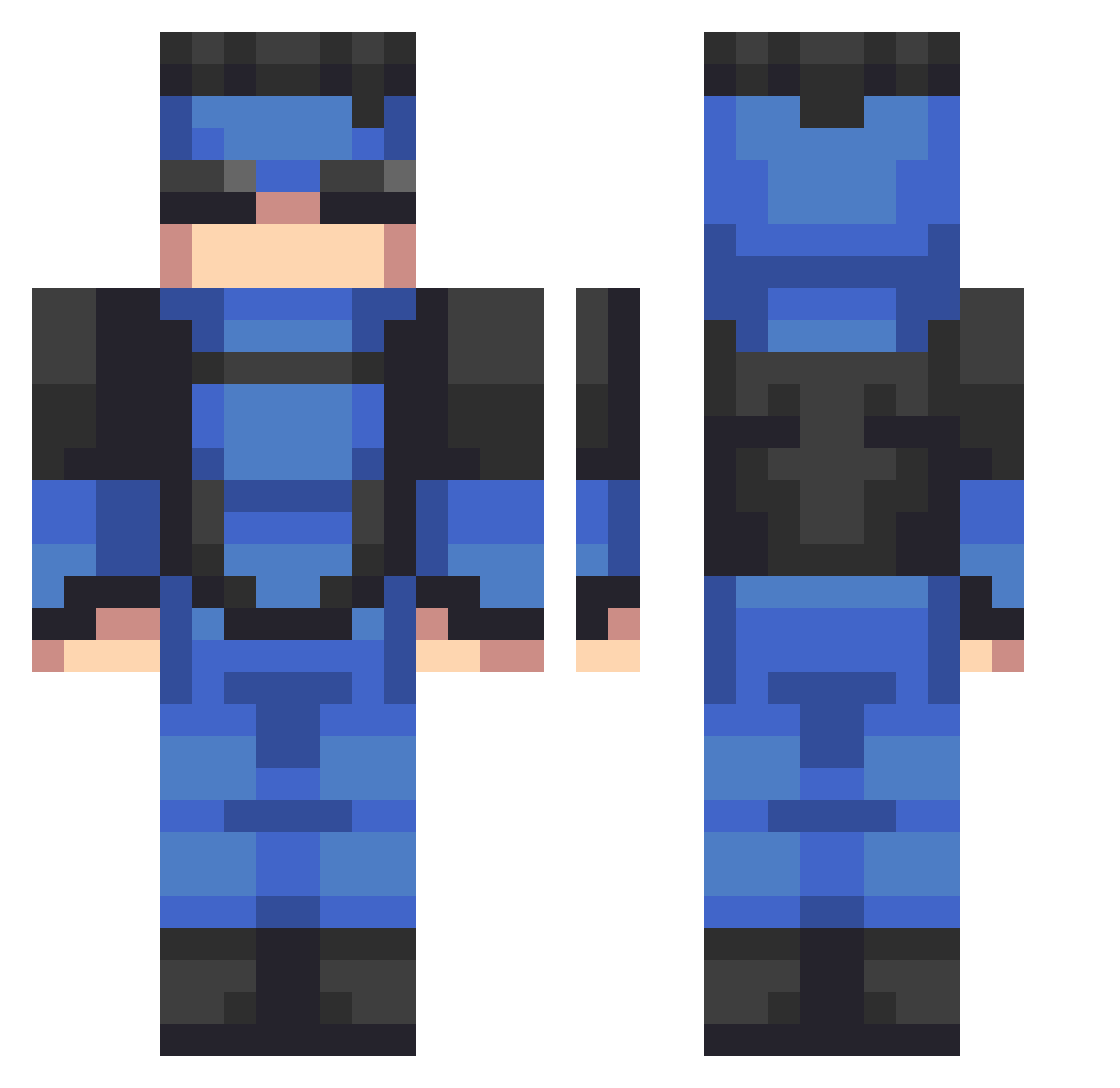
Current Minecraft skin of the player Kies_18, loaded from the official Mojang API. Rotate the 3D model with your mouse or finger, then download the skin as a PNG file and use it in Minecraft: Bedrock Edition or Java Edition for free. When Kies_18 changes their skin, this page updates automatically and the old skin stays in the history below.
Other players with this skin (534)
Kies_18 was the 461st player we have seen with this skin, first spotted on 20.10.2026. The same skin was seen on these players. Open a nickname to see their current skin and skin history.
 AbyssWatcher0072 nasuke_x Kupek69 Koleke Umal_ Penut6969 Gabroly skyassassin555 Havok_Marauder_7 x0samuuri0x snzssj dda_42 boubiboute DimaLek LitBit95 astrospecks Miro070 0motui Ploogin364 FelipeNuzzi ZoruaTheFoxYT PEDRIN099 IllScorpionxX friglz metfam4 Mystichunter808 unso6r lordMarsuvious nicomoroxo CheeseEnjoyer123 EKKOREE_cjbXT19 stroe1 lucaskiev Dogoid AustinIsBlack MercurioIM2 Doppelkanone ChicknNuggt dinglenutsLIVE trostine Bloopo101 Carrot_muncher66 Krisztian1337 C4RAMONEY Rayman5665 sosocrafter JUBAMA Khorvax Hhhhh77777 M4TEOISCOOL Syckle DoubleLL17 Droider ImSpill PeelBanana capeto2005 Luchito_T22 OhFroh AuntDouma13 Martimn1906
More Solid Snake Minecraft skins
How to install the Kies_18 skin
- Press the Download button above to save the skin as a PNG file.
- Minecraft: Bedrock Edition (PE): open the Dressing Room from the main menu (or tap your character → Edit Character), go to Classic Skins → Owned, press the + (new skin) button, choose the downloaded PNG and pick the Classic (Steve) model. Works on PC and mobile; consoles cannot import custom skins.
- Minecraft: Java Edition: open the Minecraft Launcher, go to the Skins tab, click New Skin, load the PNG, pick the Classic (Steve) model and press Save & Use. You can also upload it at minecraft.net → Profile → Change Skin.
The skin does not show up after import - what should I do?
Restart Minecraft and open the Dressing Room again - imported skins sometimes appear only after a restart. Also make sure you selected the imported skin and picked the Classic (Steve) model.
Which model should I choose, Classic or Slim?
This skin is designed for the Classic (Steve) model. If you pick the wrong model, the arms of the skin will look stretched or squeezed.
Is the skin of Kies_18 free to download?
Yes. Press Download, save the PNG file and use it in Minecraft: Bedrock Edition or Java Edition - no payment or registration needed. The skin also works on multiplayer servers and Realms.
More skins
Looking for more? Go back to all Minecraft skins and check the top skins of the week, month and all time, or find any player's skin by nickname.