
Kastrolis - Minecraft Skins & Skin History
Current Minecraft skin of the player Kastrolis, loaded from the official Mojang API. Rotate the 3D model with your mouse or finger, then download the skin as a PNG file and use it in Minecraft: Bedrock Edition or Java Edition for free. When Kastrolis changes their skin, this page updates automatically and the old skin stays in the history below.
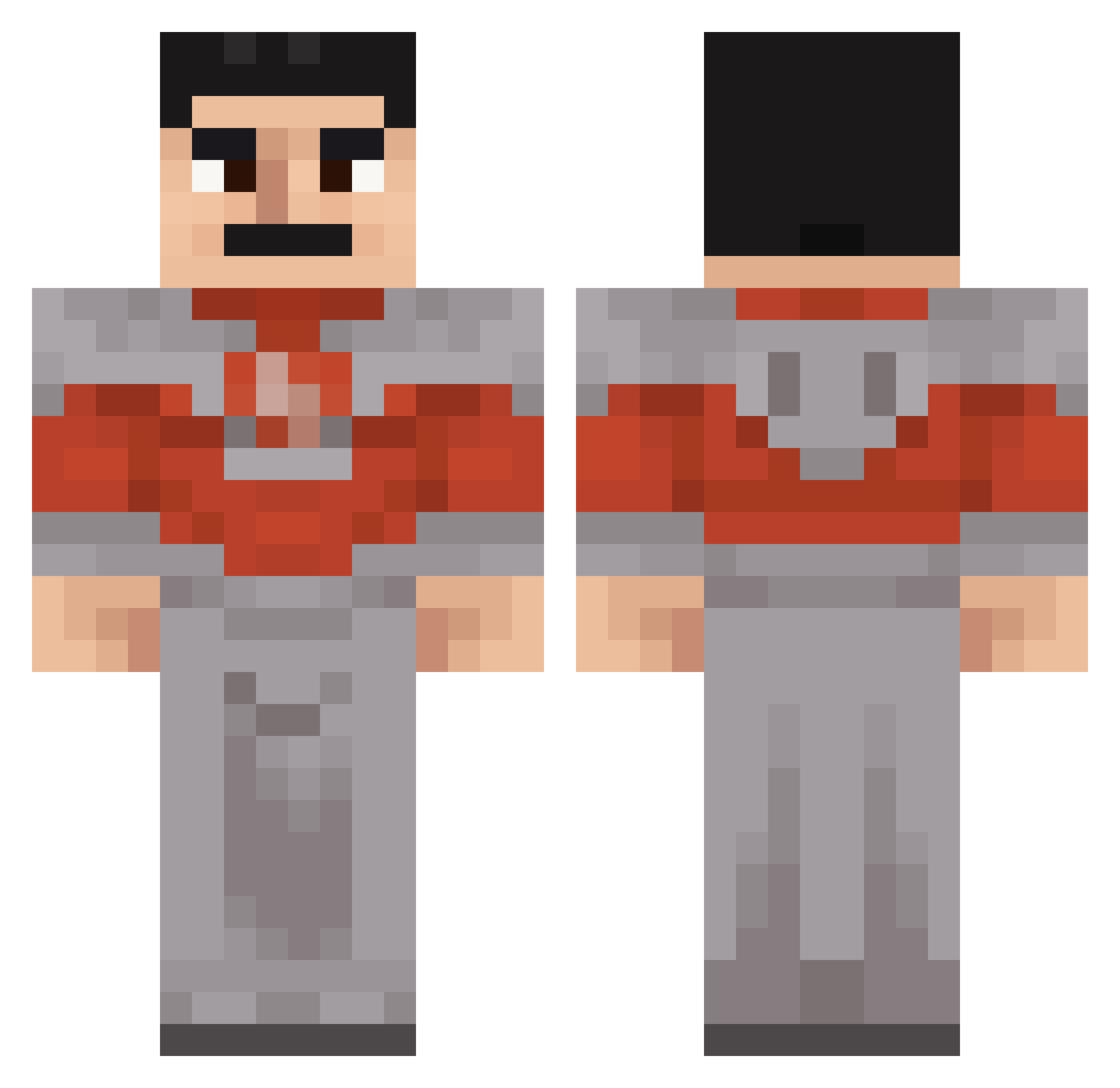
Other players with this skin (45)
Kastrolis was the 12th player we have seen with this skin, first spotted on 22.08.2026. The same skin was seen on these players. Open a nickname to see their current skin and skin history.
 Lorddogman
 Arbnori LPo7539 Bigchungtoe Ceckxz DreSleez ZypherRelic Turtlovesyall MRREX6228 Serooi Scotch4Breakfast superstarsilve astro654 CrustEdj1900 SmasherNRTY ILUVFENT1220 Zethron710 viggo2015viggo crewstyles ImaMystery42276 squiznikk craigcraft79 GingerGuy818181
 Mazzo_letto MisterioPreto znsjx TheKorruption_ AirSeal2508 Elliot_21 TidurNUAREFEMEI child0n Ohiotheo graveG59 rWaix3 Hole_Puncher bigballsrubbing AdrianMhh mzs_a7 Jtdogan Lone_Mark Blackout_07 Suunlight TwitcH3LL Letmecook155 cosmicWW
More Freddie Mercury Minecraft skins
See all 89 Freddie Mercury skins
How to install the Kastrolis skin
- Press the Download button above to save the skin as a PNG file.
- Minecraft: Bedrock Edition (PE): open the Dressing Room from the main menu (or tap your character → Edit Character), go to Classic Skins → Owned, press the + (new skin) button, choose the downloaded PNG and pick the Classic (Steve) model. Works on PC and mobile; consoles cannot import custom skins.
- Minecraft: Java Edition: open the Minecraft Launcher, go to the Skins tab, click New Skin, load the PNG, pick the Classic (Steve) model and press Save & Use. You can also upload it at minecraft.net → Profile → Change Skin.
The skin does not show up after import - what should I do?
Restart Minecraft and open the Dressing Room again - imported skins sometimes appear only after a restart. Also make sure you selected the imported skin and picked the Classic (Steve) model.
Which model should I choose, Classic or Slim?
This skin is designed for the Classic (Steve) model. If you pick the wrong model, the arms of the skin will look stretched or squeezed.
Is the skin of Kastrolis free to download?
Yes. Press Download, save the PNG file and use it in Minecraft: Bedrock Edition or Java Edition - no payment or registration needed. The skin also works on multiplayer servers and Realms.
More skins
Looking for more? Go back to all Minecraft skins and check the top skins of the week, month and all time, or find any player's skin by nickname.